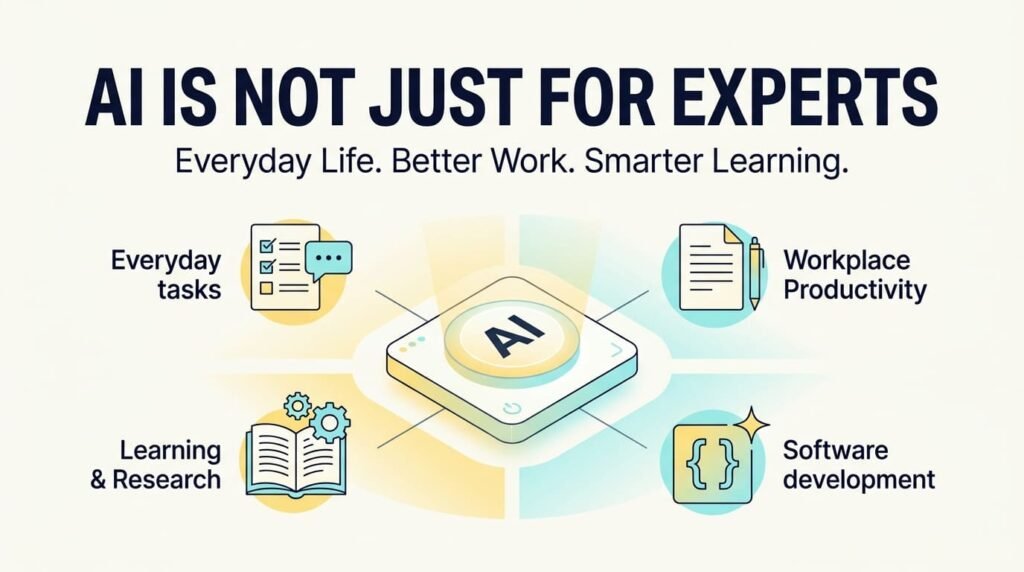
Artificial intelligence (AI) is becoming part of how we learn, communicate, organize information, solve problems, and complete everyday tasks. Yet many people still associate AI with programmers, data scientists, researchers, or large technology companies. In reality, you do not need an advanced technical background to begin using AI effectively.
Today, AI tools can help people write clearer messages, understand unfamiliar topics, plan their work, summarize information, generate ideas, and explore solutions to problems. For IT professionals and developers, they can also support coding, debugging, documentation, testing, APIs, and software development workflows.
The real opportunity is not simply using AI because it is popular. It is understanding where AI can help, how to use it responsibly, and when human knowledge and judgment are still necessary.
1. AI Is Becoming a Practical Tool for Everyday Life
You do not need to be an AI expert to benefit from artificial intelligence. Many AI tools allow people to interact with them using natural language, making it possible to ask questions, explain a problem, or describe a task without writing code.
For example, AI can help with everyday activities such as:
- Learning new subjects: Explain unfamiliar concepts in simple language, provide examples, or create a learning plan.
- Writing and communication: Improve email drafts, organize thoughts, adjust tone, or summarize lengthy messages.
- Planning and organization: Create checklists, structure daily tasks, prepare meeting agendas, or organize a project.
- Research and understanding: Explain complex topics, compare ideas, and identify questions worth investigating.
- Creative thinking: Generate ideas for articles, presentations, projects, learning activities, or personal goals.
Consider someone who needs to write a professional email but struggles to organize their thoughts. They can describe the message they want to communicate and ask an AI assistant to produce a clear, professional draft.
The person still decides what to say, reviews the wording, and makes the final decision. AI simply helps reduce the effort required to get started.
This is one of the most accessible benefits of AI: it can help people turn an idea, question, or unfinished task into a useful starting point.
2. How AI Can Improve Productivity at Work
AI can support professionals across different industries, even when their jobs have little to do with technology.
The most useful applications often involve organizing information, producing a first draft, explaining a concept, or exploring possible solutions.
Examples include:
- Administrative professionals: Draft reports, organize meeting notes, and prepare structured summaries.
- Teachers and trainers: Develop lesson outlines, generate practice questions, and explain difficult concepts using different examples.
- Writers and content creators: Brainstorm article topics, organize outlines, improve readability, and adapt content for different audiences.
- Business owners and freelancers: Prepare service descriptions, organize project requirements, draft customer communications, and explore business ideas.
- IT professionals: Review technical concepts, summarize documentation, generate troubleshooting checklists, and explore implementation approaches.
Imagine receiving a long set of project requirements. Instead of immediately working through every detail manually, you could ask an AI assistant to organize the requirements into functional areas, identify unclear points, and suggest questions to discuss with the client.
You would still need to verify the interpretation and confirm the actual requirements. However, the organized draft could make the next step easier.
AI is particularly useful when it reduces repetitive effort and gives people more time to focus on decisions, communication, and work that requires their expertise.
3. How Developers and IT Professionals Can Use AI
For developers, AI offers opportunities beyond generating code. It can support several stages of the software development process, from understanding a requirement to investigating an error or documenting a completed feature.
Understanding unfamiliar technology
When learning a new programming language, framework, API, or development concept, you can ask AI to explain the fundamentals, provide examples, and compare alternative approaches.
For example, a WordPress developer learning about REST APIs could ask for an explanation of endpoints, HTTP methods, authentication, and JSON responses, followed by a simple example.
This can make unfamiliar topics easier to approach, particularly when combined with official documentation and practical exercises.
Debugging and troubleshooting
When an application produces an error, AI can help explain the message, identify possible causes, and suggest a systematic debugging process.
A useful prompt might be:
Explain this PHP error in simple terms. Identify the likely causes, suggest how to investigate them, and explain what information I should check before changing the code.
This approach encourages understanding rather than blindly copying a suggested fix.
AI-generated explanations can be incomplete or incorrect, so developers should examine the relevant code, reproduce the problem, and test proposed changes.
Coding, testing, and documentation
AI can help developers draft functions, generate test cases, explain existing code, create documentation, and explore different implementation strategies.
In WordPress development, for example, it may help draft a plugin function, explain a hook, or suggest validation and sanitization steps.
However, generated code is not automatically secure, compatible, maintainable, or production-ready. Developers remain responsible for architecture, permissions, data handling, integration, performance, testing, and deployment.
For a deeper look at this relationship between AI and development, read From IA to AI: The Evolution of Coding Assistance.
The broader lesson is that AI can assist throughout the development workflow, but effective development still depends on understanding the software being built.
4. How to Get Better Results from AI
Using AI effectively is a skill that develops through practice. The quality of an answer often depends on how clearly you explain your objective and the context surrounding it.
A vague request such as “Help me with my website” leaves too many questions unanswered.
A more useful request might be:
I manage a WordPress website and want to investigate why one page loads slowly. Give me a step-by-step diagnostic checklist covering images, plugins, caching, server response time, and browser tools. Explain how to verify each possible cause before recommending changes.
The second prompt identifies the situation, objective, and desired format.
To improve your results, follow these principles:
- Describe the goal clearly. Explain what you want to achieve rather than asking a broad, undefined question.
- Provide relevant context. Include the audience, constraints, tools, skill level, or error message when appropriate.
- Ask for structured answers. Request steps, examples, checklists, comparisons, or explanations when useful.
- Refine the response. Ask follow-up questions, identify what is missing, and request clarification when something is unclear.
- Verify important information. Check facts, calculations, technical recommendations, and sources before relying on them.
You do not need to learn complicated prompt formulas before getting started. Clear communication, relevant context, and thoughtful follow-up questions are often enough to make AI more useful.
5. Understand AI’s Limitations and Use It Responsibly
AI can produce convincing answers that contain factual errors, outdated information, flawed reasoning, or code that does not work as intended. A well-written response is not necessarily a correct response.
OpenAI’s guidance on responsible and safe AI use emphasizes checking important information, applying critical thinking, and keeping people involved in consequential decisions.
Responsible AI adoption means understanding both its capabilities and its limitations.
Before relying on an AI-generated answer, consider the following:
- Accuracy: Verify important claims using reliable sources, official documentation, or independent calculations.
- Privacy: Avoid entering passwords, API keys, confidential business information, personal records, or sensitive client data into tools that are not approved for that information.
- Security: Review generated code for vulnerabilities, unsafe data handling, excessive permissions, and unintended behavior.
- Accountability: Make the final decision yourself, particularly when the consequences of an error could be significant.
- Independent thinking: Use AI to explore possibilities, but apply your own reasoning to determine which ideas are appropriate.
The NIST AI Risk Management Framework FAQs provide additional guidance on AI trustworthiness, including reliability, security, privacy, accountability, and transparency.
These considerations matter whether you are writing a simple email, preparing a business report, learning a new subject, or developing software.
The goal should not be to accept everything AI produces. It should be to use AI in a way that improves the efficiency and quality of your work without abandoning responsibility.
6. Start Small, Learn Continuously, and Build Confidence
One of the easiest ways to begin using AI is to choose a task you already understand.
Ask it to improve a draft, explain an unfamiliar concept, organize a checklist, or help you plan a small project. Review the result, compare it with your own judgment, and identify where the assistance was useful.
Once you become comfortable, explore more advanced applications relevant to your work.
For IT professionals, this might mean progressing from explanations and documentation to debugging, testing, API integration, and AI-assisted development. For other professionals, it could mean improving research, communication, planning, or repetitive administrative workflows.
If you are a developer, an important next step is understanding which programming fundamentals remain essential when using AI coding tools. My article Should Developers Learn Coding Fundamentals Before AI? explores that question in more detail.
You do not need to master every AI tool. Start with a real problem, learn how to use the available tools, and evaluate whether they genuinely improve the result.
Technology will continue to evolve, and the ability to learn, adapt, and evaluate new tools will remain valuable.
Frequently Asked Questions
Can beginners use AI without technical knowledge?
Yes. Many AI tools accept questions and instructions written in everyday language. Beginners can use them to learn new topics, draft messages, organize tasks, brainstorm ideas, and understand unfamiliar concepts without knowing how to program.
How can AI help improve productivity at work?
AI can assist with repetitive and information-heavy tasks, including drafting documents, summarizing meetings, organizing requirements, preparing checklists, and exploring solutions. Its usefulness depends on the task, the quality of the instructions, and how carefully the results are reviewed.
How can programmers and WordPress developers use AI?
Developers can use AI to understand code, investigate errors, draft functions, explore API integrations, generate test cases, and prepare documentation. They should still review generated code, verify compatibility, test security, and confirm that the solution meets the project's requirements.
Can AI-generated answers always be trusted?
No. AI can produce incorrect facts, outdated information, misleading explanations, or code with defects. Important information should be checked against reliable sources, and technical changes should be tested before implementation.
Is AI going to replace human skills and professional knowledge?
AI can automate or accelerate some tasks, but it does not eliminate the need for critical thinking, domain knowledge, communication, problem-solving, and accountability. Professionals who learn to evaluate and apply AI outputs may be better positioned to use these tools effectively.
What is the best way to start learning AI?
Start with a task you regularly perform. Explain your objective clearly, provide relevant context, ask for a useful output, and review the result. Build confidence through practice before applying AI to more complex or consequential tasks.
Is it safe to share personal or business information with AI tools?
It depends on the tool, its data-handling policies, and your organization's requirements. Avoid sharing passwords, API keys, confidential client information, or sensitive personal data unless the tool and its configuration are explicitly approved for that use.
Final Thoughts: AI Is a Tool, but Judgment Is Still Human
Artificial intelligence is not exclusively for experts. It can help students learn, professionals organize their work, business owners explore ideas, writers develop content, and developers investigate technical problems.
Its value depends less on how impressive a tool appears and more on whether it helps solve a real problem.
For IT professionals and developers, the opportunity is especially interesting. AI can reduce the effort involved in research, routine coding, documentation, and troubleshooting. That creates more room to focus on understanding requirements, making sound technical decisions, building reliable solutions, and solving problems that require human judgment.
However, productivity should not be measured only by how quickly a task is completed. Accuracy, security, maintainability, and the quality of the final result matter just as much.
My view is that we should approach AI with curiosity rather than fear, but also with realistic expectations. We can learn from it, use it to improve our workflows, and explore new possibilities without assuming that it can replace knowledge or independent thinking.
You do not need to be an AI expert to start benefiting from AI. You need a problem worth solving, a willingness to learn, and the judgment to evaluate the results.
This is a practical starting point for anyone who wants to understand AI's role in everyday life and work—and for IT professionals who want to explore how AI can support the next stage of their development journey.
About the Author
Mirza Hadi Baig is an IT professional, Full-Stack WordPress Developer, Technical Problem Solver, AI SEO & GEO Strategist, and independent Product Builder with 17+ years of professional experience in the technology industry. His journey spans computer education and IT training, healthcare IT and administrative information systems, web development, technical troubleshooting, and digital product development.
A continuous technology learner, Hadi explores how AI-assisted development and emerging technologies can improve productivity, support problem-solving, and help developers build practical digital solutions. His work includes WordPress plugins, browser-based tools, website engineering, technical SEO, and AI-focused search visibility.
Through his articles and professional newsletters, he shares practical insights on technology, responsible AI adoption, software development, and continuous learning.
Portfolio: https://hadi-mirza.com/
LinkedIn: https://www.linkedin.com/in/hadibaig/
GitHub: https://github.com/Hadibaig