
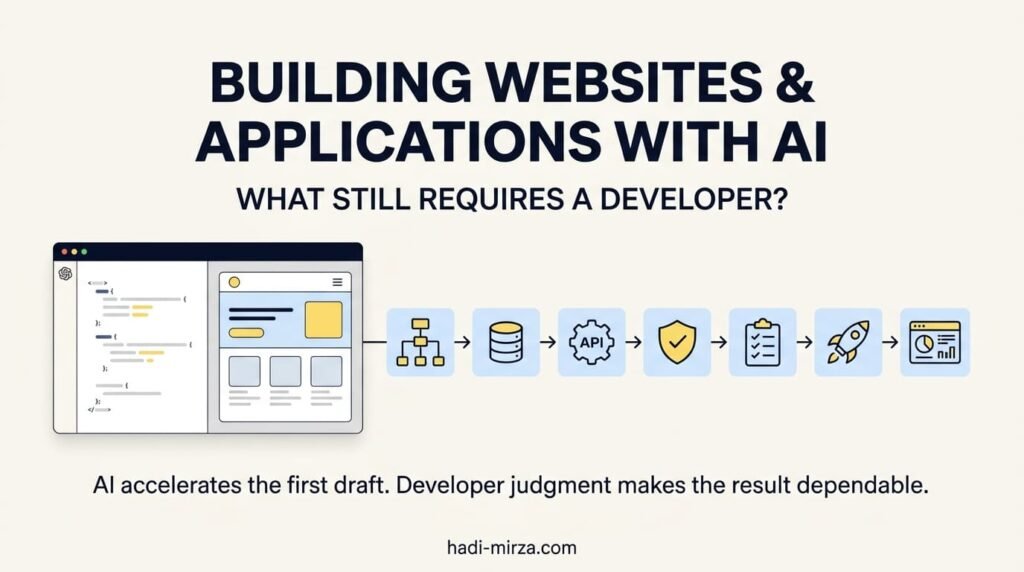
AI is changing how websites and applications are built. With a detailed prompt, developers and non-technical users can generate page layouts, write code, create interface components, and produce working prototypes faster than before.
But building a website or application involves much more than generating code.
A website may look complete while its forms fail, its database queries return incorrect results, its mobile layout breaks, or its integrations stop working under real-world conditions. An application may run during a demonstration but struggle with multiple users, unexpected inputs, security risks, or future updates.
This is where professional development still matters.
AI can help generate a website or application, but developers are responsible for turning that initial output into a reliable, secure, maintainable product.
The developer’s role is evolving from writing every line of code toward understanding requirements, designing systems, evaluating AI-generated solutions, and ensuring that everything works together.
1. Requirements: Understanding What Needs to Be Built
Before writing code, a developer needs to understand the problem.
A client might request an e-commerce website, a booking platform, a customer dashboard, or a mobile application. AI can generate an initial interface based on that description, but the description may not explain the complete business requirements.
For example, a booking application might need to handle:
- Available and unavailable time slots.
- Different user roles and permissions.
- Booking confirmations and cancellations.
- Payment processing and refunds.
- Time zones and scheduling conflicts.
- Email notifications and failed transactions.
- Administrative controls and reporting.
If these requirements are not identified early, AI may produce a convincing interface without implementing the underlying business rules.
A developer helps convert a general idea into specific requirements, user workflows, acceptance criteria, and technical constraints.
AI can assist by generating requirement checklists, identifying possible edge cases, and suggesting questions to ask stakeholders. The developer must still determine which requirements are correct and which trade-offs are acceptable.
The goal is not to make AI generate more code. It is to make sure the right problem is being solved.
2. Architecture: Connecting the Pieces Correctly
Software architecture determines how an application is organised and how its different parts communicate.
A typical web application may include a front end, a back end, a database, external APIs, authentication, and hosting infrastructure.
AI can generate individual components, but those components must fit into a coherent system.
Consider an AI-generated dashboard. It might contain navigation, charts, forms, and buttons. But several important questions remain:
- Where does the dashboard obtain its data?
- Which parts run in the browser and which run on the server?
- How are user permissions enforced?
- How are errors communicated between components?
- Which functionality should be reusable?
- How will the application be updated without breaking existing features?
These are architectural decisions.
For a small website, a straightforward implementation may be sufficient. A complex application might require separate services, a well-defined API layer, background processing, or more carefully structured modules.
Developers must avoid both extremes: building an unnecessarily complicated system and creating a quick solution that becomes difficult to maintain.
AI can suggest architectural approaches, compare alternatives, and generate implementation drafts. The developer needs to evaluate the project’s scale, performance needs, costs, risks, and future requirements before choosing an approach.
For further reading, see Smart Coding Decisions: Should Developers Learn the Fundamentals Before Using AI Coding Tools?.
3. Databases: Making Sure the Application Handles Data Properly
Many applications depend on data: customer accounts, product information, orders, bookings, messages, reports, or user preferences.
AI can generate database schemas and queries, but a query that runs successfully is not necessarily correct, secure, or efficient.
A developer must consider:
- Data structure: Are tables, fields, relationships, and constraints designed appropriately?
- Data integrity: Can the application create duplicate bookings, inconsistent records, or incomplete transactions?
- Security: Can users access only the data they are authorised to see?
- Performance: Will queries remain efficient as the amount of data increases?
- Reliability: What happens if a request fails halfway through an operation?
- Maintenance: Can the database structure evolve without unnecessarily disrupting existing users?
For example, an AI-generated booking system might check whether a time slot is available before inserting a reservation. But if two users attempt to book the same slot at nearly the same time, a simple check may not prevent a conflict.
The implementation may need appropriate database constraints, transaction handling, or concurrency controls.
This is the difference between generating a query and engineering a dependable data workflow.
Developers do not need to write every query manually. They do need to understand the data model, inspect the generated code, and test how it behaves under realistic conditions.
4. Integrations: Making Different Systems Work Together
Modern websites and applications rarely operate in isolation.
They may connect to payment providers, email services, CRM platforms, analytics tools, shipping systems, authentication providers, or third-party APIs.
AI can generate integration code, but the developer must understand the external service’s requirements and limitations.
An integration needs to handle more than the successful response shown in a demonstration.
What happens when an API is unavailable? What if a request times out after the payment provider has processed the payment? What if a webhook is delivered twice? How are API keys stored? What happens when a third-party service changes its response format?
Reliable integrations require appropriate error handling, authentication, validation, logging, retries, and sometimes idempotency—the ability to handle repeated requests without accidentally repeating an operation.
For example, a payment workflow must not create duplicate orders or charge a customer twice because a request was retried.
AI can help interpret API documentation, draft requests, and generate error-handling logic. Developers must verify those implementations against the provider’s actual documentation and test both successful and unsuccessful scenarios.
The objective is to build an integration that behaves predictably when conditions are not ideal.
5. Responsive Behaviour and User Experience
AI-generated interfaces can look impressive in a desktop preview. That does not guarantee a good experience on mobile devices, tablets, or different browsers.
Responsive development involves more than reducing the width of a layout.
Developers need to consider:
- Flexible layouts and appropriate breakpoints.
- Readable typography and spacing.
- Touch-friendly buttons and navigation.
- Forms that remain usable on smaller screens.
- Images and media that fit their containers.
- Keyboard navigation and accessibility.
- Loading, empty, error, and success states.
A navigation menu might work with a mouse but fail on a touch screen. A form may look correct on a desktop but push its submit button outside the visible area on a mobile device.
The application also needs to handle real content. Long product names, missing images, validation messages, and different amounts of text can expose problems that are not visible in a polished prototype.
Developers should test layouts at multiple viewport sizes and verify the actual interactions instead of trusting a single screenshot.
The MDN guide to responsive web design explains the principles behind adaptable layouts, media queries, and mobile-friendly design.
For WordPress projects, the choice of page builder and implementation approach also matters. See When Is a WordPress Page Builder the Right Choice?.
6. Security: Code That Works Must Also Be Safe
One of the most important responsibilities in AI-assisted development is security.
Generated code can contain vulnerabilities even when the interface works as expected. A form may accept submissions but fail to validate input properly. An API endpoint may return data without checking permissions. A database query may expose information that should remain private.
Developers need to review authentication, authorisation, input validation, output handling, secret management, dependency risks, and server configuration.
The appropriate controls depend on the technology and functionality involved. A public contact form has different risks from a financial dashboard or an application storing sensitive customer information.
Security cannot be added as a final cosmetic step. It needs to be considered throughout design, implementation, testing, and deployment.
The OWASP Top 10:2025 provides a current overview of major web application security risk categories, including broken access control, security misconfiguration, software supply chain failures, and injection.
AI can help identify potential risks and suggest improvements. It cannot guarantee that an application is secure simply because it has reviewed the code.
Developers must verify the controls, test relevant attack scenarios, and consider how the complete system behaves—not just individual functions.
7. Testing, Deployment, and Production Readiness
A working prototype is an important milestone, but it is not the end of development.
Before a website or application goes live, it needs to be tested in conditions that resemble its intended use.
A practical testing process includes:
- Functional testing: Do the main features behave as expected?
- Edge-case testing: What happens with missing, invalid, or unexpected inputs?
- Integration testing: Do connected services exchange data correctly?
- Responsive testing: Does the interface work across relevant devices and browsers?
- Security testing: Are permissions, authentication, and input handling appropriate?
- Performance testing: Does the application remain responsive under expected workloads?
- Regression testing: Have recent changes broken previously working features?
Deployment adds another layer of responsibility. Developers need to consider environment configuration, database migrations, secrets, HTTPS, backups, monitoring, logging, rollback procedures, and post-release verification.
A project may work on a developer’s computer but fail on the production server because of differences in PHP or Node.js versions, environment variables, file permissions, dependencies, or database configuration.
AI can help create test cases, explain errors, draft deployment instructions, and suggest troubleshooting steps. Developers still need to run the tests, inspect the actual environment, and confirm that the release behaves correctly.
The MDN guide to web application testing provides a useful introduction to testing strategies, while the WordPress Plugin Developer Handbook covers development practices for WordPress-specific projects.
Production readiness is not a feeling that the application looks finished. It is a level of confidence supported by evidence, testing, and appropriate safeguards.
8. Maintenance: What Happens After Launch?
Websites and applications continue to change after deployment.
Businesses add features. APIs evolve. Dependencies receive security updates. Browsers change. User needs grow. Bugs appear under conditions that were not anticipated during initial development.
Developers need to maintain code quality, document important decisions, monitor problems, manage updates, and make changes without destabilising existing functionality.
AI can help explain unfamiliar code, draft documentation, investigate errors, and support refactoring. However, generated changes must be reviewed and tested against the existing system.
This is particularly important when a project contains code produced by different tools, developers, or AI sessions. Without a clear structure and meaningful tests, even a small modification can introduce unexpected side effects.
Related reading: From IA to AI: The Evolution of Coding Assistance.
A Practical Workflow for Building with AI
AI works best when development follows a clear process rather than jumping directly from a prompt to deployment.
1. Define the requirements. Identify the users, business goals, expected behaviour, constraints, and acceptance criteria.
2. Plan the architecture. Choose the technology, data model, integrations, and overall structure before generating substantial amounts of code.
3. Build incrementally. Generate and review smaller components rather than accepting an entire unverified application at once.
4. Test each component. Check expected behaviour, invalid inputs, errors, and interactions with existing functionality.
5. Integrate the system. Verify that the front end, back end, database, and external services work together correctly.
6. Prepare for production. Review security, performance, accessibility, configuration, backups, and deployment procedures.
7. Monitor and improve. Observe real behaviour after launch, fix issues, and maintain the application as requirements change.
This workflow makes AI a practical development assistant while keeping technical decisions and accountability with the developer.
What Clients Should Expect from Developers in the AI Era
AI changes how quickly an initial implementation can be produced. It also changes what clients should expect from professional developers.
The value is no longer limited to writing every line manually. Clients need developers who can understand business requirements, select suitable technology, integrate systems, identify risks, and turn generated code into a dependable product.
A developer should be able to explain why a solution was chosen, how it will be tested, what limitations remain, and how it can be maintained.
The strongest developers will use AI to reduce repetitive work while investing more attention in architecture, debugging, security, performance, user experience, and problem-solving.
AI may generate a first draft in minutes. That does not mean every project should be delivered in minutes.
Frequently Asked Questions
Can AI build a complete website or application?
AI can generate substantial parts of a website or application, including layouts, components, and backend code. The result still needs to be checked for requirements, architecture, security, integrations, responsiveness, testing, and production readiness.
Why is AI-generated code not automatically production-ready?
Generated code may contain incorrect assumptions, missing error handling, security weaknesses, inefficient queries, or compatibility problems. Production readiness requires review, testing, suitable configuration, and verification in the intended environment.
Does AI replace the need for software architecture?
No. AI can suggest architectures and generate implementation code, but developers must determine which structure fits the requirements, complexity, performance expectations, security needs, and maintenance plans.
Can AI safely build database-driven applications?
AI can assist with database schemas, queries, and data-handling code. Developers must verify data integrity, access controls, query performance, transaction handling, and protection against unauthorised data access.
Why do AI-generated websites sometimes break on mobile devices?
A generated layout may not account for all screen sizes, content variations, touch interactions, or browser differences. Responsive behaviour must be tested and refined across the devices and viewports relevant to the audience.
What should developers check before deploying AI-generated code?
They should review functional behaviour, security, dependencies, data handling, responsive design, performance, error handling, environment configuration, backups, and relevant tests before release.
What is the developer's role when AI writes most of the code?
The developer defines requirements, makes technical decisions, evaluates generated code, integrates components, investigates errors, tests the complete system, and takes responsibility for the quality and maintainability of the delivered product.
Final Thoughts
AI is making it easier to generate website layouts, application components, and substantial amounts of code. This is a valuable change for developers, businesses, and people who want to turn ideas into working prototypes.
But production-ready software requires more than a successful code generation session.
Requirements must be understood. Architecture must make sense. Databases must preserve data integrity. Integrations must handle failures. Interfaces must work across devices. Security controls must be verified. Testing and deployment must be deliberate. Maintenance must be considered from the beginning.
Developers do not need to reject AI or manually write every line of code. They need to use AI with a clear understanding of the system they are building and the responsibilities that come with releasing it.
AI can help build the first version. Developer judgment helps make it reliable, secure, and ready for real users.
About the Author
Mirza Hadi is a Full-Stack Web Developer, Technical Problem Solver, Product Builder, and AI SEO & GEO Strategist with 17+ years of experience across the technology industry. His experience spans IT education, healthcare IT and administrative information systems, WordPress and WooCommerce development, technical troubleshooting, and independent digital product building.
He explores practical ways to use AI in software development while maintaining a focus on code quality, security, performance, and maintainability. His projects include Schema Genie Pro, HS3Dev AI Content Index, and GEOScope Content Analyzer.
Explore more at hadi-mirza.com.