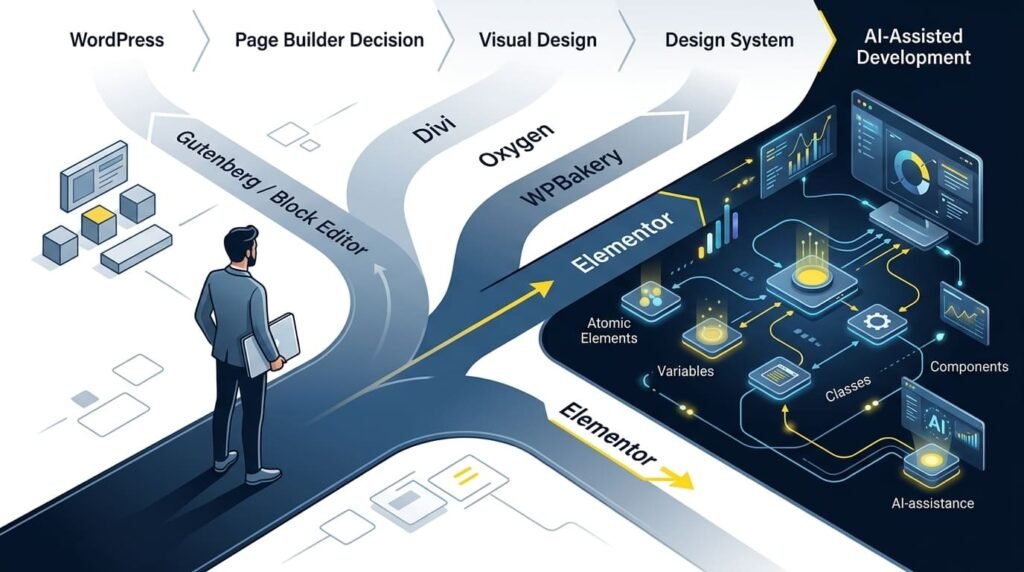
WordPress gives website owners more than one way to build a page.
You can use the default WordPress Block Editor, commonly known as Gutenberg, choose a visual page builder such as Elementor, Divi, Oxygen or WPBakery, or build much of the experience through a custom theme and code.
So the real question is not:
“Which WordPress page builder is the best?”
A better question is:
“When does a page builder make sense for this website?”
The answer depends on the project’s design requirements, content workflow, performance expectations, maintenance model, developer involvement and how much control non-technical users need after launch.
What Is a WordPress Page Builder?
A WordPress page builder provides a visual interface for creating page layouts without requiring the developer or website owner to write every piece of HTML and CSS manually.
Instead of working primarily with code, users can visually arrange elements such as headings, images, buttons, forms, columns, containers and other components.
WordPress itself now provides a powerful block-based editing experience. The Block Editor uses blocks as modular building components and is the default WordPress editing experience.
That means a third-party page builder is not automatically necessary.
The decision should be based on what the project actually needs.
Gutenberg: The Starting Point You Should Not Ignore
The WordPress Block Editor is often the most sensible choice for websites that need relatively straightforward content creation.
It works directly within WordPress and provides blocks for text, images, headings, media, lists and other content elements. More advanced block-based layouts can also be created through custom blocks and patterns.
For a blog, documentation site, news website or relatively simple business website, Gutenberg may provide everything required without adding another visual builder.
Choose Gutenberg when:
- Content is more important than complex visual composition.
- The website uses a block-friendly theme.
- You want to minimize additional dependencies.
- Editors are comfortable working with WordPress blocks.
- The design does not require extensive visual customization.
But when a project needs more sophisticated visual control, reusable design systems, dynamic layouts or client-friendly editing, a dedicated page builder can become much more useful.
Some Popular WordPress Page Builders
There is no single builder that fits every project.
Divi
Divi by Elegant Themes is a long-established visual builder in the WordPress ecosystem.
Its strength is providing a visual design environment with a large collection of layouts and design controls. It can be attractive for designers and agencies that want a highly visual workflow and a broad ecosystem around the builder.
The important consideration is not simply how many design options Divi provides, but whether its workflow matches the team’s long-term maintenance requirements.
Oxygen
Oxygen Builder takes a more developer-oriented approach.
Its current direction emphasizes visual control, reusable components, dynamic data, variables and greater control over the underlying structure. Oxygen 6 was rebuilt around a newer foundation with an emphasis on semantic HTML, CSS control and developer flexibility.
For developers who want extensive control over the output and are comfortable with a more technical workflow, Oxygen can be a strong option.
WPBakery
WPBakery Page Builder is another established WordPress builder, particularly common in older and long-running WordPress projects.
It provides both frontend and backend editing, templates, content elements and extensive compatibility options. Its 2026 version 9.0 also introduced a redesigned interface, rebuilt drag-and-drop engine and modular CSS loading.
This makes WPBakery especially relevant when maintaining an existing website that already depends on it.
Elementor: When Visual Control Becomes Part of the Workflow
Elementor Website Builder occupies an interesting position because it combines visual design with increasingly sophisticated website-building capabilities.
Its basic attraction is simple:
You can see what you are building while you build it.
For developers, designers and clients, that visual feedback can reduce the gap between a design concept and the final WordPress page.
Elementor also goes beyond individual pages.
With Elementor Pro, the Theme Builder can be used for headers, footers, single templates, archives and WooCommerce-related templates. It also provides dynamic content, forms, popups and WooCommerce tools.
That changes the role of a page builder.
It is no longer simply a tool for making a landing page.
It can become part of the site’s broader design and content-management workflow.
Why Elementor’s Atomic Direction Matters
One of the more important developments in Elementor is its move toward an Atomic Editor.
Elementor 4.0 introduced a new foundation built around Atomic Elements, Variables, Classes and Components, with a CSS-first and more systematic approach to building websites. New Elementor installations use the Atomic features by default, while existing sites can transition gradually.
This matters because large websites eventually encounter a common problem:
Too many individual design decisions.
A page might look correct today, but maintaining hundreds of pages becomes difficult when colors, typography, spacing and components are controlled independently.
A design-system approach changes that.
Instead of repeatedly styling individual elements, reusable classes, variables and components can establish consistent rules across the website.
That is particularly valuable for agencies, larger websites and projects expected to evolve for years rather than months.
Elementor and the AI Era
The more interesting question is what happens when visual website building meets AI.
Elementor’s current AI direction goes beyond generating a sentence of content or suggesting a design.
Its Angie system can work directly within the Elementor environment and generate or modify pages, design systems, forms and loops using natural-language prompts. Elementor describes the generated output as structured, editable Elementor content rather than a locked external result.
This is an important shift.
Traditional visual builders essentially say:
“Here are the tools. Build the page.”
AI-assisted builders increasingly move toward:
“Describe what you want. Let the system create the structure, then refine it.”
But that does not remove the need for developers.
It makes understanding the system more important.
AI can generate a layout, but someone still needs to evaluate accessibility, responsiveness, content hierarchy, performance, SEO, integrations, maintainability and whether the design actually solves the business problem.
The current Elementor direction is therefore interesting not simply because it adds AI, but because AI is being connected to the builder’s underlying design system and editable website structure.
When Should You Actually Choose a Page Builder?
A page builder is usually a strong choice when the project requires:
- High visual design flexibility.
- Frequent page changes by non-developers.
- Custom landing pages.
- Reusable design components.
- Dynamic content layouts.
- Marketing pages and conversion-focused designs.
- WooCommerce customization.
- Faster client-facing visual iteration.
- A workflow where developers and designers need to collaborate.
But there are also situations where adding a builder may be unnecessary.
If the website is primarily a content publication, documentation platform or simple business site with a block-friendly theme, Gutenberg may be enough.
Likewise, if a project requires highly specialized functionality, performance optimization or a completely custom architecture, traditional theme and plugin development may provide better control.
The Real Decision: Workflow, Not Popularity
Choosing a WordPress page builder should not be based only on popularity.
Ask five questions first:
1. Who will maintain the website?
A developer-only workflow has different requirements from a client-editable website.
2. How complex is the design?
A simple content page may not justify a full visual builder.
3. How often will the design change?
Frequent marketing and landing-page changes increase the value of visual editing.
4. How important are reusable systems?
Large websites benefit from global styles, components, variables and consistent design rules.
5. What happens five years from now?
A page builder is not only a design decision. It is a long-term content and maintenance decision.
The Smart Choice Is the One That Fits the Project
There is no universal winner between Gutenberg, Elementor, Divi, Oxygen and WPBakery.
Each represents a different approach to WordPress website building.
Gutenberg keeps the workflow close to WordPress itself.
WPBakery remains relevant for established projects and traditional visual editing.
Divi provides a broad visual design environment.
Oxygen emphasizes developer control and structured visual building.
Elementor offers a particularly broad combination of visual design, theme building, dynamic content, reusable systems and an increasingly AI-assisted workflow.
The important lesson is simple:
Don’t choose a page builder because everyone else is using it. Choose it because its workflow, control and long-term maintenance model fit the website you are building.
In the AI era, that decision becomes even more important.
AI can make website creation faster.
But choosing the right foundation still requires human judgment.
Final Takeaways
Choosing a WordPress page builder is not about finding the most popular tool. It is about finding the right balance between design flexibility, editing experience, performance, maintainability and long-term project requirements.
Gutenberg can be the right choice for simpler, content-focused websites. Divi, Oxygen and WPBakery each have their own strengths and established use cases.
Elementor becomes particularly compelling when a project needs visual control, reusable design systems, dynamic content, client-friendly editing and an increasingly AI-assisted workflow.
The arrival of Atomic Editor and AI capabilities also shows where visual website building is heading: from manually assembling individual elements toward structured, reusable and increasingly intelligent design workflows.
The smartest page builder is not necessarily the one with the most features. It is the one that gives your project the right capabilities without creating unnecessary complexity.
Developer Verdict
As a developer, I don’t choose a page builder simply because it is popular or has the largest feature list.
I look at where the platform is going.
For simpler content-focused websites, Gutenberg can be an excellent choice. For established projects, keeping the existing builder may be more practical than rebuilding everything. For highly specialized websites, a custom development approach can still provide greater control.
But for new projects that require a strong visual workflow, reusable design systems, dynamic content and an increasingly AI-assisted development experience, Elementor is currently one of my strongest choices.
The reason is not simply its visual editor.
The move toward Atomic Elements, Variables, Classes and Components addresses an important problem developers face as websites grow: maintaining consistency without repeatedly managing individual elements and styles.
That direction also makes Elementor particularly interesting in the AI era. AI can generate and modify things much faster, but generated work still needs structure. A system based on reusable components, variables and defined design rules gives AI-assisted workflows a stronger foundation to work with.
So, from a developer’s perspective, Elementor’s current Atomic direction gives it an advantage.
That does not mean other page builders cannot reach the same level. In fact, I would expect them to respond with their own approaches to design systems, reusable components and AI-assisted development.
And that competition is good for WordPress developers and website owners.
For now, though, if I am starting a project where visual flexibility, maintainability, reusable design systems and modern AI-assisted workflows all matter, Elementor would be high on my list—and currently my preferred choice.
The real winner will not be the builder that simply adds more features.
It will be the builder that creates a better foundation for how websites will be built five years from now.
Frequently Asked Questions
Q: Is a WordPress page builder necessary?
No. WordPress includes the Block Editor, or Gutenberg, which can handle many websites without requiring a third-party page builder. A page builder becomes useful when a project needs additional visual control, design flexibility or specialized workflows.
Q: Is Elementor better than Gutenberg?
Neither is universally better. Gutenberg is closely integrated with WordPress and can be ideal for content-focused websites. Elementor provides a more extensive visual design environment and additional capabilities for complex layouts, dynamic content and website-wide design systems.
Q: Is Elementor good for professional websites?
Yes. Elementor can support professional websites ranging from business sites and marketing websites to larger projects requiring reusable templates, dynamic content, responsive design and website-wide customization.
Q: What is Elementor Atomic Editor?
Elementor’s Atomic approach introduces concepts such as Variables, Classes, Components and Atomic Elements to create a more structured and reusable design system. It is designed to reduce repetitive styling and make larger websites easier to manage.
Q: Can AI replace WordPress developers when using Elementor?
No. AI can accelerate page creation, content generation and design workflows, but developers still need to make decisions about architecture, accessibility, responsiveness, performance, SEO, security, integrations and maintainability.
Which WordPress page builder should I choose?
Choose based on the project’s requirements rather than popularity. Gutenberg can work well for simpler websites, while Elementor, Divi, Oxygen and WPBakery offer different levels of visual control and workflows. Consider who will build and maintain the website, how complex the design is and how the site may evolve over time.
About the Author
Mirza Hadi Baig is a Full-Stack WordPress Developer, Technical Problem Solver and AI SEO & GEO Strategist with a practical focus on building and improving WordPress websites.
His work combines WordPress development, technical problem solving, SEO, AI search optimization and emerging AI-assisted development workflows. He also builds practical tools and solutions designed to solve real-world website and content problems.
He believes technology should make development more capable and efficient without removing the need for human understanding, judgment and responsible decision-making.