
I have lost count of how many times a client has called me in panic saying, “Our traffic dropped overnight.”
Sometimes the issue is algorithmic. Sometimes it’s technical. But more often than many people realize, the real culprit is a small, overlooked file sitting quietly at the root of the website: robots.txt.
In my experience as a technical troubleshooter, robots.txt is rarely complex — but it is frequently misused. And when misused, it doesn’t just hurt rankings. It can wipe out your visibility entirely.
Let me walk you through the most dangerous robots.txt mistakes I’ve personally encountered while resolving client SEO crises — and what they taught me.
Blocking the Entire Website by Accident
The most catastrophic mistake I’ve seen is this simple line:
User-agent: *
Disallow: /
This single forward slash tells search engines like Google to crawl nothing. Everything is blocked.
One client migrated from staging to production but forgot to remove the staging robots.txt file. Within days, pages started disappearing from the index. Rankings collapsed. Revenue followed.
The painful truth? The file was doing exactly what it was told to do.
What I learned
Always review robots.txt during:
- Site migrations
- Redesigns
- Hosting changes
- CMS updates
And never assume your developer removed staging restrictions.
Blocking Critical CSS and JavaScript Files
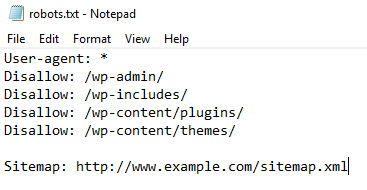
Years ago, it was common advice to block internal folders like /wp-content/ or /assets/. Today, that can be devastating.
Modern search engines render pages almost like browsers. Google uses its rendering system to evaluate layout, mobile usability, and performance signals. If your CSS or JS is blocked, Google sees a broken version of your site.
One eCommerce client came to me with declining Core Web Vitals and indexing issues. The problem? Their robots.txt blocked their theme’s JavaScript directory.
After allowing access, their render errors disappeared within weeks.
What I learned
Do not block:
- CSS files
- JavaScript files
- Core theme or framework assets
If search engines cannot render your site properly, they cannot trust it.
Confusing “Noindex” with “Disallow”
This is one of the most misunderstood technical errors.
Many site owners believe adding “Disallow” removes a page from search results. It doesn’t. It simply prevents crawling. If a page is already indexed, it may remain indexed without updated content.
Years ago, some tried using “noindex” directives in robots.txt, but this method is not officially supported anymore by Google.
When a client wanted to remove outdated landing pages, they blocked them via robots.txt. The URLs stayed indexed — but now Google couldn’t access them to see updated signals.
What I learned
Use:
- Meta robots noindex tags
- HTTP header noindex
- Proper 301 redirects
Robots.txt is for crawl control, not deindexing.
Blocking Important Pages Instead of Fixing Them
Sometimes clients block pages because they are thin, duplicated, or poorly optimized.
For example:
Disallow: /blog/
The thinking is: “If Google can’t crawl it, it won’t hurt us.”
But blocking entire directories often removes internal linking value and prevents search engines from understanding site structure.
I once audited a SaaS website where the blog was blocked to “improve crawl budget.” The result? Loss of authority flow across the domain.
Search engines use links to understand context and relevance. Blocking internal sections damages that ecosystem.
What I learned
If content is weak:
- Improve it
- Consolidate it
- Redirect it
Don’t hide structural problems behind robots.txt.
Incorrect Wildcard and Pattern Usage
Robots.txt supports pattern matching, but misuse creates unintended consequences.
I’ve seen configurations like:
Disallow: /?
Disallow: /.php$
When implemented incorrectly, they blocked essential pages with parameters, tracking URLs, or even canonical pages.
One publishing site blocked all URLs containing question marks to reduce duplicate content. Unfortunately, their internal search and filtered category pages stopped being crawled entirely — damaging discoverability.
What I learned
Test pattern rules carefully using tools like:
- Google Search Console
One small symbol can block thousands of URLs.
Forgetting to Update Robots.txt After Migration
During domain changes or HTTPS migrations, robots.txt often carries outdated references.
I resolved a case where:
- The sitemap URL pointed to HTTP
- Disallow rules referenced old folders
- CDN paths were incorrectly restricted
Search engines like Google treat each protocol and subdomain separately. Old directives can silently reduce crawling efficiency.
What I learned
After any migration:
- Revalidate robots.txt
- Update sitemap references
- Check canonical consistency
Never treat robots.txt as “set and forget.”
Not Including the Sitemap Reference
While not mandatory, including a sitemap directive improves crawl discovery.
Sitemap: https://example.com/sitemap.xml
In several audits, I’ve noticed that large websites without sitemap references experienced slower indexing of new pages.
When connected properly in Google Search Console, sitemaps provide a clearer crawling roadmap.
What I learned
Help search engines understand your structure instead of making them guess.
Using Robots.txt for Security
This is a dangerous misconception.
I’ve seen clients block admin paths thinking it protects them:
Disallow: /admin/
But robots.txt is publicly accessible. Anyone can visit example.com/robots.txt and see sensitive directories listed.
Robots.txt is not a security mechanism. It is a communication protocol for search engines.
What I learned
Use:
- Proper authentication
- Server-level restrictions
- Firewall rules
Security and crawl management are different disciplines.
Takeaways from Years of Troubleshooting
After resolving multiple SEO traffic crises, I’ve learned one thing: robots.txt rarely breaks a site gradually. When it goes wrong, it goes wrong fast.
Here are the core principles I now advise every client to follow:
- Keep it minimal.
- Never block assets required for rendering.
- Don’t use Disallow as a substitute for noindex.
- Audit after every deployment or migration.
- Test changes in Google Search Console before pushing live.
Robots.txt is a small file with enormous power.
When configured wisely, it improves crawl efficiency and clarity.
When mishandled, it can quietly shut the doors to your entire digital presence.
If your traffic suddenly drops and no obvious algorithm update explains it, check your robots.txt first.
In my experience, that simple file has ended more SEO nightmares — and created more of them — than almost any other technical factor.
References & Further Reading
Google Robots.txt Documentation
https://developers.google.com/search/docs/crawling-indexing/robots/intro
Google Search Central – Robots.txt Specifications
https://developers.google.com/search/docs/crawling-indexing/robots/robots_txt
Google Search Console Help – Manage Crawl & Indexing
https://support.google.com/webmasters/answer/7451184
Robots Exclusion Protocol Draft (IETF RFC 9309)
https://www.rfc-editor.org/rfc/rfc9309
Google Guide on Blocking Resources
https://developers.google.com/search/docs/crawling-indexing/blocking-resources
Facing Traffic Drop After a Robots.txt Change?
If your organic traffic suddenly declined after a migration, deployment, or technical update, your robots.txt file might be silently blocking search engines. Technical SEO errors require structured diagnosis — not guesswork.
- ✔ Complete robots.txt audit & validation
- ✔ Crawl & indexing diagnostics
- ✔ Rendering and blocked resource analysis
- ✔ Migration & sitemap configuration review
- ✔ Safe correction with zero ranking risk
👉 Request a professional Technical SEO audit:
Get Expert SEO Help →