
Introduction: The Performance Illusion Most Systems Fall Into
In modern web applications, performance issues are rarely caused by a lack of computing power. More often, they stem from how tasks are executed — especially when everything is handled synchronously, one step at a time.
Many systems unknowingly create bottlenecks by forcing users (or processes) to wait for tasks that don’t need immediate completion. The result? Slower response times, poor user experience, and systems that feel fragile under load.
This is where asynchronous processing becomes not just a technical upgrade, but a strategic decision.
The key insight:
You don’t always need to do things faster.
You need to do them smarter.
A system that responds quickly—even if some work continues in the background—feels significantly faster to users. This perception alone can improve engagement, trust, and retention without changing infrastructure.
What Is Asynchronous Processing?
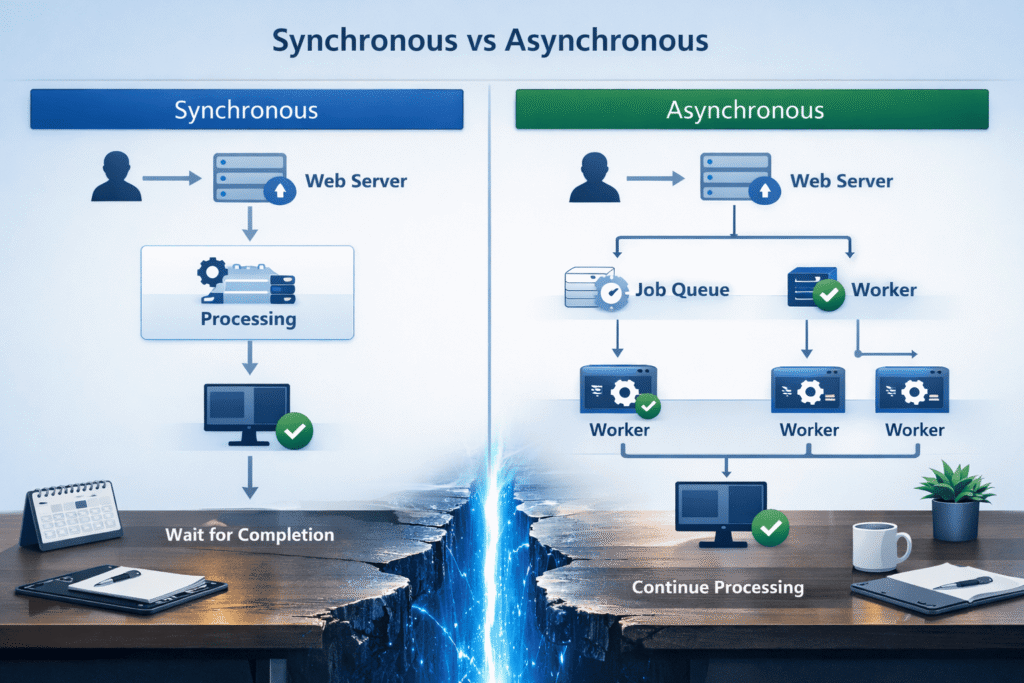
At its core, asynchronous processing means:
Decoupling task execution from the immediate request-response cycle.
Instead of making a user wait for a task to complete, the system:
- Accepts the request
- Delegates the task to be processed in the background
- Responds immediately (or near-immediately)
This approach shifts the system from a “wait-and-complete” model to a “accept-and-process” model, which is far more scalable under real-world conditions.
Simple Analogy
Think of ordering food at a restaurant:
- Synchronous: You wait at the counter until your food is cooked
- Asynchronous: You place the order, get a token, and sit down while it’s prepared
The second model scales better — both for users and the system.
It also allows the restaurant (or system) to handle more customers efficiently without increasing stress on a single point of interaction.
The Problem with Synchronous Systems
Synchronous execution works well for simple workflows, but becomes problematic when:
1. Tasks Take Time
- Sending emails
- Processing images/videos
- Generating reports
- Calling external APIs
These tasks block the main thread unnecessarily.
Even a 1–2 second delay per request can compound quickly under traffic, leading to noticeable slowdowns across the system.
2. User Experience Suffers
Users don’t care how something is processed — they care about:
- Speed
- Responsiveness
- Reliability
Waiting 5 seconds for an email to send is unacceptable in most applications.
In many cases, users may even abandon the action, assuming something is broken, when the system is simply busy doing non-critical work.
3. System Scalability Breaks Down
Under load:
- Requests queue up
- Servers get overwhelmed
- Timeouts increase
This is often misdiagnosed as a “server performance issue,” when it’s actually a design issue.
Throwing more hardware at the problem rarely fixes the root cause if blocking operations remain in place.
Where Asynchronous Processing Makes the Biggest Impact
Not every task should be asynchronous — but many should.
The goal is to identify tasks that are time-consuming but not immediately required for the user’s next action.
1. Background Jobs
Ideal for:
- Email notifications
- Data syncing
- Logging and analytics
Instead of:
- Processing inside the request
Do: - Push to a queue → process in background
This ensures the main application thread remains lightweight and responsive, even during peak usage.
2. File Processing
Uploading a file shouldn’t mean:
- Immediate resizing
- Compression
- Format conversion
Instead:
- Accept upload quickly
- Process asynchronously
- Notify user when ready
This is especially important for media-heavy platforms where processing can take several seconds or more.
3. Third-Party Integrations
External APIs introduce:
- Latency
- Uncertainty
- Failures
Asynchronous handling ensures:
- Your system remains responsive
- Failures don’t block users
It also allows you to implement retries and fallback strategies without affecting the user experience directly.
4. Report Generation
Large datasets can take seconds or minutes to process.
Better approach:
- Trigger report generation
- Provide download later (or via email)
This pattern is commonly used in dashboards and analytics tools where data processing is intensive.
Common Misconception: “Async Means Complex”
This is where many developers hesitate.
Yes, asynchronous systems can become complex — if designed poorly.
But modern tools and patterns make it far more manageable than before.
The real issue is not async itself — it’s:
- Lack of structure
- Poor error handling
- No visibility into background tasks
With clear boundaries and proper tooling, async systems can actually simplify your architecture by separating concerns.
Practical Implementation Approaches
You don’t need a massive architecture shift to start.
Even introducing a single background queue for heavy tasks can significantly improve performance.
1. Job Queues
Use a queue to manage background tasks:
- Push task → worker processes it
Common tools:
- Redis-based queues
- RabbitMQ
- Cloud queues (e.g., SQS)
Queues act as a buffer, smoothing out spikes in traffic and ensuring tasks are processed reliably.
2. Worker Processes
Separate processes that:
- Consume jobs from the queue
- Execute tasks independently
This allows:
- Horizontal scaling
- Isolation of heavy operations
If one worker fails, it doesn’t bring down the entire application, improving system resilience.
3. Event-Driven Patterns
Instead of tightly coupling actions:
- Emit events (e.g., “UserRegistered”)
- Let other services respond asynchronously
This improves:
- Flexibility
- Maintainability
It also makes it easier to extend functionality later without modifying core logic.
4. Retry & Failure Handling
A mature async system includes:
- Retry logic
- Dead-letter queues
- Logging and monitoring
Without this, async becomes unreliable.
Handling failures gracefully is critical, as background tasks often interact with unstable external systems.
Keeping It Simple: Design Principles That Matter
To truly improve performance without complexity, follow these principles:
1. Start Small
Don’t convert everything to async at once.
Identify 2–3 high-impact tasks and begin there.
This reduces risk and helps you understand the behavior of async systems before scaling further.
2. Keep Business Logic Clean
Avoid scattering logic across:
- Controllers
- Jobs
- Services
Define clear responsibilities.
Well-structured code ensures that async processing enhances your system rather than making it harder to maintain.
3. Make Tasks Idempotent
Ensure tasks can run multiple times safely.
This prevents issues during retries.
For example, sending the same email twice should not create duplicate records or unintended side effects.
4. Prioritize Observability
If you can’t see:
- What’s running
- What failed
- What’s delayed
Then async becomes a black box.
Use dashboards, logs, and alerts to maintain visibility and control.
5. Avoid Over-Engineering
Not every delay requires:
- Microservices
- Distributed systems
- Event streaming platforms
Sometimes a simple queue is enough.
Overcomplicating early can slow development and introduce unnecessary maintenance overhead.
Real-World Example: A Common Mistake
A typical WordPress or web application flow:
User submits a form → system:
- Saves data
- Sends email
- Calls CRM API
- Logs analytics
All synchronously.
Result:
- Slow response
- Higher failure risk
- Poor user experience
Users may experience delays or errors even though the core action (form submission) is simple.
Improved Async Flow:
- Save data (sync)
- Push tasks to queue:
- CRM sync
- Analytics
Outcome:
- Faster response
- Better reliability
- Scalable system
This small architectural change often delivers immediate, noticeable improvements.
When NOT to Use Asynchronous Processing
Async is powerful — but not always necessary.
Avoid it when:
- The task is extremely fast (<50ms)
- Immediate feedback is critical (e.g., authentication)
- Complexity outweighs benefit
The goal is balance, not blind adoption.
Introducing async where it’s not needed can increase debugging difficulty without meaningful gains.
Key Takeaways
- Performance issues are often architectural, not hardware-related
- Asynchronous processing improves responsiveness and scalability
- Not all tasks need to block user requests
- Modern tools make async more accessible than ever
- Simplicity comes from disciplined design, not avoiding async
Small, thoughtful changes in execution flow can often outperform large infrastructure upgrades.
Conclusion: Performance Is a Design Choice
Asynchronous processing is not about making systems more complicated.
It’s about respecting time — both the user’s and the system’s.
The best systems don’t just process faster.
They prioritize what matters now and defer what doesn’t.
If you approach async with clarity and discipline, you’ll find that it doesn’t add complexity —
it removes the unnecessary kind.
In the long run, systems designed this way are easier to scale, maintain, and evolve.
References:
- Amazon Web Services – Asynchronous Messaging Pattern
- Microsoft Azure – Queue-Based Load Leveling Pattern
- Google Cloud – Architecture Framework (Scalability & Reliability)
- RabbitMQ – Work Queues Tutorial
- Redis – Streams (Queues & Messaging)
- Apache Kafka – Introduction
- Martin Fowler – Event-Driven Architecture