
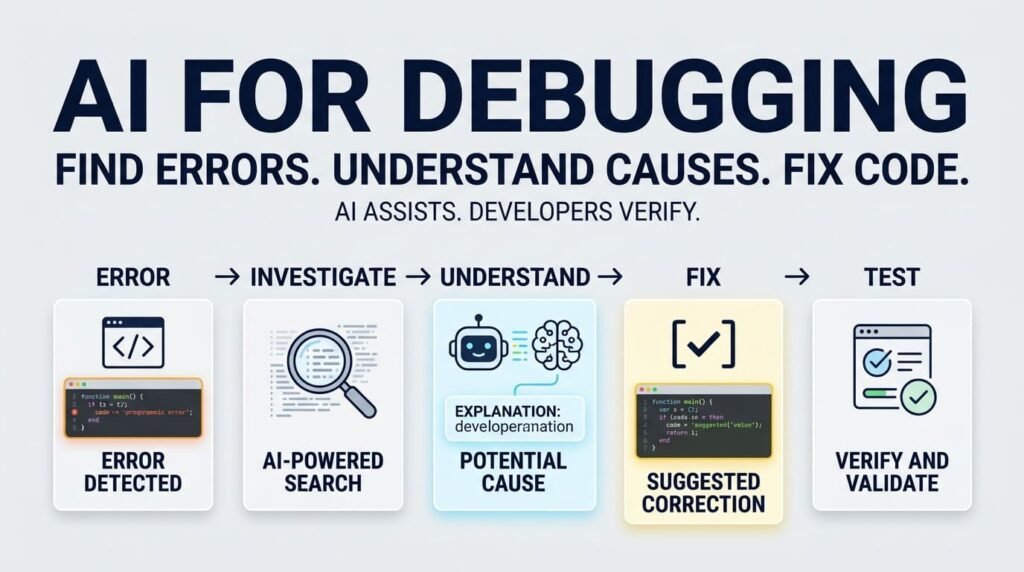
Debugging is an essential part of software development. Whether you are building a WordPress website, developing a PHP application, or working with JavaScript, errors are inevitable. The real challenge is not simply finding an error message—it is understanding why the problem occurred and fixing it without creating another issue.
AI for debugging can help developers investigate errors faster, understand unfamiliar code, and explore possible solutions. However, AI does not automatically know the complete application context, and its suggested fixes are not always correct.
The most effective approach combines AI assistance with debugging fundamentals, careful code review, and testing.
How AI Helps Developers Find Errors
Traditionally, developers investigate errors by reproducing a problem, checking logs, reviewing code, inspecting variables, and testing possible causes. AI can support this process by analysing error messages, explaining code behaviour, and suggesting areas to investigate.
For example, when a JavaScript function fails, you can provide an AI tool with the error message, relevant code, expected behaviour, and actual result. It can help identify possible causes and recommend the next debugging steps.
AI can assist with:
- Understanding error messages: Translate unfamiliar errors into explanations that are easier to understand.
- Identifying potential causes: Highlight incorrect conditions, missing values, unexpected data types, or asynchronous execution problems.
- Reviewing code: Suggest improvements and point out suspicious logic.
- Exploring solutions: Compare different approaches and explain their trade-offs.
- Creating test cases: Suggest scenarios that help confirm whether a fix works.
For a practical introduction to browser-based troubleshooting, read my article JavaScript Errors Explained: How to Read the Browser Console.
AI is most useful when it helps you investigate a problem systematically rather than simply replacing the code that appears to be broken.
Finding an Error Is Not the Same as Understanding Its Cause
One of the most common debugging mistakes is fixing the line where an error appears without investigating what caused it.
Consider this JavaScript example:
function calculateTotal(price, quantity) {
    return price * quantity;
}

console.log(calculateTotal("ten", 2));
The function expects numeric values, but the first argument is a string. JavaScript returns NaN because the multiplication operation cannot produce a meaningful number from "ten".
An AI assistant might suggest converting the value to a number. That may be part of the solution, but a developer should first ask:
- Why did the function receive a string instead of a number?
- Did the value come from a form, API response, database, or another function?
- Should invalid input be rejected, converted, or handled with an error message?
- Could the same problem occur elsewhere in the application?
A better implementation might validate the inputs before calculating:
function calculateTotal(price, quantity) {
    if (
        typeof price !== "number" ||
        typeof quantity !== "number" ||
        !Number.isFinite(price) ||
        !Number.isFinite(quantity)
    ) {
        throw new TypeError("Price and quantity must be valid numbers.");
    }

    return price * quantity;
}
This example demonstrates one possible approach, not a universal solution. A production application may need to convert validated form input, apply business rules, or handle errors at a suitable boundary.
The important lesson is that the correct fix depends on the cause and the expected behaviour of the application—not just the error message.
How to Ask AI Better Debugging Questions
The quality of AI-assisted debugging often depends on the information you provide. A vague request such as “Fix my code” gives an AI tool little context about the intended result or the conditions under which the problem occurs.
Instead, describe the issue clearly.
Include:
- Expected behaviour: What should happen?
- Actual behaviour: What happens instead?
- Error details: Share the exact message, stack trace, or relevant log.
- Relevant code: Include the smallest useful section that reproduces the issue.
- Environment: Mention the language, framework, runtime, and relevant versions.
- Previous attempts: Explain what you have already tested.
For example, instead of asking, “Why does my JavaScript not work?”, try:
“ This function should calculate a numeric total, but it returns NaN when the value comes from a form. Explain the likely causes, identify what I should inspect, and suggest a minimal fix. Explain the reasoning and include test cases for valid and invalid inputs.”
This approach encourages investigation rather than an unexplained code replacement. OpenAI’s guidance on writing effective prompts also recommends providing clear instructions, relevant context, and refining the request when necessary. <Cite refs={[“turn321520search6″,”turn321520search2”]} />
Do not share passwords, API keys, customer data, private credentials, or other sensitive production information when asking an AI tool for debugging help.
A Practical AI-Assisted Debugging Workflow
AI works best as one part of a repeatable debugging process.
1. Reproduce the problem.
Identify the exact steps that trigger the error. Confirm whether it happens consistently or only under particular conditions.
2. Collect evidence.
Inspect the browser console, server logs, network requests, stack traces, and relevant application code. Avoid guessing before gathering useful evidence.
3. Ask AI to investigate.
Provide the evidence and ask for likely causes, additional checks, and alternative explanations. Request an explanation before accepting a proposed fix.
4. Evaluate the suggested solution.
Check whether the proposal matches your application logic, framework, dependencies, and security requirements. AI may misunderstand the environment or suggest outdated approaches.
5. Apply and test the change.
Make the smallest appropriate change. Run relevant tests, reproduce the original scenario, and check whether other functionality has been affected.
6. Verify the result.
Confirm that the original problem is resolved and that the fix has not introduced regressions. If the result differs from expectations, return to the evidence and investigate further.
Microsoft’s JavaScript debugging guide explains techniques such as reproducing bugs, using breakpoints, stepping through code, and inspecting variable values. These techniques remain valuable when AI is part of the workflow. <Cite refs={[“turn321520search7”]} />
Where AI-Assisted Debugging Needs Human Judgment
AI-generated fixes can look convincing while being incomplete, inefficient, or unsafe. A suggested change may suppress an error without resolving its underlying cause. It might also alter application behaviour, introduce a security weakness, or fail under conditions that were not included in the prompt.
Developers should be especially careful when debugging:
- Authentication and permissions: Ensure that a fix does not bypass access controls.
- Database operations: Check data integrity, query behaviour, and error handling.
- API integrations: Verify request formats, response structures, timeouts, and failure cases.
- WordPress custom code: Confirm compatibility with WordPress hooks, plugins, themes, and supported PHP versions.
- Production incidents: Use logs, backups, staging environments, and appropriate change controls before deploying risky changes.
This is where programming fundamentals become particularly important. Developers who understand variables, control flow, data structures, APIs, and application architecture are better equipped to evaluate AI-generated explanations.
For further reading, see Should Developers Learn Coding Fundamentals Before AI Coding Tools? and AI Can Build the First Draft — So What Does the Developer Do Now?.
The goal is not to avoid AI suggestions. It is to evaluate them intelligently.
Frequently Asked Questions
How can AI help with debugging code?
AI can explain error messages, identify possible causes, review code, suggest fixes, and generate test cases. Developers should verify its suggestions against the actual application and test the changes before deployment.
Can AI find the root cause of a programming error?
AI can help investigate potential root causes, but it may not have enough context to identify the exact problem. Providing relevant code, logs, error messages, and reproduction steps improves the investigation.
Should developers trust AI-generated code fixes?
AI-generated fixes should be treated as proposals rather than guaranteed solutions. Review the logic, check security and compatibility, run relevant tests, and confirm that the original issue is resolved.
Can beginners use AI to learn debugging?
Yes. Beginners can ask AI to explain error messages, describe program behaviour, and suggest debugging steps. They should also practise using developer tools and learn programming fundamentals to build independent problem-solving skills.
What information should I give AI when debugging?
Provide the expected behaviour, actual result, exact error message, relevant code, programming language, framework, and steps to reproduce the problem. Never include passwords, API keys, or sensitive production data.
Can AI fix JavaScript and PHP errors?
AI can help diagnose JavaScript and PHP errors by explaining messages, reviewing code, and suggesting possible solutions. The proposed fix still needs to be checked against the runtime, framework, dependencies, and application requirements.
Does AI replace debugging skills?
No. AI can assist with investigation, but developers still need to understand code, reproduce problems, evaluate possible causes, test solutions, and maintain reliable software.
Final Thoughts: AI Assists, Developers Verify
AI is becoming a useful debugging partner because it can explain error messages, explore possible causes, review code, and suggest tests. Used well, it can reduce the time developers spend searching for explanations and help them learn from unfamiliar problems.
But debugging is more than producing code that no longer displays an error. It requires understanding the application's expected behaviour, identifying the root cause, assessing risks, and verifying the result.
Use AI to investigate, question, explain, and test—not simply to copy and paste a proposed fix.
AI can suggest the fix. The developer remains responsible for understanding, validating, and maintaining the solution.
About the Author
Mirza Hadi Baig is a Full-Stack Web Developer, Technical Problem Solver, Product Builder, and AI SEO & GEO Strategist with more than 17 years of experience across the technology industry. His professional journey spans IT education, healthcare IT and administrative information systems, WordPress development, technical troubleshooting, and independent digital product building.
His work focuses on WordPress and WooCommerce, PHP, JavaScript, website performance, technical SEO, and practical solutions to real-world development problems. He continues to explore AI-assisted software development, emerging technologies, and ways to make technical knowledge more accessible without losing sight of programming fundamentals or engineering judgment.
He also builds practical digital tools, including Schema Genie Pro, HS3Dev AI Content Index for llms.txt, GEOScope Content Analyzer, and ButtonCraft Generator.
Through his writing, Mirza shares practical lessons from technology, software development, and continuous learning, helping developers and website owners make better-informed decisions.
Explore his work at hadi-mirza.com or connect on LinkedIn.