
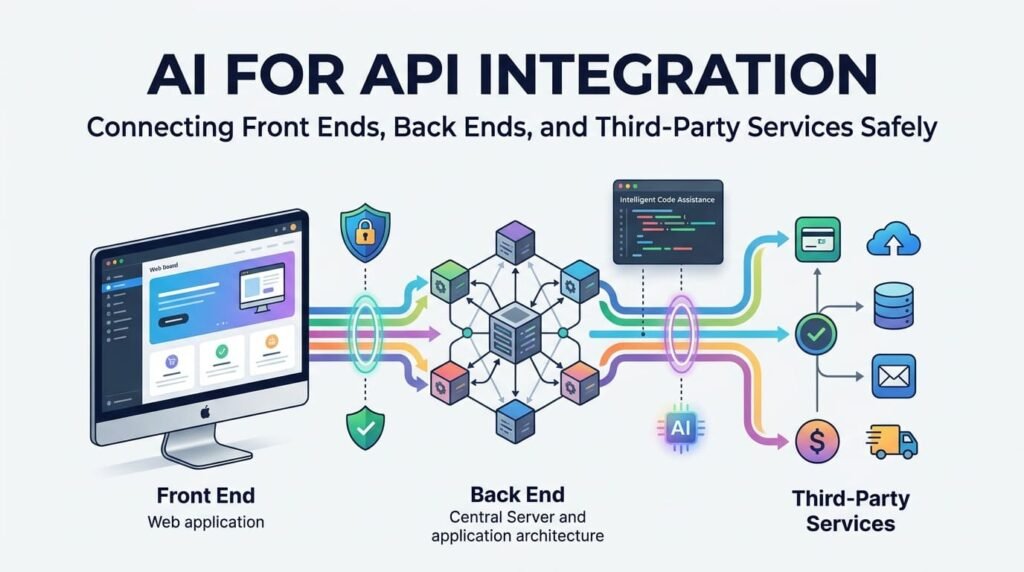
Modern applications rarely operate independently. A website may retrieve information from a database, communicate with a backend service, process payments through an external provider, send notifications through an email platform, and synchronize information with a customer relationship management (CRM) system.
Application Programming Interfaces (APIs) make these connections possible.
AI is changing how developers approach this work. It can explain unfamiliar API documentation, generate request examples, suggest integration structures, draft validation logic, and help investigate errors. However, connecting two systems is not simply a matter of generating code that sends a request and receives a response.
A reliable integration must respect the API contract, protect credentials, validate information, enforce permissions, handle failures, and remain maintainable as connected services evolve.
The central principle remains important:
AI can accelerate API integration. Developer judgment makes the connection reliable and secure.
1. Understanding the Complete API Integration Flow
Before writing integration code, developers need to understand how information moves through the application.
Consider an e-commerce website that allows customers to place orders and receive shipping updates. Its architecture might include:
- Front end: Displays products, collects customer information, and presents order status.
- Back end: Processes business logic, validates requests, checks permissions, and communicates with other services.
- Database: Stores customers, products, orders, and transaction records.
- Third-party services: Handle payment processing, shipping, email notifications, or inventory synchronization.
A simplified request flow looks like this:
- A customer submits an order through the front end.
- The front end sends the required information to the application’s backend API.
- The backend authenticates the request and validates the submitted data.
- The backend checks business rules and creates or updates the relevant records.
- The backend communicates with the payment or inventory provider.
- The application processes the provider’s response and updates the order status.
- The front end receives an appropriate response and displays the result.
Each stage has its own responsibilities.
The front end should manage user interaction and presentation. The backend should enforce business rules, protect sensitive operations, and manage trusted communication with external services. The database should preserve the application’s data integrity.
AI can help developers map this flow, identify missing steps, and suggest an implementation structure. However, developers must decide which system owns each piece of information and which component is allowed to perform each operation.
For a broader explanation of how these layers work together, see Beyond Code Generation: How AI Is Changing the Full-Stack Developer’s Workflow.
2. Define the API Contract Before Connecting Systems
One of the most important parts of API integration is understanding the contract between the systems.
An API contract describes how a client and server communicate. It defines the available endpoints, HTTP methods, required parameters, request formats, response structures, authentication requirements, and possible errors.
Without a clear contract, developers may make assumptions about fields, data types, or expected behaviour. Those assumptions can produce integrations that work in a limited test but fail when real data or different application states are involved.
What should an API contract include?
Before implementation, identify:
- Endpoint: Which URL or resource will be accessed?
- HTTP method: Is the operation GET, POST, PUT, PATCH, or DELETE?
- Request parameters: Which query parameters, headers, and body fields are required?
- Data types: Are values strings, numbers, booleans, arrays, or objects?
- Required fields: Which fields must always be present?
- Response structure: What data will the API return?
- Authentication: How must the client identify itself?
- Authorization: Which operations is the authenticated client allowed to perform?
- Error responses: Which status codes and error formats should the client expect?
- Limits: Are there rate limits, payload limits, or pagination requirements?
For example, a shipping service might accept an order reference and delivery address, then return a tracking number and shipment status.
The integration must know whether the address fields are mandatory, whether the tracking number can be null, and which status values the provider may return.
It should not assume that every successful response contains every expected field.
Use OpenAPI to reduce guesswork
The OpenAPI Specification provides a standard, machine-readable way to describe HTTP APIs. It can document endpoints, operations, parameters, request bodies, response schemas, and security requirements.
This is particularly useful when developers work with multiple services or when frontend and backend teams need a shared understanding of the interface.
AI can help interpret an OpenAPI document, explain unfamiliar schemas, generate sample requests, and identify potentially missing descriptions. It can also assist with drafting an initial specification from existing code.
However, the generated specification must be checked against the actual implementation. A document that describes an endpoint incorrectly can create confusion for every developer who depends on it.
How AI can help with API contracts
A developer can provide the official API documentation or OpenAPI specification and ask AI to:
- Summarize the available endpoints.
- Identify required and optional fields.
- Explain request and response structures.
- Map fields between two systems.
- Highlight authentication and permission requirements.
- List possible error responses.
- Generate test cases for valid and invalid requests.
The important point is to use the provider’s documentation as the source of truth. AI should explain and organize the contract, not invent one.
3. Keep Authentication and Credentials in the Right Place
Authentication is a critical part of API integration because connected systems often exchange information that should not be publicly accessible.
However, authentication is not the same as authorization.
Authentication establishes who or what is making a request.
Authorization determines which resources and operations that identity is allowed to access.
An application may successfully authenticate a user but still need to prevent that user from viewing another customer’s order or modifying an administrative resource.
Common API authentication methods
Depending on the service and use case, an API may use:
- API keys.
- Bearer tokens.
- OAuth 2.0 authorization flows.
- Session-based authentication.
- Signed requests or other provider-specific mechanisms.
Developers should use the authentication method recommended by the API provider rather than selecting one simply because AI generated a convenient example.
For OAuth 2.0 implementations, the IETF’s OAuth 2.0 Security Best Current Practice (RFC 9700) provides important security guidance. Browser-based applications also need to consider the relevant guidance in RFC 10017: OAuth 2.0 for Browser-Based Applications.
Never expose private credentials in frontend code
One common integration mistake is placing a private API key directly inside JavaScript that runs in the browser.
For example, a developer might create a frontend request that includes a secret API key in its headers. The request may work, but the key can be exposed through browser developer tools, page source, or network inspection.
A safer architecture is:
- The front end sends a request to the application’s backend.
- The backend validates the user and checks permissions.
- The backend retrieves the required credential from a secure configuration or secret-management system.
- The backend communicates with the third-party provider.
- The backend returns only the necessary information to the front end.
This keeps private service credentials away from the browser.
Not every public API requires authentication, and some integrations use public client identifiers by design. The important distinction is between public configuration values and secrets that grant access to protected resources.
WordPress example
WordPress developers may use the REST API to connect plugins, custom applications, and external services.
WordPress supports Application Passwords for programmatic access. These are separate, revocable credentials associated with a user account and intended for API use. They should be transmitted over HTTPS and stored securely rather than placed in public frontend code.
See the official WordPress REST API Authentication Handbook and Application Passwords documentation.
For a custom integration, use an account with only the capabilities it needs. Avoid giving an external service unrestricted administrator access when a more limited role is sufficient.
4. Validate Data at Both Sides of the Integration
Data validation is not a task that should happen only in the frontend.
A browser form may check whether an email address looks valid or whether a required field has been completed. Those checks improve the user experience, but they do not protect the backend.
A user can bypass frontend validation and send a request directly to an endpoint. Therefore, the backend must independently validate incoming data before processing it.
Validate more than data types
Consider an order submission containing:
- Product ID.
- Quantity.
- Customer ID.
- Delivery address.
- Payment reference.
The backend should check:
- Whether required fields are present.
- Whether values have the expected data types.
- Whether quantities are within acceptable limits.
- Whether the product exists and is available.
- Whether the current user is permitted to place or modify the order.
- Whether the submitted price or total is calculated by the trusted system.
- Whether the address and other values meet the application’s business rules.
A value can be syntactically valid but still be invalid for the requested operation.
For example, a quantity of 500 may be a valid integer, but it may exceed the maximum allowed quantity for a particular product.
The OWASP Input Validation Cheat Sheet explains why applications should validate both the format and the meaning of incoming data.
Validate third-party responses too
An external API is another source of data, not an automatic source of truth.
A provider may return:
- Missing fields.
- Unexpected data types.
- An unfamiliar status value.
- An incomplete response.
- An error object instead of the expected resource.
- Data that has changed since the last API version.
The application should check the response before using it.
For example, if a shipping service returns a tracking status, the application should verify that the response contains the expected structure and that the status belongs to a supported set of values.
Do not assume that a successful HTTP response guarantees that the returned business data is complete or correct.
AI can help generate validation rules and test cases, but developers must verify that those rules reflect the actual business requirements.
5. Design Error Handling for Real-World Conditions
An API integration should not be designed only for the situation in which every service works perfectly.
Networks fail. Servers become unavailable. Credentials expire. Requests contain invalid information. External providers change their responses. Rate limits can prevent applications from making additional requests.
A reliable integration needs to recognize these situations and respond appropriately.
Understand common HTTP status codes
Some common status codes include:
- 200 OK: The request was successful.
- 201 Created: A resource was successfully created.
- 204 No Content: The request succeeded without a response body.
- 400 Bad Request: The request could not be processed because of invalid input or request structure.
- 401 Unauthorized: Authentication is missing or invalid.
- 403 Forbidden: The caller is not permitted to perform the operation.
- 404 Not Found: The requested resource or endpoint could not be found.
- 409 Conflict: The request conflicts with the current state of a resource.
- 422 Unprocessable Content: The request was understood but failed validation or processing requirements.
- 429 Too Many Requests: The caller has exceeded a rate limit.
- 500 Internal Server Error: The server encountered an unexpected problem.
- 502 Bad Gateway / 503 Service Unavailable / 504 Gateway Timeout: An upstream or service availability problem has occurred.
The exact status codes and response formats depend on the API. Developers should always consult the provider’s documentation.
Separate technical errors from user-facing messages
A backend may need detailed diagnostic information to understand a failure. The customer, however, usually needs a short and understandable message.
For example:
Internal diagnostic information:
- Provider request timed out.
- Endpoint and request identifier.
- Retry attempt count.
- Timestamp.
- Sanitized error category.
User-facing message:
“We could not confirm your payment status yet. Please check your order before attempting the payment again.”
Avoid returning raw stack traces, internal server details, access tokens, database errors, or private provider responses to the browser.
Handle errors consistently
A useful backend error structure might contain:
- A stable error code.
- A safe message.
- Optional field-level validation details.
- A request or correlation identifier.
For example:
{
  "error": {
    "code": "INVALID_ORDER_DATA",
    "message": "The order information could not be validated.",
    "request_id": "req_example_123"
  }
}
This is an illustrative structure, not a universal standard. The application should define a consistent format that its frontend and other clients can understand.
AI-assisted error investigation
AI can help interpret sanitized error messages, compare expected and actual responses, and suggest diagnostic steps.
For useful results, provide the relevant endpoint pattern, HTTP method, status code, sanitized response, programming language, and expected behaviour.
Do not paste live credentials or confidential customer records into an AI prompt.
For a practical approach to investigating errors, see AI for Debugging: Finding Errors, Understanding Causes, and Fixing Code.
6. Implement Retries Without Creating Duplicate Operations
Retries are useful when an external service experiences a temporary problem. However, repeating every failed request is not a safe strategy.
Consider an online payment workflow.
A customer submits a payment request. The payment provider processes it successfully, but the response is delayed or lost before the application receives confirmation.
The application sees a timeout.
If it immediately sends the same payment request again without a suitable duplicate-protection mechanism, the customer could be charged twice.
This is why developers need to understand idempotency.
An operation is idempotent when repeating the same operation does not create additional unintended changes to the final state.
For example, retrieving an order is generally safe to repeat. Creating a new payment or submitting a new order may not be.
Use idempotency keys where supported
Some payment and API providers support idempotency keys.
An application generates a unique key for a particular operation and sends it with the request. If the same operation must be retried, the application reuses the same key according to the provider’s rules.
This helps the provider recognize repeated attempts and avoid processing the same operation multiple times.
The exact behaviour, retention period, and scope of idempotency keys vary by provider. Always follow the provider’s implementation documentation.
Use exponential backoff
When a request is eligible for retry, the application should avoid sending repeated requests immediately.
Exponential backoff increases the waiting time between attempts. A simplified example might use:
- First retry: 1 second.
- Second retry: 2 seconds.
- Third retry: 4 seconds.
- Fourth retry: 8 seconds.
A maximum delay and maximum retry count should also be defined. Randomized jitter can help prevent many clients from retrying at exactly the same time.
The Google Cloud retry strategy documentation explains the relationship between retry behaviour, exponential backoff, and idempotency.
Which failures should be retried?
A retry may be appropriate for certain temporary network failures, timeouts, or rate-limit responses, depending on the provider’s guidance.
However:
- Do not automatically retry every 400-level response.
- Do not assume a 401 or 403 error will disappear after waiting.
- Respect
Retry-Afteror provider-specific rate-limit instructions when supplied. - Do not repeat non-idempotent operations without appropriate safeguards.
- Set maximum attempts and time limits.
- Record failed attempts so they can be investigated.
For longer-running operations, background jobs or queues may be more appropriate than keeping a browser request open while waiting for an external service.
The goal is controlled recovery, not endless repetition.
7. Treat Third-Party Services and Webhooks as Untrusted Inputs
Third-party APIs are useful, but their responses must be handled with the same care as other external input.
A service may be legitimate and widely used while still returning unexpected data, experiencing an outage, or changing its API behaviour.
The OWASP API Security guidance includes unsafe consumption of APIs among its major risk areas. Developers should not assume that data from a trusted provider is automatically safe to use.
Verify webhook requests
Webhooks allow an external service to notify an application when an event occurs.
For example:
- A payment provider reports that a payment succeeded.
- A shipping service reports that an order has been dispatched.
- An email platform reports a delivery failure.
- A CRM system reports that a customer record has changed.
A webhook endpoint should not simply accept any incoming request and update the database.
Depending on the provider’s supported security mechanism, developers should:
- Verify the webhook signature.
- Use the provider’s recommended signing algorithm and secret.
- Check timestamps or replay-protection mechanisms where available.
- Validate the event structure.
- Confirm that the event relates to a known resource.
- Prevent duplicate event processing.
- Record the event outcome.
- Avoid exposing sensitive information in logs.
Webhook signatures should be verified using the provider’s documented process. A developer should not invent a custom verification method when the provider already defines one.
Make webhook processing resilient
Webhook providers may deliver the same event more than once, or retry delivery when the application does not respond successfully.
The receiving application should therefore be designed to recognize duplicate events.
A common approach is to store a provider event ID and processing status. Before applying an event, the backend checks whether that event has already been processed.
For complex operations, the application can acknowledge receipt quickly and move the actual processing into a background job.
This reduces the chance that a slow database operation or third-party dependency will cause unnecessary webhook delivery failures.
8. Document the Integration So It Can Be Maintained
An integration that works today may become difficult to maintain if nobody understands how it was built.
API providers can introduce new versions, deprecate old endpoints, change authentication requirements, adjust rate limits, or modify response structures.
Good documentation helps developers understand what the integration does and how to maintain it.
A practical integration document should cover:
- Purpose of the integration.
- Systems and services involved.
- Base URLs and API versions.
- Endpoints and HTTP methods.
- Authentication method and required permissions.
- Request and response examples.
- Data mapping and validation rules.
- Error codes and handling behaviour.
- Timeout and retry policies.
- Webhook events and verification requirements.
- Rate limits and provider-specific restrictions.
- Environment configuration.
- Testing instructions.
- Known limitations and maintenance responsibilities.
Do not include live credentials, private tokens, or sensitive production information in the documentation.
How AI can improve API documentation
AI can help turn an existing API specification, implementation, or verified examples into readable documentation.
It can draft:
- Endpoint descriptions.
- Request and response examples.
- Authentication instructions.
- Error-handling references.
- Data-mapping explanations.
- Testing procedures.
- Developer onboarding notes.
- Change summaries.
However, generated documentation must be checked against the real implementation. AI can confidently describe a parameter or response field that does not actually exist.
For more on using AI to understand and document APIs, see AI for API Development, Documentation, and Integration Workflows.
9. A Practical AI-Assisted API Integration Workflow
AI becomes more useful when developers give it a structured task instead of asking it to build an entire integration without context.
A practical workflow can be divided into eight stages.
Step 1 — Define the business requirement
Describe what the integration must accomplish, which systems are involved, and what should happen when the operation succeeds or fails.
Step 2 — Review the API documentation
Provide the official API reference or OpenAPI specification. Ask AI to explain the endpoints, required fields, authentication, response formats, rate limits, and error conditions.
Step 3 — Map the data
Identify how information in the front end, backend, database, and third-party service relates to one another. Confirm which system is authoritative for each important value.
Step 4 — Design the security boundaries
Determine where credentials are stored, how users are authenticated, which permissions are required, and which operations must remain server-side.
Step 5 — Plan validation and failure handling
Define input rules, response validation, error formats, timeouts, retry conditions, and duplicate-operation safeguards before generating the implementation.
Step 6 — Generate and review the code
Ask AI to produce small, focused components that fit the existing architecture. Review the code for correctness, security, framework compatibility, and maintainability.
Step 7 — Test normal and failure scenarios
Test successful requests, invalid input, missing permissions, expired credentials, unexpected responses, rate limits, timeouts, duplicate events, and service outages.
Step 8 — Document and monitor
Record the integration’s behaviour, monitor failures, review provider changes, and maintain the implementation over time.
This approach is useful for WordPress plugins, PHP applications, JavaScript front ends, Laravel applications, and other systems that communicate with external services.
10. A Reusable Prompt for AI-Assisted API Integration
Developers can use a structured prompt to make AI’s role clearer and reduce unsupported assumptions.
I need to integrate an external API into an existing application.

Application context:
[Describe the programming language, framework, and existing architecture.]

Integration objective:
[Explain what the integration should accomplish.]

API documentation:
[Provide the official documentation or OpenAPI specification.]

Systems involved:
[Describe the front end, backend, database, and third-party service.]

Please help me:

1. Explain the API contract and required endpoints.
2. Identify request and response fields and their data types.
3. Map the data between the connected systems.
4. Explain the authentication and authorization requirements.
5. Identify which credentials must remain server-side.
6. Recommend input and response validation rules.
7. Define suitable error-handling behaviour.
8. Identify safe retry conditions and idempotency requirements.
9. Suggest security and testing scenarios.
10. Draft implementation code that follows the existing architecture.

Important instructions:
- Do not invent undocumented endpoints or parameters.
- Identify any missing information before proposing assumptions.
- Do not include real credentials or sensitive data.
- Explain security implications.
- Separate example code from production-ready implementation.
- Include failure scenarios and test cases.
- Explain any framework-specific dependencies.

Do not assume the integration is production-ready until the implementation has been reviewed and tested.
The developer should provide only the relevant project context and sanitized documentation. Private credentials and confidential data should remain protected.
11. Final API Integration Readiness Checklist
Before releasing an integration, review the following areas:
API contract
- Confirm endpoints, HTTP methods, API versions, and request schemas.
- Verify required fields, response structures, and provider limits.
- Check that documentation matches the actual API.
Authentication and authorization
- Use the provider’s recommended authentication method.
- Keep private credentials on the server.
- Apply least-privilege access.
- Verify resource ownership and user permissions.
Validation and data handling
- Validate frontend input again on the backend.
- Validate third-party responses before using them.
- Enforce business rules and data types.
- Handle missing, unexpected, or malformed data.
Errors and retries
- Handle relevant HTTP status codes.
- Return safe, consistent error messages.
- Set appropriate timeouts.
- Retry only eligible operations.
- Use idempotency protection where supported.
- Respect provider rate limits.
Third-party security
- Verify webhook signatures.
- Protect against duplicate event processing.
- Avoid trusting external data without validation.
- Protect sensitive information in logs.
Testing and maintenance
- Test successful and unsuccessful requests.
- Test expired credentials and permission failures.
- Test timeouts, rate limits, and duplicate operations.
- Document the integration.
- Monitor failures and review provider changes.
A successful integration is not simply one that returns a successful response during development. It must continue to behave correctly when data is unexpected, services are unavailable, credentials change, and real users interact with the application.
Frequently Asked Questions
How can AI help with API integration?
AI can explain API documentation, identify endpoints, generate request examples, map data fields, draft authentication and validation logic, suggest error handling, and create test scenarios. Developers must verify its suggestions against the provider’s actual documentation and the application’s requirements.
Why should API credentials remain on the backend?
Private API keys and access tokens can be exposed when placed in browser-based JavaScript. Keeping secrets on the backend allows the application to control access, protect credentials, and communicate with third-party services without revealing private keys to users.
What is an API contract?
An API contract defines how two systems communicate. It describes endpoints, HTTP methods, parameters, request and response formats, authentication requirements, and possible errors. OpenAPI is a widely used specification for documenting HTTP APIs.
What is the difference between authentication and authorization?
Authentication verifies the identity of a user or application. Authorization determines what that identity is allowed to access or do. Secure API integrations need both where protected resources or operations are involved.
Why is input validation important in API integration?
Validation ensures that incoming information meets the application’s expected formats, data types, and business rules. Backend validation is essential because frontend checks can be bypassed. Third-party responses should also be validated before the application uses them.
Should developers automatically retry failed API requests?
No. Retries should be limited to appropriate temporary failures and follow the provider’s guidance. Repeating non-idempotent operations can create duplicate orders, payments, or records. Developers should use idempotency mechanisms where supported, along with suitable backoff and retry limits.
How can AI help troubleshoot API errors?
AI can analyze sanitized status codes, response bodies, request details, and relevant code to suggest possible causes and diagnostic steps. Developers should verify those suggestions through documentation, logs, and controlled testing rather than accepting an explanation without evidence.
What is the role of OpenAPI in AI-assisted development?
OpenAPI provides a structured description of an HTTP API, including endpoints, parameters, request bodies, responses, and security requirements. AI can help developers understand the specification and generate examples, but the specification must remain consistent with the actual implementation.
Final Thought
API integration is where individual components become a working application.
The front end, backend, database, and third-party services must communicate through clear contracts and predictable behaviour. Authentication, authorization, validation, error handling, retries, and documentation are not optional details; they are part of building a dependable system.
AI can help developers understand unfamiliar APIs, prepare implementation drafts, and investigate problems more efficiently. But it cannot take responsibility for the security, correctness, and long-term reliability of the integration.
Use AI to accelerate the work. Use engineering judgment to connect the systems safely.
About the Author
Mirza Hadi Baig is a Full-Stack Web Developer, Technical Problem Solver, Product Builder, and AI SEO & GEO Strategist with 17+ years of experience across the technology industry. His professional background spans IT education, healthcare information systems, WordPress and WooCommerce development, technical troubleshooting, and independent digital product building. He explores practical ways to use AI in development while emphasizing sound engineering fundamentals, security, and responsible implementation. Through DCX Herald, he shares practical insights on web technologies, software development, technical SEO, and emerging AI-driven workflows.