
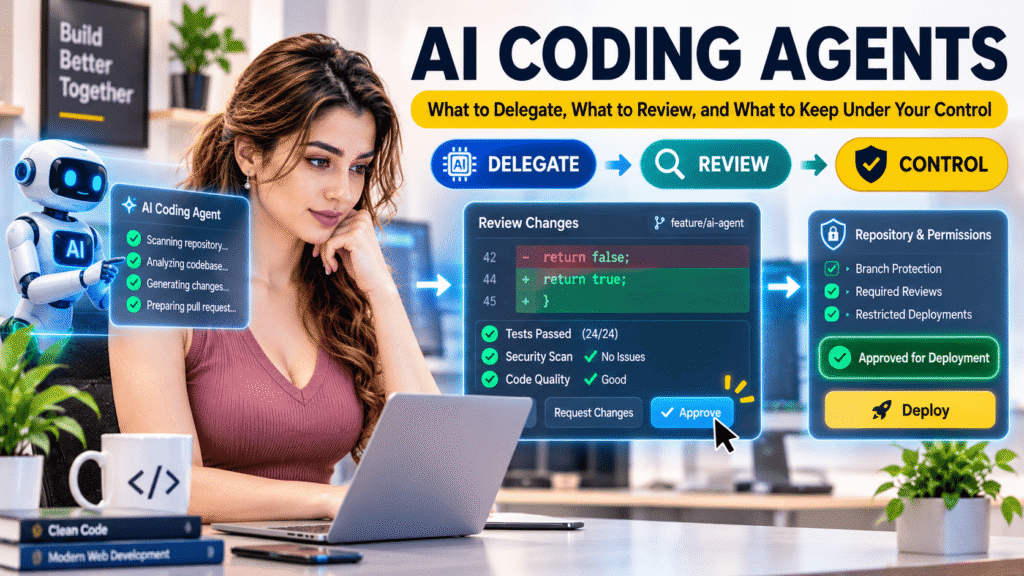
AI coding agents are changing how developers work with software repositories. Unlike traditional AI coding assistants that mainly suggest code or answer questions, coding agents can inspect project files, understand repository instructions, modify multiple files, execute commands, run tests, and prepare changes for review.
This creates new opportunities for full-stack development. Developers can delegate focused implementation tasks, investigate unfamiliar codebases, generate tests, and automate parts of their development workflow.
However, giving an agent access to a repository does not mean giving it unrestricted authority over the project.
The real challenge is knowing what to delegate, how much context and permission to provide, and how to verify the changes before accepting them.
AI CODING AGENTS CAN EXECUTE TASKS. DEVELOPERS MUST CONTROL THE SCOPE, REVIEW THE CHANGES, AND VERIFY THE RESULTS.
1. Understand the Difference Between AI Assistants and Coding Agents
A traditional AI coding assistant generally responds to a specific request. You ask a question, share code, or request a function, and it provides a suggestion.
A coding agent can work through a sequence of actions to achieve a defined goal.
For example, consider a WordPress plugin that needs a new settings field.
With a traditional assistant, you might ask for the PHP code, receive a function, and manually integrate it into your plugin.
With a coding agent, you can provide repository access and ask it to:
- Inspect the existing plugin structure.
- Identify how settings are registered.
- Find the relevant implementation files.
- Propose an implementation plan.
- Modify the necessary files.
- Run available checks and tests.
- Summarize the changes for your review.
The difference is not simply how much code AI can generate. It is the ability to interact with the development environment and carry out multiple steps.
But more autonomy also means more responsibility for controlling the agent’s actions.
2. Delegate Bounded Tasks, Not Entire Projects
One of the most important practices when working with coding agents is defining a clear boundary around each task.
A request such as “Improve my application” gives an agent too much freedom. It does not establish what should change, what should remain untouched, or how success will be measured.
A better request describes one specific outcome.
For example:
Poor delegation:
“Improve the security of my WordPress plugin.”
Better delegation:
“Inspect the plugin’s settings form and identify missing input validation, sanitization, capability checks, and output escaping. Do not modify any files yet. Report the affected files, potential risks, and recommended changes.”
The second request gives the agent a defined investigation task without immediately authorizing code modifications.
Once the findings are reviewed, implementation can be delegated separately.
Tasks suitable for delegation
Coding agents can be useful for bounded activities such as:
- Explaining unfamiliar repository structures.
- Finding where a particular function is implemented.
- Identifying duplicated code.
- Implementing a clearly defined function.
- Adding validation to a specific form.
- Writing unit tests for existing behaviour.
- Updating documentation to match an implementation.
- Investigating a reproducible bug.
- Preparing a focused refactoring proposal.
Tasks requiring stronger supervision
Some tasks affect multiple components or introduce significant architectural and security implications.
Examples include:
- Database schema changes and migrations.
- Authentication and authorization changes.
- Payment processing integrations.
- Major dependency upgrades.
- Changes to public APIs.
- Refactoring shared application architecture.
- Production deployment and infrastructure configuration.
These tasks may still benefit from agent assistance, but they should be divided into smaller stages with explicit review and approval points.
A useful rule is:
THE SMALLER THE TASK BOUNDARY, THE EASIER IT IS TO REVIEW THE RESULT.
3. Give the Agent the Right Repository Context
An agent cannot make reliable implementation decisions if it does not understand how the project is organized.
Providing the entire repository is not necessarily the same as providing useful context. Large projects contain legacy code, different architectural patterns, outdated documentation, and dependencies that may not be relevant to the current task.
The objective is to give the agent the information it needs without overwhelming it with unrelated details.
Before implementation, establish:
- The application’s purpose.
- The programming languages and frameworks.
- The repository structure.
- Important entry points.
- Existing coding conventions.
- Relevant dependencies.
- Testing commands.
- Compatibility requirements.
- Files or components that must not be changed.
Use repository instructions
A practical approach is maintaining an AGENTS.md file at the repository root.
It can describe project-wide development rules, such as:
- How the application is structured.
- Where new functionality belongs.
- Which coding standards to follow.
- How tests should be executed.
- Which dependencies are already available.
- Which files require special care.
For larger repositories, additional instruction files can be placed in relevant directories to provide more specific guidance.
For example:
my-project/
├── AGENTS.md
├── src/
│   └── AGENTS.md
├── tests/
│   └── AGENTS.md
├── docs/
└── package.json
The root instructions should remain focused on rules that apply across the project. Directory-level instructions can explain requirements that only apply to a particular area.
Avoid turning these files into large collections of duplicated documentation. Keep instructions accurate, concise, and connected to the project’s actual development practices.
For WordPress development, the repository context might explain:
- Whether functionality belongs in a plugin, theme, or custom integration.
- Which WordPress hooks and APIs are already used.
- How settings and database operations are handled.
- Which PHP and WordPress versions must remain compatible.
- Which security and coding standards apply.
The Gutenberg project provides a useful real-world example of organizing AGENTS.md instructions and task-specific skills for AI coding agents.
4. Control Permissions Before Giving an Agent Access
Repository context explains what the agent should do. Permissions determine what it is technically allowed to do.
These are different controls, and both matter.
A coding agent may need to read files, modify source code, execute tests, or access external services. But it does not automatically need permission to modify every file, install arbitrary dependencies, access production systems, or use unrestricted network access.
A safer approach is to grant only the access required for the current task.
Apply least-privilege access
Consider these permission levels:
READ-ONLY ACCESS
Suitable for repository exploration, code explanation, architecture analysis, and initial investigations.
LIMITED WORKSPACE ACCESS
Allows the agent to modify relevant project files and execute approved local commands.
APPROVAL-REQUIRED ACCESS
Requires confirmation before higher-risk actions, such as accessing external resources, modifying protected locations, or executing sensitive operations.
RESTRICTED PRODUCTION ACCESS
Production credentials, live databases, deployment permissions, and sensitive infrastructure should remain outside ordinary agent access unless a carefully designed and explicitly authorized workflow requires them.
Use version control and isolated development environments so that changes can be inspected and reversed.
For example, Codex uses sandboxing and approval policies to establish execution boundaries. Its documentation explains how workspace access, network permissions, and approval requirements work together.
The broader lesson applies regardless of which coding agent you use:
DO NOT GIVE AN AGENT MORE ACCESS THAN ITS TASK REQUIRES.
5. Review Every Meaningful Change
A coding agent can produce code that looks correct but does not fit the application’s architecture or actual requirements.
A function may work in isolation but break another component. A dependency may introduce compatibility problems. A security check may be missing even though the implementation appears complete.
That is why reviewing the changes is not optional.
What should developers review?
1. Scope of changes
Did the agent modify only the files required for the task? Did it introduce unrelated refactoring or remove existing functionality?
2. Architecture
Does the implementation follow the existing project structure? Does it reuse established functions and APIs rather than introducing unnecessary alternatives?
3. Security
Does it handle permissions, authentication, user input, sensitive information, and external data correctly?
4. Dependencies
Did the agent introduce new packages, change existing versions, or add external services? Are those changes necessary and compatible?
5. Error handling
What happens when an API request fails, a database operation returns an error, or an unexpected value is received?
6. Maintainability
Can another developer understand, debug, and extend the implementation?
WordPress example
Suppose an agent implements a plugin settings page.
The feature may appear functional, but you should still verify:
- Capability checks before allowing settings changes.
- Nonce verification for relevant administrative actions.
- Appropriate input validation and sanitization.
- Escaping when displaying stored values.
- Correct use of WordPress Settings API functions where appropriate.
- Compatibility with the supported WordPress and PHP versions.
A working settings page is not automatically a secure settings page.
The WordPress Plugin Developer Handbook and Security Handbook provide established guidance that should remain part of the review process, whether code is written manually or generated with AI.
6. Verify the Work with Tests, Not Just Agent Explanations
A coding agent may report that it completed a task successfully. That statement is not proof that the implementation works.
Verification must be based on observable results.
A practical verification process includes:
- Reviewing the Git diff.
- Running the project’s existing test suite.
- Executing relevant static analysis and linting.
- Checking PHP and JavaScript errors.
- Testing important application workflows.
- Checking edge cases and failure conditions.
- Comparing the actual behaviour with the acceptance criteria.
For example, if an agent adds an API integration, testing should include more than a successful response.
Check:
- Valid requests.
- Invalid parameters.
- Unauthorized requests.
- Missing or expired credentials.
- API timeouts.
- Unexpected response formats.
- Rate limits and error responses.
For WordPress plugins, use appropriate PHPUnit tests, WordPress integration tests, and manual checks where necessary.
For frontend applications, test interactive behaviour, validation, browser compatibility, and important user journeys.
Do not let the agent validate only its own assumptions
There is an important difference between asking an agent to write code and asking it to prove that the code works.
A test generated by the same agent can contain incorrect assumptions or weak assertions.
Review whether the tests actually verify the requirements. Use independent checks wherever possible.
A useful related read is AI-Assisted Testing: Turning Requirements into Unit, Integration, and End-to-End Tests.
7. A Practical Workflow for Real Projects
Instead of asking an agent to plan, implement, test, and finalize an entire feature in one unrestricted operation, divide the work into controlled stages.
STAGE 1 — UNDERSTAND
Ask the agent to inspect the relevant repository files and explain the existing implementation.
STAGE 2 — PLAN
Request a proposed solution, affected files, potential risks, and acceptance criteria.
STAGE 3 — AUTHORIZE
Confirm the scope and provide only the permissions needed for implementation.
STAGE 4 — IMPLEMENT
Let the agent modify the approved files and follow existing project conventions.
STAGE 5 — REVIEW
Inspect the Git diff, architectural decisions, security implications, and dependencies.
STAGE 6 — VERIFY
Run tests, linting, static analysis, and relevant manual checks.
STAGE 7 — ACCEPT
Approve the work only when the actual implementation meets the requirements.
This workflow makes agent activity more observable and reduces the risk of accepting changes simply because the agent reports success.
A reusable coding-agent prompt
The following prompt can help establish boundaries before delegating a development task:
You are working in an existing software repository.

TASK:
[Describe one specific development task.]

PROJECT CONTEXT:
First inspect the relevant repository instructions,
architecture, existing implementation, and dependencies.

SCOPE:
- Identify the files relevant to this task.
- Follow existing project conventions.
- Avoid unrelated refactoring.
- Do not modify protected or unrelated files.
- Do not introduce dependencies without explaining why.

IMPLEMENTATION:
- Propose a short plan before making changes.
- Follow the existing architecture.
- Consider compatibility, security, and error handling.
- Do not expose credentials or sensitive information.

VERIFICATION:
- Run relevant available tests and checks.
- Report what was executed and the actual results.
- Identify any tests that could not be run.
- Do not claim success without supporting evidence.

FINAL REPORT:
- Summarize modified files.
- Explain important implementation decisions.
- List tests and verification results.
- Identify remaining risks or limitations.

Wait for approval before expanding the task scope
or performing high-impact actions.
The prompt does not replace technical controls. Actual file permissions, sandbox policies, approval settings, and access restrictions must be configured in the coding-agent environment itself.
Final Thoughts
AI coding agents can become valuable members of a development workflow. They can investigate repositories, implement bounded features, write tests, and reduce repetitive engineering work.
But greater autonomy does not remove the need for developer understanding.
A developer must know what the agent is changing, why those changes are necessary, which permissions are appropriate, and how the result will be verified.
The objective is not to let an agent control the entire development process. It is to give it clearly defined responsibilities while keeping architectural decisions, security, quality, and final approval under human control.
DELEGATE THE TASK. CONTROL THE ACCESS. REVIEW THE CHANGES. VERIFY THE RESULT.
AI coding agents can help developers move through implementation faster. Engineering judgment is what makes the final product dependable.
About the Author
Mirza Hadi Baig is a Full-Stack Web Developer, Technical Problem Solver, AI SEO & GEO Strategist, and Product Builder with 17+ years of experience in the technology industry. His professional background includes IT education, healthcare IT and administrative information systems, WordPress and WooCommerce development, technical troubleshooting, and independent digital product building.
He explores practical applications of AI in software development, builds digital tools and WordPress solutions, and shares insights on development workflows, technical problem-solving, and emerging technologies through DCX Herald. His approach emphasizes maintainability, security, verification, and the importance of developer judgment when working with AI.
References:
- GitHub Docs — About GitHub Copilot and Agentic Capabilities
- GitHub Docs — Customizing GitHub Copilot Code Review
- OpenAI — Agent Approvals and Security
- OpenAI — Sandboxing
- WordPress Developer Handbook — Agents and Skills
- WordPress Developer Handbook — Plugin Security
- WordPress Developer Handbook — WordPress Coding Standards