
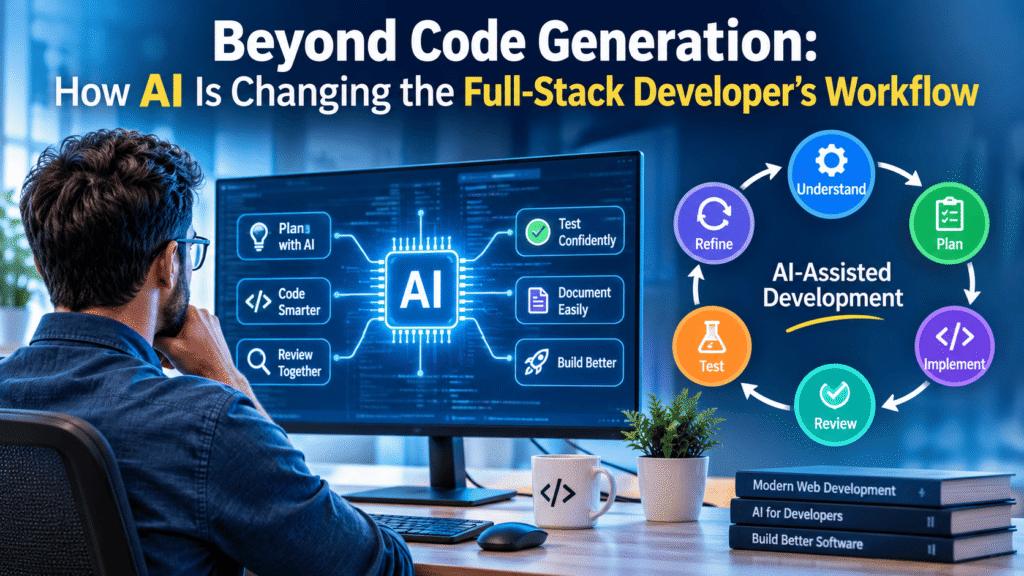
AI-assisted development is changing how full-stack developers approach software development. What started with code suggestions and snippet generation is expanding into requirement analysis, application planning, architecture discussions, coding, debugging, code review, testing, and documentation.
A developer can now describe a feature in natural language, ask AI to examine an existing codebase, explore implementation approaches, generate backend and frontend components, and receive suggestions for testing and improving the solution.
This changes more than the speed of writing code. It changes the entire development workflow.
However, generating code is only one part of building reliable software. A working application also needs the right architecture, secure data handling, reliable integrations, proper testing, and maintainable code.
For full-stack developers, the opportunity is to use AI throughout the development lifecycle rather than treating it as a tool that simply generates code.
The important distinction is this: AI can help produce a solution, but developers remain responsible for deciding whether that solution is correct.
1. AI in Requirement Analysis and Development Planning
Software development begins before the first line of code.
Developers need to understand what a client wants, identify the actual problem, define functionality, and determine how different components should work together.
Traditionally, this requires discussions, documentation, research, and technical planning.
AI can now assist with this early stage.
For example, imagine a client requests an appointment booking application.
Instead of immediately asking AI to generate the application, a developer can use it to break the requirement into smaller components:
- User registration and authentication.
- Appointment availability and scheduling.
- Frontend booking interface.
- Backend business logic.
- Database structure.
- Email notifications.
- Administrative dashboard.
- Payment integration, if required.
The developer can then ask AI to identify dependencies, possible technical challenges, missing requirements, and alternative implementation approaches.
AI can also help prepare user stories, acceptance criteria, development tasks, and initial technical documentation.
The developer’s responsibility: Validate the requirements, understand business rules, choose the appropriate architecture, and decide what should actually be implemented.
AI can help organize the thinking process, but it cannot independently determine every business requirement or technical constraint.
2. AI-Assisted Full-Stack Coding
Code generation remains one of the most visible uses of AI in development.
However, full-stack development involves more than generating an isolated function or component.
A feature may require changes across several layers:
- Frontend: HTML, CSS, JavaScript, and UI components.
- Backend: PHP, Laravel, Node.js, or other server-side technologies.
- Database: Tables, relationships, queries, and data validation.
- APIs: Requests, responses, authentication, and integrations.
- Application configuration: Environment variables, dependencies, and server settings.
AI can help developers generate initial implementations across these layers.
For example, when building a WordPress plugin, AI might assist with creating an admin settings page, registering hooks, processing form submissions, storing options, and displaying frontend functionality.
But generated code must fit the existing WordPress architecture and follow its security and compatibility requirements.
A function that works independently may not work correctly when placed inside an existing plugin or theme.
The same applies to Laravel applications, REST APIs, and other full-stack environments.
Developers should provide relevant project context, explain existing conventions, and request smaller, reviewable changes rather than asking AI to rebuild an entire application without understanding its structure.
3. AI for Code Understanding, Review, and Refactoring
As AI becomes capable of working with larger codebases, developers can use it to understand existing implementations rather than simply creating new ones.
This is particularly useful when working with legacy applications, unfamiliar frameworks, inherited projects, or code written by another developer.
AI can help:
- Explain unfamiliar functions and classes.
- Identify dependencies between files.
- Summarize existing application logic.
- Suggest code improvements.
- Identify duplicated functionality.
- Recommend refactoring approaches.
- Review changes for potential problems.
- Prepare pull request summaries.
For example, a developer maintaining an older PHP application might ask AI to explain how a particular form submission travels from the frontend to the database.
That explanation can provide a useful starting point for investigating the code.
However, AI-generated code reviews are not equivalent to complete technical verification.
AI may overlook business logic, misunderstand project-specific conventions, or fail to identify a problem that only appears under particular conditions.
Developers should review suggestions against the actual requirements and application behavior.
GitHub’s documentation describes how its Copilot tools support code understanding, planning, implementation, and pull request reviews within development workflows. GitHub Copilot documentation. GitHub Docs
4. AI-Assisted Debugging and Problem Solving
Debugging is another area where AI can change the developer’s daily workflow.
A developer working on a full-stack application may encounter:
- PHP fatal errors.
- JavaScript console errors.
- Database connection failures.
- API authentication problems.
- Incorrect HTTP responses.
- Plugin and theme conflicts.
- Server configuration issues.
- Unexpected frontend behavior.
AI can help interpret error messages, explain unfamiliar technical concepts, identify possible root causes, and suggest diagnostic steps.
But an error message alone rarely provides the complete picture.
A useful debugging workflow is:
- Reproduce the issue.
- Collect relevant error messages and logs.
- Identify the affected component.
- Provide AI with relevant code and environment details.
- Examine the suggested causes.
- Verify the actual root cause.
- Apply a controlled fix.
- Test the affected functionality and related features.
For example, if a WordPress plugin stops working after a PHP version update, AI may suggest possible compatibility issues.
The developer still needs to examine the PHP error log, plugin code, dependencies, and server environment to establish what actually failed.
I explored this approach in my article JavaScript Errors: How to Read the Browser Console, where the emphasis is on understanding errors rather than blindly applying AI-generated fixes.
5. AI in Testing and Quality Assurance
One of the most important changes in AI-assisted development is the ability to use AI beyond implementation.
Developers can ask AI to help prepare test cases, identify edge cases, generate unit-test drafts, and review existing test coverage.
Consider a registration form.
A basic test might confirm that a user can register with valid information.
But a more complete testing approach should also consider:
- Empty required fields.
- Invalid email addresses.
- Duplicate accounts.
- Incorrect passwords.
- Unexpected input formats.
- Unauthorized requests.
- Database failures.
- Repeated form submissions.
- Session and authentication behavior.
AI can help identify these scenarios and prepare initial tests.
It can also explain why a test is failing and suggest possible corrections.
However, generated tests are not automatically reliable. They may reproduce the same incorrect assumptions as the implementation itself.
Developers should check whether tests actually validate the intended business behavior.
Testing should also include integration, regression, browser compatibility, performance, and security checks where appropriate.
DORA’s guidance on test automation emphasizes continuous testing, fast feedback, and combining automated testing with manual activities such as exploratory and usability testing. Capabilities: Test automation
A useful principle: AI can help write tests, but passing tests alone do not prove that an application is production-ready.
6. AI for Technical Documentation and Knowledge Management
Documentation is frequently postponed during development because developers prioritize implementation.
AI can make documentation easier to maintain by helping create initial drafts from existing code and project information.
It can assist with:
- Function and class descriptions.
- API documentation.
- Installation instructions.
- Configuration guides.
- README files.
- Database documentation.
- Change summaries.
- Technical handover notes.
- Pull request descriptions.
For example, after developing a REST API endpoint, a developer can ask AI to prepare documentation describing the endpoint’s purpose, request parameters, authentication requirements, response structure, and possible error codes.
This is useful for both individual developers and development teams.
However, documentation must reflect the actual implementation.
If an endpoint changes but its documentation does not, the generated explanation can become misleading.
Developers should verify examples, parameter names, response formats, permissions, and version information before publishing documentation.
7. AI Is Changing the Full-Stack Developer’s Responsibilities
When AI assists with multiple development activities, the developer’s role naturally evolves.
The focus moves beyond writing code toward understanding requirements, coordinating components, evaluating implementations, and ensuring that the final application meets its intended purpose.
Consider the difference between two approaches.
Traditional development workflow
- Developer researches the problem.
- Developer plans the implementation.
- Developer writes the code.
- Developer reviews and debugs.
- Developer creates tests.
- Developer prepares documentation.
AI-assisted development workflow
- Developer defines the problem with AI assistance.
- AI helps explore implementation approaches.
- AI generates or modifies selected code.
- Developer reviews the architecture and implementation.
- AI helps identify bugs and prepare tests.
- Developer validates functionality, security, and performance.
- AI assists with documentation.
- Developer approves the final implementation.
The second workflow can reduce repetitive effort, but it also requires developers to manage AI output carefully.
Google’s DORA research identifies code generation, information seeking, code review, and testing among the prominent AI use cases in software development, with debugging, prototyping, documentation, and refactoring also emerging as important applications. DORA: Balancing AI tensions. dora.dev+1
The shift is not simply from manual coding to automated coding.
It is from a coding-focused workflow toward a broader engineering workflow.
8. What Developers Must Not Delegate Blindly to AI
AI can assist with many development activities, but some decisions require particular care.
Developers should not blindly delegate:
Architecture decisions: AI can suggest structures, but the developer must consider project requirements, scalability, maintainability, and existing infrastructure.
Security implementation: Authentication, authorization, payment handling, database access, and sensitive data processing require careful review.
Production deployment: Generated commands and configuration changes must be understood before execution.
Data protection: Passwords, API keys, private client data, and confidential business information should not be shared with AI tools unless the tool and its configuration are approved for that use.
Final quality approval: The developer must verify that the application works correctly and meets the required standards.
The NIST Secure Software Development Framework provides a useful foundation for integrating security into software development practices. Its guidance is relevant when evaluating how AI-assisted changes should fit into secure development processes. CSRC+1
AI-generated code should meet the same security and quality expectations as manually written code.
9. A Practical Workflow for AI-Assisted Full-Stack Development
Rather than treating AI as a separate coding tool, developers should integrate it into a structured development process.
The following workflow provides a practical approach:
01 — Understand
Define the problem, user requirements, business rules, and expected outcome.
02 — Plan
Explore architecture, dependencies, database requirements, APIs, and implementation steps.
03 — Implement
Use AI to assist with code generation, repetitive tasks, explanations, and selected modifications.
04 — Review
Examine logic, security, compatibility, dependencies, performance, and maintainability.
05 — Test
Validate functionality, edge cases, integrations, and regression behavior.
06 — Refine
Improve the implementation, correct problems, update documentation, and prepare for deployment.
This approach keeps AI involved throughout development without allowing generated output to bypass engineering discipline.
Conclusion: AI Is Changing the Workflow, Not Removing the Developer
The biggest change in AI-assisted development is not how quickly code can be generated. It is how developers can use AI across the entire software development lifecycle.
From understanding requirements and planning architecture to coding, reviewing, debugging, testing, and documentation, AI can contribute at multiple stages.
This creates an opportunity for developers to reduce repetitive work and spend more time on problem-solving, system design, technical decisions, and product quality.
However, there is an important distinction between generating an application and engineering a reliable application.
AI can suggest an implementation, but developers must understand its logic, verify its behavior, protect its data, and ensure it works in the real environment.
I believe the developers who adapt successfully will be those who combine programming fundamentals, practical experience, and AI-assisted workflows.
AI can generate code. Developers make it reliable.
The future of full-stack development is not about competing with AI at writing code. It is about learning how to use AI effectively while retaining the technical understanding required to build products that actually work.
About the Author
Mirza Hadi Baig is a Full-Stack Web Developer, Technical Problem Solver, Product Builder, and AI SEO & GEO Strategist with 17+ years of experience in the technology industry.
His professional journey includes IT education, healthcare information systems, and hands-on web development. His technical work covers WordPress and WooCommerce development, PHP, JavaScript, REST APIs, database integration, technical troubleshooting, website performance, and security.
Since 2021, he has focused on building websites, developing digital products, solving technical challenges, and exploring practical applications of emerging technologies. He is particularly interested in AI-assisted software development, technical SEO, AI search visibility, and Generative Engine Optimization (GEO).
Through his writing and product-building work, Hadi shares practical insights into how developers can combine technical knowledge with AI to build more useful, reliable, and maintainable digital solutions.