
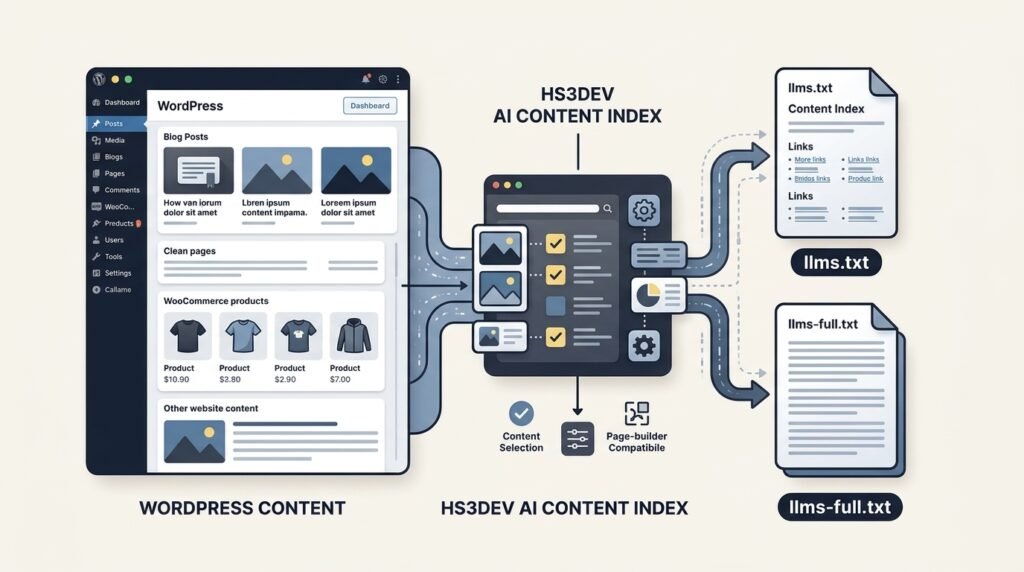
If you already understand what llms.txt is, the next question is practical: how do you generate and maintain llms.txt and `llms-full.txt on a WordPress website without manually editing files every time your content changes?
For a small website, creating a text file manually may be manageable. But WordPress websites often contain blog posts, pages, products, custom content types, and page-builder layouts. Maintaining an accurate AI-oriented content index across all of them can quickly become another technical SEO task.
A dedicated llms.txt WordPress plugin can automate much of this process.
In this guide, we will look at the difference between the two files, manual and plugin-based implementation, and how to configure HS3Dev AI Content Index for llms.txt to generate and manage them from WordPress.
The objective is straightforward: create a structured representation of your website’s content, control what gets included, and reduce the ongoing work of maintaining it.
1. Understanding llms.txt and llms-full.txt
Before generating the files, it is important to understand what each one represents.
Although they are commonly discussed together, llms.txt and llms-full.txt serve different purposes.
What is llms.txt?
llms.txt is a proposed Markdown-based convention for providing AI-oriented context about a website.
It typically contains:
- The website or project name.
- A short description of the website.
- Important resources and pages.
- Organized links to relevant content.
- Brief descriptions that explain what each resource contains.
Think of it as a structured content index rather than a complete copy of your website.
For example:
# Example Technology

> Resources about WordPress development, technical SEO,
> web applications, and AI-assisted development.

## WordPress Development

- [WordPress Services](https://example.com/services/):
  Development and technical support.
- [WordPress Guide](https://example.com/wordpress-guide/):
  Practical development resources.

## AI and Search

- [AI Search Guide](https://example.com/ai-search/):
  Information about AI search and GEO.
The purpose is to provide a concise starting point that identifies useful website resources.
The original proposal is available at llmstxt.org.
What is llms-full.txt?
llms-full.txt is a companion convention used by some websites and documentation platforms.
Instead of providing only a concise list of resources, it can contain a much more extensive representation of the website’s content in one text document.
The distinction is:
| File | Main purpose |
|---|---|
llms.txt | A concise index of important resources and links |
llms-full.txt | A fuller content representation containing more extensive information |
One important technical clarification: the current llms.txt proposal defines llms.txt, but does not formally define llms-full.txt as part of the specification. The latter is a related convention rather than a required companion file.
You can read the official llms.txt proposal for the format and its intended use.
2. Three Ways to Generate llms.txt in WordPress
WordPress users have several implementation options. The right approach depends on website size, publishing frequency, technical knowledge, and how much control is required.
Option 1: Create the file manually
You can create a plain-text file named llms.txt using any text editor.
Write the content in Markdown, add your important website resources, and upload the file to your WordPress installation’s root directory.
For example:
public_html/
    wp-admin/
    wp-content/
    wp-includes/
    wp-config.php
    llms.txt
The file should then be accessible at:
https://yourdomain.com/llms.txt
You can create a separate llms-full.txt if you want to publish a fuller content representation.
The limitation: every important content change may require manual maintenance. New posts, updated URLs, deleted pages, and product changes can make the file outdated.
This approach is reasonable for a small website with infrequent updates, but it becomes inconvenient for a growing content library.
Option 2: Use your existing SEO plugin
Some SEO plugins and related WordPress tools provide features for generating or managing llms.txt.
If your current SEO plugin already provides the functionality you need, check its settings before installing another plugin.
However, compare the available controls carefully.
You may need more than a basic file containing a list of URLs. Consider whether the solution supports:
- Both
llms.txtandllms-full.txt. - Post-type selection.
- Individual content exclusions.
- SEO metadata descriptions.
- Page-builder content extraction.
- Custom URL management.
- Automatic regeneration.
- Diagnostics and conflict detection.
A simple generator may be sufficient for a small website. A larger website may need more granular content management.
Option 3: Use a dedicated llms.txt WordPress plugin
A dedicated plugin can handle generation and ongoing maintenance from the WordPress dashboard.
This is particularly useful when your website has multiple content types, products, page-builder layouts, and frequently updated pages.
For this workflow, I developed HS3Dev AI Content Index for llms.txt, a free and open-source WordPress plugin designed to generate and manage both files dynamically.
You can explore the plugin here:
HS3Dev AI Content Index for llms.txt
Or download it directly from the official WordPress Plugin Directory.
The following sections explain how to use it.
3. How to Install HS3Dev AI Content Index for llms.txt
The installation process follows the standard WordPress plugin workflow.
Step 1: Open the WordPress plugin directory
Log in to your WordPress dashboard.
Navigate to:
Plugins → Add New Plugin
Search for:
HS3Dev AI Content Index for llms.txt
Check the plugin name and developer before installing.
Alternatively, download it from the official WordPress Plugin Directory.
Step 2: Install and activate the plugin
Click Install Now, wait for the installation to finish, and then select Activate.
The plugin will become available in your WordPress administration area.
Step 3: Open the plugin settings
Navigate to the HS3Dev AI Content Index settings.
The plugin’s configuration allows you to manage the content types and generation options used for your AI-oriented content index.
Step 4: Save your Permalink settings once
After activation, visit:
Settings → Permalinks
Save the existing permalink settings once.
You do not need to change your permalink structure just for this purpose. Saving the settings allows WordPress to refresh its rewrite rules so the plugin’s generated endpoints can be served correctly.
The plugin’s installation instructions also specify this step.
4. Select Which WordPress Content Should Be Included
This is one of the most important parts of creating a useful WordPress AI content index.
A website may contain hundreds or thousands of URLs, but not every URL deserves equal representation.
For example, consider a WooCommerce website containing:
- Blog posts.
- Standard pages.
- Products.
- Product categories.
- Custom post types.
- Documentation.
- Landing pages.
You may want to include selected content types while excluding others.
Choose the relevant post types
Start by identifying the content that represents your website’s main knowledge, services, products, or expertise.
For example:
| Content type | Possible decision |
|---|---|
| Important pages | Include |
| Educational blog posts | Include |
| Product pages | Include selected products |
| Outdated landing pages | Exclude |
| Low-value content | Review before including |
| Internal or temporary pages | Exclude where appropriate |
These are editorial decisions, not universal rules. A product-focused website may need product pages, while a documentation website may prioritize documentation and technical articles.
The HS3Dev plugin allows administrators to select content by post type.
Exclude individual posts, pages, or products
Selecting an entire post type does not mean every item within it must be included.
Consider a website with 300 blog posts. Some may be outdated, duplicated, or no longer relevant.
You may want most posts included but exclude a few specific articles.
The same applies to WooCommerce products. Some products may be discontinued, temporary, or unsuitable for representation in the index.
HS3Dev provides controls for excluding individual posts, pages, and products, as well as managing specific URLs.
The goal is not to include the maximum number of URLs. It is to represent the website accurately.
5. Use SEO Metadata for Better Content Descriptions
A content index becomes more useful when its links have meaningful descriptions.
Compare these two examples:
- [WordPress Security](https://example.com/security/)And:
- [WordPress Security](https://example.com/security/):
  Practical guidance on securing WordPress websites,
  protecting login access, and managing common risks.
The second entry provides additional context.
But manually writing descriptions for every URL can become time-consuming.
This is where existing WordPress SEO metadata can help.
Integrating existing SEO descriptions
Many WordPress websites already use SEO plugins to manage page titles and meta descriptions.
HS3Dev supports metadata integration with:
- Yoast SEO.
- Rank Math.
- All in One SEO (AIOSEO).
- SEOPress.
Depending on the available content and plugin settings, descriptions can use existing SEO meta descriptions, manual excerpts, or generated summaries.
There is also an option to disable descriptions when you prefer a simpler output containing only titles and links.
This creates a practical connection between traditional SEO and AI-oriented content management.
Your existing metadata can provide useful descriptive information without requiring you to maintain another set of summaries manually.
However, remember that a meta description should accurately describe the page. If the original description is outdated or misleading, including it in an AI content index will not improve its quality.
6. Handling Elementor and Other Page Builders
Page builders introduce another challenge.
A WordPress page may look perfectly readable to a visitor while its underlying stored content contains shortcodes, builder-specific structures, or layout data.
A basic content extractor may retrieve those structures instead of the actual readable page content.
For example, an extraction process might encounter builder-related content rather than a clean article or page description.
That can make the generated representation less useful.
Page-builder-aware content extraction
HS3Dev includes page-builder-compatible content extraction intended to produce a cleaner representation of supported layouts.
The plugin also provides a compatibility mode for situations where additional handling is required.
This is particularly relevant for websites using builders such as:
- Elementor.
- WPBakery.
- UX Builder.
Compatibility can depend on the builder, its configuration, and the way the website renders its content. That is why checking the generated output is important even when a compatibility feature is available.
A useful test: open a page built with your page builder and compare its visible content with the content represented in the generated files. Look for raw shortcodes, missing text, duplicated sections, or incomplete descriptions.
The objective is to represent the actual content—not the underlying layout implementation.
7. Generate and Check Your llms.txt and llms-full.txt Files
Once you have configured the content selection and other available options, check the generated output.
HS3Dev serves the files dynamically through WordPress, so permanent physical text files are not required.
Open the following URLs in your browser, replacing the domain with your own:
Standard content index
https://yourdomain.com/llms.txt
Full content representation
https://yourdomain.com/llms-full.txt
Check both endpoints.
What should you look for?
For llms.txt, review:
- Is the website name correct?
- Is the summary meaningful?
- Are the expected pages listed?
- Are the links correct and accessible?
- Are descriptions relevant?
- Are excluded pages missing?
For llms-full.txt, review:
- Is the expected content present?
- Are important pages represented?
- Is the content readable?
- Are there unexpected shortcodes or layout structures?
- Are excluded resources handled as intended?
Do not assume that a successful browser response means the content is automatically useful to every AI system. The purpose of this check is to confirm that your website is serving the intended output correctly.
8. Troubleshooting Common llms.txt Problems
Even when a plugin handles generation automatically, WordPress websites can have configuration or delivery issues.
Here are some common situations to investigate.
Problem 1: The llms.txt URL returns a 404 error
Possible cause: WordPress rewrite rules may not have been refreshed after plugin activation.
What to check:
- Confirm that the plugin is active.
- Visit Settings → Permalinks.
- Save the existing permalink settings once.
- Recheck
/llms.txtand/llms-full.txt.
Also check whether another plugin or server rule is interfering with the endpoints.
Problem 2: The generated content does not update
Possible cause: a cached response, regeneration issue, or scheduled task problem.
What to check:
- Clear the relevant WordPress or server cache.
- Check whether the plugin’s regeneration process has completed.
- Review scheduled regeneration settings.
- Check whether your hosting environment is running WordPress scheduled tasks reliably.
HS3Dev supports automatic regeneration through WP-Cron, including on-save, daily, and weekly options.
Problem 3: Another llms.txt file appears instead of the generated output
Possible cause: an existing physical llms.txt file or another generator may be taking precedence.
What to check:
- Look for an existing physical file in the website root.
- Check whether another SEO or content plugin is generating the same endpoint.
- Review server rewrite rules.
- Use the plugin’s conflict detection and diagnostics tools.
Avoid deleting or replacing files without first checking which component created them and whether another website feature depends on them.
Problem 4: Raw shortcodes appear in the output
Possible cause: the content extractor is reading stored page-builder data rather than the rendered page.
What to check:
- Confirm that the page-builder content is supported.
- Review the plugin’s compatibility mode.
- Recheck the generated output.
- Test with a representative page before applying the configuration across the entire website.
Problem 5: Some content is missing
Possible cause: content-type selection, individual exclusions, custom URL configuration, or multilingual settings.
What to check:
- Confirm that the relevant post type is selected.
- Check individual exclusions.
- Review custom URL entries.
- Check the language configuration if using WPML or Polylang.
- Allow batch generation to complete before evaluating the final output.
For large websites, batch processing helps manage generation without requiring the entire content collection to be processed in one operation.
Problem 6: The generated file looks correct, but crawler activity is unclear
A generated file does not prove that an AI crawler has requested it.
HS3Dev includes request analytics to help administrators review requests to both endpoints and identify supported crawler user agents, such as GPTBot, ClaudeBot, and PerplexityBot.
Remember that crawler analytics show request activity—not whether an AI system used the information in an answer or cited a particular page.
9. Maintaining Your WordPress AI Content Index
Generating the files is only the first step.
A website changes over time. New articles are published, products are updated, old pages are removed, and important URLs may change.
An outdated content index can misrepresent the current website.
For this reason, ongoing maintenance matters.
HS3Dev supports automatic regeneration through WP-Cron, with options including on-save, daily, and weekly regeneration.
It also includes features designed to help with larger and multilingual WordPress websites:
- Batch processing for larger content collections.
- WPML and Polylang support.
- Multisite compatibility.
- AI crawler request analytics.
- Conflict detection and diagnostics.
These features help make content-index management part of the WordPress workflow rather than a separate manual file-maintenance task.
For more details, see the plugin documentation and feature overview.
10. Does Generating llms.txt Improve AI Search Visibility?
This question deserves a clear answer.
Generating llms.txt and llms-full.txt does not guarantee better Google rankings, AI search visibility, ChatGPT citations, or inclusion in AI-generated answers.
The format is a proposed convention, and individual AI systems may handle it differently.
A website should not treat the presence of these files as a substitute for established SEO practices.
Continue working on:
- Helpful and accurate content.
- Clear page structure and headings.
- Strong internal linking.
- Appropriate structured data.
- Crawlability and technical accessibility.
- Relevant metadata.
- Reliable website performance.
- Content accuracy and freshness.
For additional context, see the Google Search Central guidance on AI features and your website.
You can also explore my related guide, LLMs.txt Explained — What It Is, What It Actually Does, and How to Add It to WordPress, and the article Beyond Sitemap: What Role Could llms.txt Play in AI Search?.
The practical takeaway is simple:
Create a useful content index, keep it accurate, and treat it as one supporting part of a broader technical SEO and GEO strategy.
Conclusion: Automate the Work, Keep Control of the Content
Creating llms.txt manually is possible, but maintaining it across a growing WordPress website can become inconvenient.
A dedicated llms.txt and llms-full.txt generator can reduce repetitive work by automating content selection, descriptions, file generation, and ongoing updates.
The important part is retaining control over what gets included.
That is the purpose of HS3Dev AI Content Index for llms.txt: helping WordPress website owners generate and manage AI-oriented content indexes with flexible content controls, SEO metadata integration, page-builder compatibility, batch processing, analytics, and diagnostics.
It is free and open source, and available through the official WordPress Plugin Directory.
AI search is evolving, but good website management still begins with useful content, accurate information, and sound technical implementation.
Automate the process. Review the output. Keep your content meaningful.
About the Author
Mirza Hadi Baig is a Full-Stack Web Developer, Technical Problem Solver, Product Builder, and AI SEO & GEO Strategist with 17+ years of experience in the technology industry. His professional background spans IT education, healthcare information systems, WordPress and WooCommerce development, technical troubleshooting, website performance, security, and digital product building.
He develops practical WordPress solutions and web-based tools, including HS3Dev AI Content Index for llms.txt, a free and open-source plugin for managing AI-oriented website content indexes, and Schema Genie Pro, a WordPress solution for structured data management. His writing explores WordPress development, technical SEO, structured data, AI-assisted development, AI search, and Generative Engine Optimization (GEO), with an emphasis on turning emerging technologies into practical workflows for website owners and developers.