
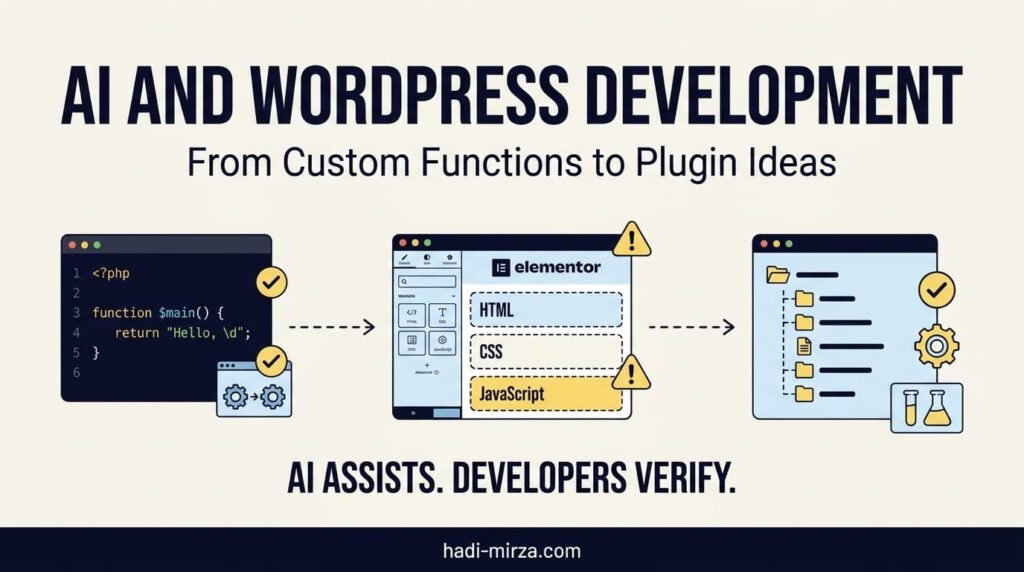
Artificial intelligence is changing how developers approach WordPress development. Tasks that once required hours of searching documentation, debugging PHP, writing JavaScript, or planning plugin architecture can now begin with a well-structured prompt.
For WordPress developers, AI can help create custom functions, troubleshoot Elementor code, explore plugin ideas, and accelerate repetitive development tasks. But generating code is only one part of building a reliable website.
The real skill is knowing what to build, where the code belongs, how it interacts with WordPress, and how to test it safely.
As AI-assisted development becomes more common, developers need to move beyond copying code into a website. They need to understand the code, identify conflicts, choose the right implementation method, and turn useful ideas into maintainable solutions.
1. Using AI to Build Custom WordPress Functions
WordPress developers frequently need small custom functions to extend existing website functionality.
Examples include:
- Adding custom functionality to a WordPress theme.
- Modifying how content or metadata is displayed.
- Creating shortcodes for reusable content.
- Connecting WordPress with an external API.
- Automating repetitive administrative tasks.
- Adding validation or conditional logic to forms.
- Extending WooCommerce behaviour.
AI can help generate an initial implementation when the developer explains the requirement clearly.
For example, instead of asking:
“Write a WordPress function.”
A better prompt would be:
“Create a WordPress function that registers a shortcode to display a selected post’s title and permalink. Use WordPress coding conventions, escape the output correctly, explain where the code should be placed, and identify any security considerations.”
The second prompt provides a specific requirement and asks for implementation details that matter in a real project.
However, generated code still needs review. Check whether the function uses appropriate WordPress hooks, handles unexpected inputs, avoids naming conflicts, and follows security practices such as sanitizing input and escaping output where appropriate.
The official WordPress Plugin Developer Handbook explains how plugins, hooks, and security practices fit into WordPress development.
Where should custom code go?
The right location depends on the purpose of the code.
- A child theme: Suitable for functionality closely tied to a particular theme.
- A custom plugin: Better for reusable functionality that should continue working when the theme changes.
- An existing plugin or integration: Appropriate when a maintained solution already provides the required feature.
- Elementor custom CSS or JavaScript: Useful for targeted presentation or browser-side interactions when the implementation fits Elementor’s capabilities.
Avoid editing WordPress core files. For functionality that should survive a theme change, a plugin is often the more appropriate choice.
Related reading: AI-Assisted Development and AI-Generated Websites: From Design to Production-Ready Websites.
2. Elementor Development: Why Copying and Pasting AI Code Can Create Problems
Elementor makes it possible to build sophisticated pages with visual controls, HTML widgets, custom CSS, and JavaScript. AI can help developers create interactive components, pricing sections, calculators, tabs, accordions, and custom layouts.
But there is an important risk: code that works in one widget may cause problems when copied into several other widgets.
Imagine a developer asks AI to create a pricing calculator. The generated code includes:
- HTML markup for the calculator.
- CSS rules for its layout and appearance.
- JavaScript for calculations and button interactions.
The developer pastes the entire snippet into an Elementor HTML widget. It works.
Later, the developer creates another calculator on the same page and asks AI to generate another complete snippet. The second snippet contains similar CSS, another JavaScript function, and overlapping element selectors.
Both widgets might work independently, but together they can create unexpected behaviour.
Common problems with duplicated Elementor code
1. Duplicate CSS rules
If every widget contains its own styling, similar rules may be repeated unnecessarily. Generic selectors such as .button, .container, or h2 can also affect unrelated elements elsewhere on the page.
2. Conflicting styles
Two snippets might assign different colours, widths, spacing, or display properties to the same elements. CSS specificity and loading order determine which rules win, making the result difficult to predict.
3. Duplicate JavaScript execution
If multiple widgets contain scripts that initialise the same component, event handlers may be attached more than once. A button click could trigger duplicate actions, calculations could run repeatedly, or state could become inconsistent.
4. Global variable and function conflicts
Repeated declarations of globally named functions or variables can conflict, particularly when snippets are copied without understanding their scope and execution behaviour.
5. Unnecessary code and maintenance work
Repeated styles and scripts make future changes harder. Updating one component may require editing several widgets, increasing the chance of inconsistent fixes.
Elementor’s documentation on its HTML widget specifically warns that one inserted snippet can conflict with another. Its custom CSS documentation also explains that styling can be applied at element, page, or site level.
A better approach to AI-generated Elementor code
Before pasting a new snippet into a widget, ask whether the code duplicates something that already exists on the page or website.
Use this workflow:
- Inspect existing code. Check the page, other widgets, global CSS, and custom code settings for existing styles or scripts.
- Use scoped selectors. Give the component a unique wrapper class, such as
.mh-pricing-calculator, and target its children through that wrapper rather than styling every.buttonon the page. - Avoid repeated initialisation. Ensure the script handles the component instances correctly and does not attach duplicate event listeners when initialised more than once.
- Separate reusable assets. If multiple components share the same styles or behaviour, maintain common CSS and JavaScript in an appropriate central location instead of copying everything into each widget.
- Test the whole page. Verify the new component alongside existing widgets, not just in isolation.
For a simple, self-contained component, an HTML widget can be reasonable. For functionality reused across multiple pages or projects, a more structured implementation is often easier to maintain.
Elementor also provides documentation for adding custom code. When developing custom Elementor widgets, developers can use registered script and style dependencies rather than embedding duplicate assets in every widget. See the Elementor widget dependencies guide.
The objective is not to avoid Elementor or AI-generated snippets. It is to use them in a way that keeps the website predictable, maintainable, and easier to debug.
3. Turning WordPress Problems into Plugin Ideas
One of the most valuable uses of AI is exploring whether a recurring development problem could become a reusable tool.
A developer might repeatedly solve the same problem across different websites. Instead of continuing to write one-off functions, they can investigate whether the functionality deserves a dedicated plugin.
Potential plugin ideas include:
- A tool that generates and validates structured data.
- A dashboard for reviewing technical SEO issues.
- A utility that creates secure random passwords.
- A content analysis tool for traditional search and AI search visibility.
- A generator for reusable buttons, snippets, or interface components.
- A site maintenance tool that checks selected configuration settings.
AI can help with the early stages of this process by brainstorming features, organising requirements, comparing implementation approaches, proposing a plugin structure, and drafting initial code.
However, a useful plugin begins with a real problem—not simply with the ability to generate code.
Before building one, ask:
- Does this solve a recurring problem?
- Who would use it?
- Does WordPress already offer this functionality?
- Is an existing plugin a better solution?
- What permissions and security controls are required?
- What should happen when inputs are missing or invalid?
- Can the feature work without unnecessary dependencies?
- How will it be tested and maintained?
The WordPress Plugin Developer Handbook explains that plugins can range from simple single-file tools to more complex applications. The right architecture depends on the functionality being developed.
From a small function to a maintainable plugin
Consider a developer who repeatedly adds structured data to WordPress websites.
The first version might be a small custom function. As requirements grow, the developer may need an administrative interface, configurable schema types, reusable fields, JSON-LD output, previews, validation support, and a way to manage multiple schema entries.
At that point, a plugin may be more suitable than a growing collection of unrelated snippets.
This is an example of how a practical development task can evolve into a reusable product.
For example, my own Schema Genie Pro project focuses on managing schema markup in WordPress. It illustrates how a recurring technical need can become a dedicated tool rather than remaining a collection of manually maintained code snippets.
The important lesson is not that every custom function should become a plugin. It is that developers should recognise when a small solution has grown into a reusable feature that needs its own interface, structure, and maintenance process.
4. How AI Can Help Plan and Build a WordPress Plugin
Once a plugin idea is clear, AI can assist throughout the development process.
Step 1: Define the problem
Describe the problem, target users, expected outcome, and limitations.
For example:
“I want to build a WordPress plugin that helps website owners manage a specific type of structured data. Identify the core features, user workflow, technical requirements, and potential risks before proposing code.”
This encourages planning before implementation.
Step 2: Design the architecture
Ask AI to propose a file structure and explain the responsibilities of each file.
A plugin might eventually include:
- A main plugin file.
- Separate classes or modules for core functionality.
- Admin interface files.
- Front-end CSS and JavaScript assets, if required.
- Validation and output-handling logic.
- Documentation and tests.
The architecture should match the plugin’s actual complexity. A small utility does not need an elaborate framework simply because AI can generate one.
Step 3: Build incrementally
Develop one feature at a time. Start with the basic plugin structure, then add settings, functionality, validation, and user-interface improvements.
Review each stage before continuing.
This makes errors easier to isolate than asking AI to generate an entire plugin in one response and installing the result without inspection.
Step 4: Review security and compatibility
Generated code must be checked for appropriate capability checks, input sanitization, output escaping, nonce verification where relevant, and safe database or API interactions.
Also consider supported WordPress and PHP versions, compatibility with the active theme and plugins, and whether scripts or styles are loaded only where necessary.
WordPress provides official guidance on plugin security and loading JavaScript and CSS.
Step 5: Test before deployment
Test the plugin on a staging site or local development environment before using it on a production website.
Check expected behaviour, invalid inputs, edge cases, browser console errors, PHP warnings, conflicts with other plugins, and behaviour after updates.
AI can help create test scenarios and explain error messages, but it cannot replace testing the actual environment where the plugin will run.
Related reading: From Coding Questions to Clear Answers: Using AI to Learn Programming and AI for Debugging: Finding Errors, Understanding Causes, and Fixing Code.
5. The Developer’s Role: From Code Generation to Technical Problem-Solving
AI can reduce the time needed to explore solutions, generate boilerplate, explain unfamiliar APIs, and prototype features. But producing a working-looking snippet is not the same as delivering reliable software.
A developer still needs to decide:
- Whether the proposed solution is appropriate for WordPress.
- Whether it belongs in a theme, plugin, Elementor widget, or shared asset.
- Whether it introduces security or performance risks.
- Whether it duplicates existing functionality.
- Whether it works with the site’s current plugins and theme.
- Whether another developer can understand and maintain it later.
This is especially important when clients bring AI-generated designs or code and expect developers to make them production-ready.
The developer’s value increasingly lies in architecture, integration, debugging, security, performance, testing, and technical judgment—not merely in producing lines of code.
AI can suggest an implementation, but someone must evaluate its consequences.
My approach to development remains practical:
DIAGNOSE → PLAN → BUILD → TEST → OPTIMIZE
This process applies whether the task is a short PHP function, a custom Elementor component, a WordPress integration, or a complete plugin.
Frequently Asked Questions
Can AI write custom functions for WordPress?
Yes. AI can draft PHP functions, shortcodes, hooks, and integrations. Review the code for correctness, security, compatibility, and appropriate placement before using it on a live website.
Is it safe to copy AI-generated code into Elementor?
Not automatically. Generated code may contain broad CSS selectors, duplicate styles, conflicting JavaScript, or unsafe behaviour. Review and test each snippet alongside the existing page code.
Why can duplicated CSS cause problems in Elementor?
Duplicated or conflicting CSS rules can override one another or unintentionally affect other elements. Scoped selectors and shared styles help make components easier to maintain.
Can duplicate JavaScript in Elementor widgets cause errors?
Yes. Repeated scripts may attach event listeners more than once, repeat actions, or create conflicts involving shared variables and function names. Use a deliberate initialisation strategy for reusable components.
When should a WordPress custom function become a plugin?
Consider a plugin when functionality needs reuse across themes or websites, includes multiple features or settings, requires an admin interface, or needs independent versioning and maintenance.
Can AI build a complete WordPress plugin?
AI can help plan architecture and generate code, but a complete plugin still requires developer review, security checks, compatibility testing, and ongoing maintenance.
How can developers use AI without losing their programming skills?
Ask AI to explain its reasoning, compare approaches, and suggest tests. Read the generated code, verify it against official documentation, and practise debugging and modifying the solution yourself.
Final Thoughts
AI is creating new opportunities in WordPress development, from small custom functions to reusable Elementor components and complete plugin ideas.
The opportunity is not to paste more code into websites as quickly as possible. It is to use AI to investigate problems, explore better solutions, build reusable functionality, and improve the development process.
A few lines of generated code can save time. A well-designed, secure, tested, and maintainable solution delivers lasting value.
AI generates possibilities. Developers turn them into reliable WordPress solutions.
About the Author
Mirza Hadi is a Full-Stack Web Developer, Technical Problem Solver, Product Builder, and AI SEO & GEO Strategist with 17+ years of experience across the technology industry. His experience spans IT education, healthcare IT and administrative systems, WordPress and WooCommerce development, technical troubleshooting, and independent digital product building.
He explores practical ways to use AI in software development while maintaining a focus on code quality, security, performance, and maintainability. His projects include Schema Genie Pro, HS3Dev AI Content Index, and GEOScope Content Analyzer.
Explore more at hadi-mirza.com.