AI-assisted development is changing how developers write, understand, debug, and maintain software. AI coding assistants can generate functions, explain unfamiliar code, suggest fixes, write tests, and help developers explore new technologies. These capabilities can reduce repetitive work and make software development more accessible.
However, generating code quickly is not the same as building reliable software.
A useful development workflow still requires clear requirements, sound technical decisions, code review, testing, security checks, and ongoing maintenance. The real value of AI-assisted development comes from combining AI’s speed with a developer’s understanding and judgment.
For developers, the goal should not simply be to write more code in less time. It should be to solve problems more effectively, make better engineering decisions, and deliver software that works reliably in real-world environments.
1. AI-Assisted Development Is More Than Code Generation
Many developers initially use AI tools to generate code snippets, build interface components, or create complete functions. These are useful starting points, but they represent only one part of software development.
AI can also support several other activities:
- Understanding unfamiliar code: Ask for explanations of functions, classes, dependencies, and execution flow.
- Debugging: Use error messages, logs, and relevant code to investigate possible causes.
- Planning: Break a feature into smaller tasks and identify dependencies before implementation.
- Testing: Generate test cases for normal behavior, invalid input, and edge cases.
- Documentation: Create initial documentation for functions, APIs, configuration, and project structure.
- Refactoring: Explore ways to improve readability, modularity, and maintainability.
The important distinction is that AI can assist with these activities, but its suggestions still need to be evaluated.
In The New Developer Role: From Code Writer to Technical Problem Solver, I discuss how the developer’s role increasingly involves evaluating solutions, diagnosing problems, integrating systems, and making sure software is ready for practical use.
AI can help produce an implementation. Developers must determine whether that implementation is appropriate.
2. Start With the Problem Before Asking AI for Code
One common mistake in AI-assisted development is asking for a complete solution before defining the actual problem.
For example, a developer might ask:
“Write a WordPress function to display custom content.”
The request leaves several important questions unanswered. Where should the content appear? Who can edit it? Does it depend on a custom post type? Should it use a shortcode, a block, or a template? What permissions and data-handling rules apply?
Without sufficient context, an AI assistant may produce code that works in a demonstration but does not fit the existing website.
A better approach is to define the requirement first.
Before requesting code, clarify:
- The problem the feature must solve.
- The platform, programming language, and relevant versions.
- The existing code or architecture the solution must work with.
- The expected inputs, outputs, and user interactions.
- Security, performance, compatibility, and maintenance requirements.
Then ask AI to suggest an implementation plan before generating the code.
This encourages a more deliberate process. You can review the proposed approach, identify missing requirements, and correct assumptions before investing time in implementation.
A useful principle: define the problem, review the approach, and then generate the code.
3. Use AI to Understand Code, Not Just Produce It
AI-assisted development becomes more valuable when developers use it to improve their understanding rather than bypass learning.
Suppose an AI tool generates a PHP function, JavaScript event handler, or API request. Instead of copying it immediately, ask the assistant to explain how it works and what assumptions it makes.
Useful follow-up questions include:
- Explain this code step by step.
- What does each function or condition do?
- What inputs does this code expect?
- Which dependencies or software versions does it require?
- What could cause this implementation to fail?
- Are there simpler or safer alternatives?
- How can I test whether the result is correct?
You should then verify important details against documentation and practical tests.
This approach is particularly useful when learning unfamiliar frameworks or expanding existing technical skills. It turns an AI-generated answer into an opportunity to understand the underlying concepts.
My article Should Developers Learn Coding Fundamentals Before AI Coding Tools? explores why programming fundamentals remain valuable even when AI can generate working code.
Developers do not need to memorize every line of every library. They do need enough understanding to evaluate the code they implement, recognize its limitations, and investigate problems when they arise.
4. Make Debugging More Systematic With AI
Debugging is one of the practical areas where AI can assist developers. It can explain error messages, suggest possible causes, compare alternative fixes, and help identify where further investigation is needed.
However, an error message does not always reveal the root cause. The visible symptom may come from a different component, an unexpected input, a dependency conflict, or an environment-specific issue.
Consider a WordPress website that stops working after a plugin update. An AI assistant might suggest changing a PHP function, but the underlying cause could be a PHP version mismatch, a conflict with another plugin, or a missing dependency.
Applying the first suggested fix without investigating the evidence may introduce additional problems.
A more reliable debugging workflow is:
- Reproduce the issue. Determine when and under what conditions it occurs.
- Collect evidence. Examine error messages, browser-console output, server logs, and relevant code.
- Investigate possible causes. Use AI to explore hypotheses and identify what to check next.
- Apply a targeted fix. Address the likely root cause rather than hiding the symptom.
- Test the result. Confirm that the original problem is resolved and related functionality still works.
For a practical introduction to browser-based debugging, see JavaScript Errors Explained: How to Read the Browser Console.
The same approach applies to PHP errors, API failures, database problems, and front-end behavior.
AI can help developers investigate faster, but reliable debugging still depends on evidence, technical understanding, and verification.
5. Use AI to Improve Testing, Security, and Code Quality
Code that appears correct is not necessarily ready for production.
An AI-generated function may work with expected input but fail when data is missing, a user submits an unexpected value, or an external service returns an error. It may also introduce unnecessary dependencies, inefficient operations, or security weaknesses.
Before deploying AI-assisted code, review several areas.
Functional correctness: Does the code meet the original requirement? Test normal scenarios, invalid input, missing values, and relevant edge cases.
Security: Check input validation, output escaping, authorization, authentication, and sensitive data handling. In WordPress, understand the different purposes of sanitization, escaping, nonces, and capability checks.
Performance: Look for unnecessary database queries, repeated network requests, oversized assets, and inefficient processing.
Compatibility: Confirm that the code works with the intended language versions, framework, plugins, APIs, and deployment environment.
Maintainability: Ensure the implementation is understandable, appropriately structured, and practical to update later.
AI can help generate test ideas or identify potential risks, but generated tests are not proof that a feature is secure or correct. Important applications may require independent code review and dedicated security testing.
The level of review should reflect the risk. A small visual adjustment and a feature that handles authentication, payments, or sensitive data do not require the same degree of scrutiny.
6. Choose the Right Level of AI Assistance
Not every development task needs the same amount of AI involvement.
For repetitive tasks, such as generating boilerplate, formatting data, or drafting documentation, AI may save considerable time.
For complex architectural decisions, database migrations, security-sensitive features, and production incidents, developers should apply more careful analysis and review.
A practical approach is to match AI assistance to the task.
- Routine tasks: Use AI to generate a first draft, then check the result.
- Unfamiliar technologies: Ask for explanations, examples, dependencies, and documentation references.
- Complex features: Use AI to compare approaches and identify trade-offs before implementation.
- Debugging: Provide relevant error messages and code, investigate suggested causes, and test each meaningful change.
- High-risk changes: Require stronger validation, controlled testing, rollback planning, and qualified review when needed.
This is not about using AI as much as possible. It is about using it where it provides value without weakening the development process.
My article AI-Generated Website Designs Are Easy. Production-Ready Websites Are Not. explores a related challenge: producing a promising first version is different from delivering a reliable, maintainable product.
7. Build a Repeatable AI-Assisted Development Workflow
A consistent workflow makes AI assistance easier to evaluate and improves the chances of catching mistakes before deployment.
Use this sequence as a starting point:
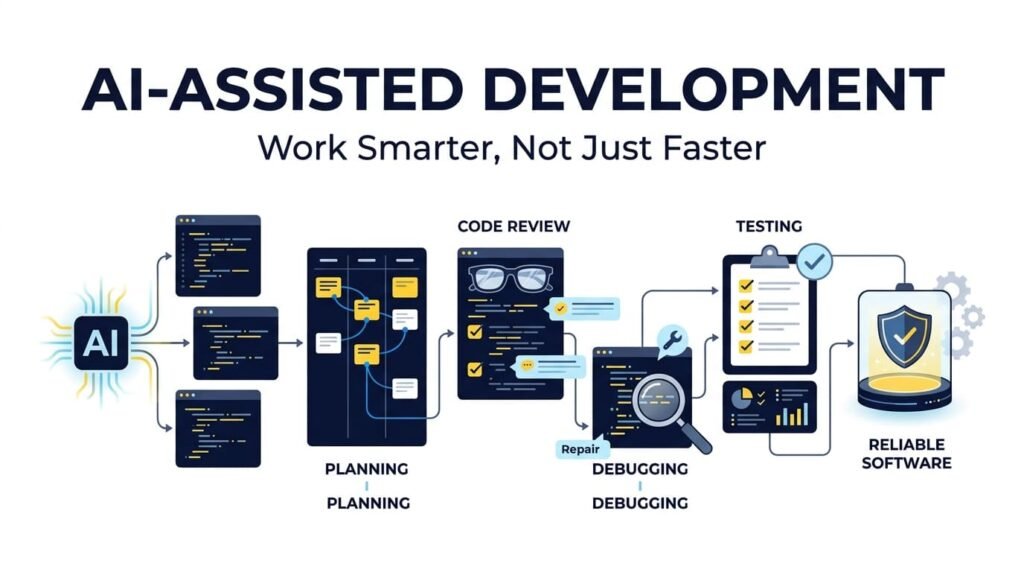
Understand → Plan → Implement → Review → Test → Refine
Understand: Define the requirement and investigate the existing system.
Plan: Identify the implementation approach, dependencies, risks, and expected behavior.
Implement: Use AI to generate or refine selected parts of the solution.
Review: Read the code, check assumptions, verify dependencies, and evaluate whether it fits the project.
Test: Validate expected behavior, edge cases, compatibility, performance, and security as appropriate.
Refine: Correct problems, improve the implementation, and document important decisions.
Keep useful project context available to the AI assistant, but avoid sharing passwords, API keys, private customer information, or other sensitive data without an approved and secure process.
For substantial changes, use version control so you can inspect differences, track decisions, and revert changes when necessary.
The workflow should remain flexible. AI may help at several stages, but it should not eliminate the stages themselves.
8. Build Practical Tools With the Same Engineering Mindset
AI-assisted development is not limited to writing code for client projects. It can also help developers explore ideas, build utilities, and turn recurring problems into practical products.
My own product-building work includes WordPress plugins and browser-based tools such as Schema Genie Pro, which helps users apply structured data in WordPress, and HS3Dev AI Content Index for llms.txt, a WordPress solution for generating AI-oriented content index files.
Other projects include GEOScope Content Analyzer, ButtonCraft Generator, and SecurePass Generator.
These products address different practical needs, from content analysis and interface development to password generation and website structured data. They also illustrate an important point about software development: producing an initial implementation is only part of the work. A useful tool must have a clear purpose, appropriate behavior, a usable interface, and enough testing to support its intended use.
AI can assist with brainstorming, code drafts, documentation, and debugging during product development. The developer must still decide what to build, evaluate the implementation, test real use cases, and improve the product over time.
You can explore these projects and other work through my portfolio.
Frequently Asked Questions
What is AI-assisted development?
AI-assisted development is the use of artificial intelligence tools to support software development tasks such as code generation, debugging, explanation, testing, documentation, and refactoring. Developers remain responsible for reviewing and validating the results.
Can AI make software developers more productive?
Yes. AI can reduce repetitive work, accelerate initial implementations, explain unfamiliar code, and help developers explore possible solutions. The productivity benefit depends on the task, the quality of the output, and the amount of review and rework required.
Should developers trust AI-generated code?
Developers should treat AI-generated code as a proposal rather than a guarantee. They should review its logic, dependencies, compatibility, security, and performance, then test it in an appropriate environment before deployment.
How can developers use AI for debugging?
Developers can provide relevant error messages, code snippets, logs, and information about the environment to help AI investigate possible causes. Suggested fixes should be checked against the evidence and tested rather than applied blindly.
Does AI-assisted development remove the need to learn programming?
No. Programming knowledge helps developers understand generated code, identify incorrect assumptions, choose suitable approaches, and diagnose failures. AI can support learning, but it does not remove the need for technical understanding.
What is a good workflow for AI-assisted development?
A practical workflow is to understand the requirement, plan the approach, implement the solution, review the code, test the behavior, and refine the result. AI can assist throughout the process, while developers retain responsibility for the final outcome.
Is it safe to share personal or business information with AI tools?
It depends on the tool, its data-handling policies, and your organization's requirements. Avoid sharing passwords, API keys, confidential client information, or sensitive personal data unless the tool and its configuration are explicitly approved for that use.
Final Thoughts
AI-assisted development offers real opportunities to work more efficiently, learn unfamiliar technologies, investigate errors, and build useful software. But speed alone is not a reliable measure of development quality.
Developers still need to understand requirements, make sound technical decisions, review code, test behavior, protect data, and maintain the systems they build.
The most effective approach is not to avoid AI or accept every suggestion it produces. It is to use AI deliberately, verify its output, and combine its capabilities with programming fundamentals and engineering judgment.
Work smarter with AI, but never outsource your responsibility for the software you deliver.
About the Author — Mirza Hadi
Mirza Hadi Baig is a Full-Stack Web Developer, Technical Problem Solver, AI SEO & GEO Strategist, and Product Builder with 17+ years of professional experience in the technology industry. His career spans IT education, healthcare IT and administrative information systems, web development, technical troubleshooting, and independent digital product development.
Since 2021, he has focused on WordPress and WooCommerce development, website troubleshooting, practical web applications, and digital tools. His projects include Schema Genie Pro, HS3Dev AI Content Index, GEOScope Content Analyzer, ButtonCraft Generator, and SecurePass Generator.
He explores how AI-assisted development can improve productivity and support technical problem-solving while emphasizing that understanding, testing, security, and responsible engineering remain essential. Through his articles and projects, he shares practical insights on web development, technical SEO, AI search, and continuous technology learning.
Explore his work at hadi-mirza.com, connect on LinkedIn, or visit GitHub.