Introduction
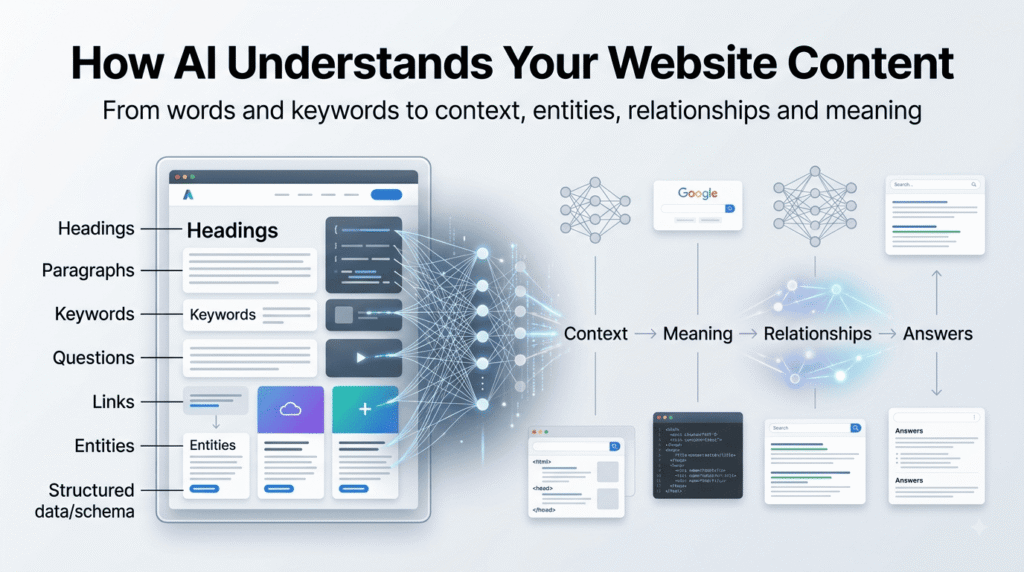
Search is no longer limited to a person typing keywords into a search box and choosing from ten blue links. AI-powered search and answer systems can interpret questions, identify concepts, connect related information, and generate responses from multiple sources.
That creates an important question for website owners:
How does AI actually understand what your website content is about?
The answer is more complicated than simply adding keywords.
AI systems need to interpret the topic, context, entities, relationships, structure, intent, and meaning of your content before it can determine whether a page is useful for a particular question.
For example, a page that says:
“It improves performance and gives better results.”
contains very little context.
What does “it” refer to? What kind of performance? What results?
Compare that with:
“Improving WordPress page-loading speed can reduce delays for visitors and create a better user experience, particularly on mobile devices.”
The second statement is much more explicit. The subject, action, and expected effect are easier to identify.
That difference is at the heart of AI-readable content.
The goal isn’t to write content that sounds like it was created for a machine. The goal is to write naturally for people while making the meaning clear enough for machines to interpret.
What Does It Mean for AI to Understand Website Content?
When we say that an AI system “understands” website content, we should not assume that it understands a webpage exactly like a human does.
AI systems process information through computational methods that can identify language patterns, concepts, entities, relationships, context, and other signals.
For website content, a useful simplified model is:
Content → Structure → Meaning → Context → Relationships → Question Matching → Answer
Consider an article about WordPress security.
An AI system may need to identify:
- WordPress as the primary technology
- Website security as the broader topic
- Plugins, themes, passwords, updates, and backups as related concepts
- The relationship between security practices and website protection
- Which questions the article answers
- Whether particular statements are explanations, recommendations, examples, or claims
This is why simply mentioning “WordPress security” twenty times doesn’t necessarily make an article easier for AI to understand.
Repeated words are not the same as clearly expressed meaning.
Crawling Is Not the Same as Understanding
This distinction is important.
A search engine or other system may discover and crawl a webpage, but that doesn’t automatically mean the page will become useful for an AI-generated answer.
There are several different stages that website owners often mix together:
Can the system access the page?
↓
Indexing / Storage
Can the content be processed and retained for retrieval?
↓
Retrieval
Can the page be found when a relevant question is asked?
↓
Interpretation
Can the system determine what the content actually discusses?
↓
Relevance
Does the content provide useful information for the question?
↓
Answer Use
Could information from the page contribute to an answer?
These stages are related, but they are not identical.
A website can therefore have technically accessible content while still providing weak or ambiguous information for interpretation.
This is one reason “AI-readable” should not be treated as simply another word for “crawlable.”
AI Does Not Just Look for Keywords
Traditional SEO taught many website owners to think heavily about keywords.
Keywords still have a role, but AI-oriented search requires a broader view.
Imagine two pages.
Page A
WordPress SEO is important. WordPress SEO helps websites with WordPress SEO. WordPress SEO can improve WordPress websites.
The phrase appears repeatedly, but the meaning is poorly developed.
Page B
WordPress is a content management system used to create and manage websites. For a WordPress site, SEO involves improving factors such as content quality, page structure, internal links, technical accessibility, and search visibility.
The second example establishes relationships:
WordPress → Content Management System
WordPress → Website
SEO → Content
SEO → Page Structure
SEO → Internal Links
SEO → Search Visibility
The content gives the reader—and a machine processing the language—more context.
The important shift
Don’t ask only:
“Did I use my keyword?”
Also ask:
“Did I clearly explain what this concept means and how it relates to the other concepts on the page?”
Context Gives Words Meaning
Individual words can be ambiguous.
Take the word “Apple.”
It could refer to:
- A fruit
- A technology company
- A product
- A brand
- A location or organization using the same name
Context helps determine which meaning is relevant.
A sentence such as:
“Apple released a new iPhone.”
provides considerably more context than:
“Apple released a new product.”
The first statement connects Apple → iPhone → product release.
Website content works in the same way.
Instead of assuming that an AI system will infer everything from isolated keywords, provide enough surrounding information to establish the intended meaning.
This is particularly important for:
- Product names
- Technical terminology
- Abbreviations
- People
- Organizations
- Locations
- Brands
- Industry-specific language
- Concepts with multiple meanings
Clear context reduces ambiguity.
Entities Help AI Connect Information
An entity is a distinct person, organization, place, product, technology, concept, or other identifiable thing.
For example:
“WordPress is a content management system.”
This connects:
WordPress → Content Management System
A richer explanation could be:
“WordPress is an open-source content management system used to publish and manage websites. Businesses, publishers, developers, and individuals use it for websites ranging from blogs to larger publishing platforms.”
Now several relationships become clearer:
WordPress → open-source software
WordPress → CMS
WordPress → websites
WordPress → publishing
WordPress → businesses
WordPress → developers
This doesn’t mean you should deliberately stuff entities into every paragraph.
It means that when an important concept matters to your explanation, identify it clearly and explain its relationship to the subject.
Headings Are More Than Visual Formatting
Headings help readers scan an article, but they also provide important structural information.
Compare these headings:
Weak
More Information
Better
How AI Interprets Website Content
The second heading tells the reader immediately what the section is about.
It also establishes a clearer relationship between the section and the article’s primary subject.
A strong content hierarchy might look like:
H1: How AI Understands Your Website Content
→ H2: What Does It Mean for AI to Understand Content?
→ H2: Crawling Is Not the Same as Understanding
→ H2: How Context Helps AI Interpret Meaning
→ H2: Why Entities Matter
→ H2: How Questions Help Structure Content
→ H2: Common Problems That Make Content Difficult to Interpret
This is much clearer than using vague headings such as:
Introduction
Important Things
More Tips
Conclusion
A useful rule
A reader should be able to understand the basic subject of your article by reading only its headings.
AI-Readable Content Should Answer Real Questions
AI-powered search is increasingly conversational.
People don’t always search using short keyword combinations.
They ask complete questions:
How does AI understand a website?
Why isn’t my website appearing in AI search?
How can I make my content easier for AI to understand?
Does structured data help AI understand a webpage?
This makes question-oriented content useful.
But there is an important distinction.
Don’t add artificial questions simply because you think they might generate traffic.
Instead, identify questions your audience genuinely has and answer them clearly.
For example:
What makes website content AI-readable?
AI-readable content clearly communicates its topic, context, entities, relationships, answers, and supporting information using understandable language and logical structure. It is written for humans but organized clearly enough for machine systems to interpret.
That answer works because it can stand on its own.
A reader doesn’t need to read five paragraphs before discovering what the question means.
Write Answers That Can Stand on Their Own
This is one of the most useful habits when creating content for AI-oriented search.
Consider:
“Yes, it can help.”
The sentence has almost no standalone meaning.
Now consider:
“Clear descriptive headings can help AI systems interpret the structure and subject of a webpage.”
The second sentence is much more useful outside its original paragraph.
This matters because information can potentially be retrieved and presented in different contexts.
Try this test
Take an important sentence from your article and imagine that someone sees it without the paragraph above it.
Can they still understand:
- What is being discussed?
- What is happening?
- Who or what is involved?
- Why does it matter?
If not, the sentence may need more context.
Your Content Should Demonstrate What It Teaches
This is also where I approach AI content analysis from a slightly different perspective.
I’m not only writing about AI search and content optimization. As a technical SEO and WordPress developer, I also build tools that help analyze website content.
One example is my own free browser-based tool:
GEOscope Content Analyzer
GEOscope Content Analyzer is designed for writers, bloggers, marketers, and SEO professionals who want to examine content across several dimensions, including:
- Traditional SEO
- AI SEO / Generative Engine Optimization
- Readability
- Keyword usage
- Word count
- Titles
- Meta descriptions
- Headings
- Overall content quality
The analyzer runs directly in the browser and is designed to be privacy-friendly, meaning the content can be analyzed without sending it to an external server.
Try the live tool:
GEOscope Content Analyzer
I built it because content optimization shouldn’t be limited to asking whether a keyword appears enough times.
A useful analysis should also encourage us to ask:
Is the topic clear?
Is the content structured logically?
Are important questions answered?
Is the language readable?
Are concepts and relationships clearly expressed?
That is the same philosophy behind this article.
Don’t just optimize what appears on the page. Analyze what the page actually communicates.
AI-Readable Does Not Mean AI-Written
This distinction is becoming increasingly important.
Some people hear “AI-readable content” and assume the content needs to be written in robotic language.
It doesn’t.
You don’t need to replace natural writing with sentences such as:
“The aforementioned website optimization methodology facilitates enhanced artificial intelligence comprehension.”
That is technically descriptive, but nobody wants to read it.
A better sentence is:
“Clear structure and precise language make it easier for both readers and machines to understand what your page is about.”
Simple.
Natural.
Specific.
Useful.
The goal is:
Human-readable first.
Machine-interpretable by design.
Good content should not force you to choose between the two.
What AI-Friendly Content Looks Like in Practice
A strong page generally makes its important information easy to identify.
For example, imagine a page about WordPress backups.
A clear structure could be:
What Is a WordPress Backup?
A WordPress backup is a copy of the website’s files and database that can be restored if the original site is damaged or lost.
Why Are WordPress Backups Important?
Backups provide a recovery option when problems such as failed updates, security incidents, server failures, or accidental changes affect a website.
How Often Should a WordPress Website Be Backed Up?
The appropriate backup frequency depends on how often the website changes. A site that publishes content daily may require more frequent backups than a mostly static website.
What Should a WordPress Backup Include?
A complete backup generally needs both the website’s files and its database.
Notice what is happening.
The page isn’t trying to manipulate an AI system.
It is simply:
Defining the concept → explaining why it matters → answering questions → adding context → clarifying relationships
That is good information architecture for humans and machines.
The Core Principle
AI does not need your content to sound like a machine wrote it.
It needs the information to be clear, contextual, structured, and meaningful.
The strongest AI-readable content therefore tends to share several characteristics:
Clear topic
→ What is this page about?
Context
→ What does the subject mean here?
Entities
→ Who or what is being discussed?
Relationships
→ How do the concepts connect?
Structure
→ How is the information organized?
Answers
→ Which questions does the page actually resolve?
Evidence
→ Why should the information be trusted?
These principles will become even more important as search moves from simply returning pages toward systems that retrieve, interpret, summarize, compare, and answer information.
And that leads to the next question:
If AI can interpret the meaning of your content, what signals can you deliberately improve to make that interpretation clearer?
That is where we move from understanding AI-readable content to analyzing and improving it.
From Understanding Content to Making It Easier to Interpret
With these principles established, we can now move from understanding how AI interprets content to making your website content easier for AI systems to understand. AI-readable content is not content written for machines. It is human-friendly content whose meaning, structure, context, and relationships are clear enough for machines to interpret.
Now we can move from the question “How does AI understand content?” to the more practical question:
“How can you make your website content easier for AI systems to interpret?”
The answer is not one optimization technique.
It is a combination of clarity, structure, context, evidence, relationships, and technical accessibility.
7 Signals That Help Make Website Content Easier to Interpret
There is no universal public checklist that guarantees an AI system will understand or cite a page. Different search engines and AI systems use different technologies and ranking or retrieval processes.
However, content can be deliberately structured around several principles that make information clearer and easier to process.
1. Clear topic
The page should have an identifiable primary subject.
2. Context
Important terms should be explained in their intended context.
3. Structure
Headings and sections should create a logical information hierarchy.
4. Relationships
Related concepts should be connected rather than presented as isolated keywords.
5. Direct answers
Important questions should receive clear answers.
6. Evidence
Claims should have appropriate support, examples, or authoritative references.
7. Technical accessibility
The important content should be accessible to systems that need to retrieve and process it.
These principles work together.
A technically perfect webpage with vague content is still difficult to understand.
Likewise, excellent writing cannot compensate for a page that cannot be properly accessed or rendered.
Make the Main Topic Impossible to Misunderstand
One of the first things to examine is the page’s topical focus.
Suppose your article is about:
How to Improve WordPress Website Speed
But the first half discusses:
- WordPress history
- Website design trends
- Hosting companies
- SEO
- AI
- Plugins
- Online marketing
and the actual speed recommendations appear much later.
The content may contain useful information, but its primary purpose becomes less obvious.
A stronger article establishes the subject early.
For example:
WordPress website speed optimization involves improving the technical and content-related factors that affect how quickly a WordPress page loads and becomes usable.
Now the subject is clear.
Then the article can expand into:
What affects speed → How to measure it → Common causes → How to fix them → How to monitor improvements
A useful test
Ask:
If someone saw only my title, introduction, and headings, would they understand exactly what this page is about?
If the answer is no, the content probably needs stronger topical structure.
Use Precise Language Instead of Ambiguous Language
Ambiguous language creates unnecessary interpretation work.
Consider:
“This can improve performance.”
What is this?
What performance?
For whom?
Under what conditions?
Now compare:
“Reducing unused JavaScript can improve page-loading performance by reducing the amount of code the browser needs to process.”
The second statement gives considerably more context.
This doesn’t mean every sentence needs to become long.
In fact, precision often allows you to write shorter sentences.
Instead of:
“It can help users get better results.”
Write:
“Internal links help visitors discover related pages.”
The subject and action are immediately identifiable.
Connect Concepts Instead of Isolating Keywords
A webpage becomes more informative when concepts are connected naturally.
Imagine an article about website accessibility.
Weak content might repeatedly mention:
accessibility, accessible website, web accessibility, accessibility SEO
Stronger content explains relationships:
Web accessibility helps people with different abilities use websites. Practices such as descriptive link text, keyboard accessibility, appropriate color contrast, semantic HTML, and text alternatives can make website interfaces easier to navigate.
Now the central concept has meaningful relationships:
Accessibility
→ keyboard navigation
→ semantic HTML
→ link text
→ color contrast
→ text alternatives
This creates a richer explanation than keyword repetition.
Think in concepts, not keyword counts.
Your goal is not to make a page contain more instances of a phrase.
Your goal is to make the subject understandable in context.
Internal Links Can Explain Relationships Too
Internal links are usually discussed as a navigation and SEO technique, but they can also help communicate how pages within a website relate to one another.
Imagine a website about WordPress.
You might have:
WordPress Security
linked to:
- WordPress backups
- Plugin security
- WordPress updates
- User permissions
- Malware recovery
The links create a conceptual network.
Instead of treating each article as an isolated document, your website begins to communicate:
WordPress Security → Backups → Recovery
WordPress Security → Plugins → Updates
WordPress Security → Users → Permissions
This is useful for people navigating the website and provides additional context about the site’s subject areas.
But don’t link everything to everything.
A useful internal link should answer:
“Would this link help someone understand or continue exploring this subject?”
If the answer is no, the link probably doesn’t belong there.
Use Examples to Remove Ambiguity
Examples are particularly powerful when explaining technical or abstract concepts.
Suppose you write:
“Use descriptive anchor text.”
That is correct, but a reader may still wonder what descriptive means.
Instead:
Weak
Click here
More descriptive
Read our guide to WordPress backup strategies
The second version gives the destination context before the user follows the link.
Examples like this don’t just teach readers.
They make the meaning of your recommendation explicit.
This is why practical examples are valuable throughout AI-oriented content.
Make Important Claims Traceable
AI-readable content shouldn’t mean AI-friendly unsupported claims.
If you make a statement such as:
“Websites with faster pages always rank higher.”
you have created an overly broad claim.
A more responsible explanation would be:
“Page experience can contribute to how search engines evaluate websites, but improving page speed does not guarantee higher rankings by itself.”
The second statement is more precise because it defines the relationship without exaggerating it.
For important claims, consider adding:
- Research
- Official documentation
- First-party data
- Expert sources
- Real examples
- Case studies
This gives the reader something to verify.
It also makes the content more useful when an AI system evaluates information from multiple sources.
Structured Data: Helpful Context, Not a Shortcut
Structured data deserves a place in an AI-content discussion, but it is often misunderstood.
Structured data provides machine-readable information about elements of a webpage.
Depending on the page, this can include information about:
- Articles
- Organizations
- People
- Products
- Breadcrumbs
- Events
- Websites
- Other supported entities and content types
For example, an article can use structured data to identify information such as its headline, author, publication date, and other relevant properties.
But there is an important limitation:
Structured data does not turn weak content into strong content.
Adding schema does not mean:
“AI will now rank my article.”
Instead, think of structured data as another layer of information that can help systems interpret specific page elements when the markup is accurate and supported by the page.
Content first. Structured data second.
And structured data should describe the page accurately rather than contain information that visitors cannot reasonably find or verify on the page.
Don’t Hide the Important Answer
Sometimes websites bury the useful information beneath several paragraphs of introduction.
For example:
“In today’s rapidly evolving digital landscape, businesses increasingly recognize the importance of…”
Five paragraphs later:
“The answer is to compress large images.”
If someone asks:
“How can I reduce image-related page weight?”
the useful answer should not require a treasure hunt.
A stronger structure might be:
How Can You Reduce Image-Related Page Weight?
Compress images, use appropriate dimensions, select efficient formats, and avoid serving unnecessarily large files.
Then explain each recommendation.
This is better for:
- Readers
- Screen scanning
- Search retrieval
- AI-generated summaries
- Voice-style questions
The principle is simple:
Answer first when the question deserves a direct answer. Explain afterward.
Content Depth Does Not Mean Content Length
This is another common misunderstanding.
An article does not become more useful simply because it becomes longer.
Consider two articles.
Article A
5,000 words containing:
- Repeated explanations
- Generic introductions
- Keyword variations
- Filler
- Repeated conclusions
Article B
2,000 words containing:
- Clear definitions
- Useful examples
- Original analysis
- Evidence
- Direct answers
- Practical recommendations
The shorter article may provide significantly more useful information.
AI-readable content should optimize for information density, not word count.
Ask:
Does this paragraph add a new idea?
If it doesn’t, shorten it or remove it.
Avoid the “AI Content” Trap
Ironically, one of the biggest problems with content created for AI search can be writing too much generic AI-style content.
You have probably seen articles that contain phrases such as:
“In today’s rapidly evolving digital landscape…”
“It’s important to note that…”
“In conclusion, by leveraging these strategies…”
These phrases are not automatically bad.
The problem occurs when they replace useful information.
AI-generated filler can make an article longer without making it more informative.
Instead, prefer:
Specific claims
Clear examples
Original observations
Practical experience
Evidence
Useful comparisons
This is particularly important if your website publishes content regularly.
First-Hand Experience Gives Content More Value
There is a major difference between:
“Website owners should analyze their content.”
and:
“I built a browser-based content analyzer because I wanted to evaluate content beyond keyword usage, including readability, headings, AI SEO signals, and overall content structure.”
The second statement comes from an actual experience.
That experience can make the article more useful because the author isn’t only repeating an abstract recommendation.
This is also why original tools, experiments, examples, screenshots, case studies, and documented processes can strengthen educational content.
They provide something that generic summaries cannot easily reproduce.
Your Website Should Have a Clear Information Architecture
AI understanding doesn’t happen only at the paragraph level.
The website itself communicates relationships.
Consider a site structured like:
SEO
→ Technical SEO
→ On-Page SEO
→ Content Strategy
→ AI Search
→ GEO
That structure tells visitors what the website covers and how the subjects relate.
Now imagine a website with hundreds of unrelated articles and no meaningful categories or internal connections.
The individual articles may still be good, but the broader topical relationships become harder to understand.
Build topic relationships deliberately.
A useful website should make it possible to answer:
What does this site specialize in?
Which pages explain the major topics?
Which articles go deeper into each subject?
How are those subjects related?
AI Readability Is Not a Single Score
This is especially important when using content analysis tools.
A tool can calculate:
- Word count
- Keyword frequency
- Readability
- Heading distribution
- Meta information
- Content patterns
- Other measurable signals
Those measurements are useful.
But no single score can completely determine whether an AI system will understand, retrieve, trust, or cite a webpage.
Why?
Because meaning is contextual.
A 90/100 content score does not guarantee visibility in AI search.
Likewise, a page with a lower numerical score isn’t automatically poor content.
Use analysis tools to identify potential problems—not to replace editorial judgment.
A Practical AI Content Audit
Before publishing a page, run through this checklist.
Topic
Can I identify the primary topic immediately?
Answer
Does the introduction answer the main question?
Context
Have I explained important terms clearly?
Entities
Are important people, products, organizations, technologies, and concepts identifiable?
Relationships
Have I explained how the important concepts connect?
Structure
Can someone understand the article by scanning the headings?
Questions
Have I answered the real questions my audience has?
Evidence
Can important claims be supported or verified?
Examples
Have I shown what my recommendations look like in practice?
Internal Links
Do links connect genuinely related topics?
Structured Data
Does my schema accurately describe the page?
Original Value
Does this page provide something beyond information that could be copied from dozens of generic articles?
If you can answer “yes” to most of these questions, you are moving toward content that is clearer for both people and machines.
The CLEAR Framework for AI-Readable Content
You can simplify the entire approach into five principles:
C — Context
Explain what you’re talking about and why it matters.
L — Language
Use precise, natural, understandable language.
E — Entities
Clearly identify the important people, products, organizations, technologies, and concepts.
A — Answers
Answer meaningful questions directly.
R — Relationships
Explain how concepts connect to one another.
CLEAR Content
Context + Language + Entities + Answers + Relationships
Then strengthen it with:
Structure + Evidence + Original Value
This isn’t a ranking formula.
It is a practical editorial framework for making information easier to understand.
What Makes Content Difficult for AI to Interpret?
Before publishing, look for these warning signs:
Vague references
“This improves it.”
Unclear subjects
“They recommend it.”
Generic headings
“More Information”
Keyword repetition
The same phrase appears repeatedly without additional meaning.
Unsupported claims
Strong statements are presented without evidence or qualification.
Missing definitions
Technical terms appear without explanation.
Buried answers
The reader must go through hundreds of words to find the actual answer.
Contradictory information
Different sections give conflicting explanations.
Excessive filler
Large amounts of text add length but not information.
Poor relationships
Related topics exist on the site but are not meaningfully connected.
Fixing these issues can improve the clarity of the content before you worry about anything else.
The Future of Website Content Is About Being Understandable
AI search is changing how people discover information, but the fundamental principle isn’t new.
Useful information needs to be understandable.
The difference is that websites now need to communicate with more than one kind of audience.
There is the human reader who asks:
“Can I understand this?”
And there are machine systems processing the same page that need to determine:
“What is this about?”
“What questions does it answer?”
“What concepts are connected?”
“How reliable and useful is this information for the current request?”
You don’t need to create two versions of your content.
You need to create one clear version that serves both.
Final Takeaway
Making a website easier for AI to understand is not about filling a page with keywords, adding every possible schema type, or writing robotic paragraphs.
It starts with something much simpler:
Know what you are saying.
Then:
Say it clearly.
Give it context.
Connect related concepts.
Answer real questions.
Support important claims.
Structure the information logically.
Add technical signals where they genuinely help.
And most importantly:
Give the page a reason to exist.
If an AI system can identify what your page means but the page contains nothing useful beyond what hundreds of other websites already say, being understandable alone won’t make it valuable.
The strongest content combines:
Clarity + Context + Structure + Evidence + Original Value
That is the real foundation of AI-readable website content.
Frequently Asked Questions
Q: How does AI understand website content?
Ans: AI systems can process website content to identify language patterns, topics, entities, relationships, context, and other information. Clear structure and precise language can make the intended meaning easier to interpret.
Q: What makes website content AI-readable?
Ans: AI-readable content clearly communicates its topic, uses understandable language, provides context, establishes relationships between concepts, answers relevant questions, and organizes information logically.
Q: Does AI understand keywords or meaning?
Ans: Keywords can provide useful signals, but modern AI systems can process broader context and relationships between concepts. Repeating a keyword does not replace clearly explaining the subject.
Q: Do headings help AI understand a webpage?
Ans: Clear, descriptive headings create a logical hierarchy and make the subject of each section easier to identify. They also help readers scan and navigate the content.
Q: Are entities important for AI search?
Ans: Entities help identify specific people, organizations, products, technologies, places, and concepts. Clearly naming and contextualizing important entities can make relationships within content easier to interpret.
Q: Does structured data help AI understand website content?
Ans: Structured data provides machine-readable information about specific page elements. It can provide useful context, but it does not replace high-quality content or guarantee visibility in AI search.
Q: How can I make my website easier for AI systems to understand?
Ans: Start with a clear topic, precise language, descriptive headings, meaningful internal links, useful definitions, direct answers, supporting evidence, identifiable entities, and logical relationships between concepts.
Q: Does AI-readable content need to be written differently for humans?
No. The goal should be natural, useful writing that is also clearly structured. Content does not need to sound robotic to be understandable to machines.
Q: Does longer content perform better in AI search?
Ans: Not necessarily. Content length alone does not determine usefulness. A focused article with clear answers, evidence, examples, and original information can be more valuable than a much longer article filled with repetition.
Q: Can a content analyzer guarantee AI search visibility?
Ans: No. A content analyzer can identify measurable characteristics and potential content issues, but no tool can guarantee that a page will appear in AI-generated answers. Retrieval and ranking depend on many factors outside a single content score.
About the Author
Mirza Hadi Baig is a Full-Stack WordPress Developer and Technical SEO Specialist with 5+ years of hands-on experience building websites and WordPress solutions. He completed the IBM SEO Mastery: From Fundamentals to GenAI and GEO Strategies Specialization and writes about SEO strategy, WordPress development, AI search, and digital growth.
He also builds practical web tools for website owners and content professionals, including GEOscope Content Analyzer, a free browser-based tool for analyzing traditional SEO, AI SEO/GEO, readability, keyword usage, headings, metadata, and word count.
Try GEOscope Content Analyzer:
GEOscope Content Analyzer
The tool runs its analysis in the browser and is designed to avoid sending users’ content to external servers.
Author’s Perspective
As a developer and SEO practitioner, I believe AI search should not encourage us to write for machines instead of people.
It should encourage us to become better at explaining information.
When the topic is clear, the language is precise, the relationships are understandable, the answers are useful, and the information is supported by evidence, the content becomes stronger for everyone—including the systems increasingly being used to discover it.
Don’t write content that is merely optimized to be found.
Write content that can be understood, verified, and genuinely used.