
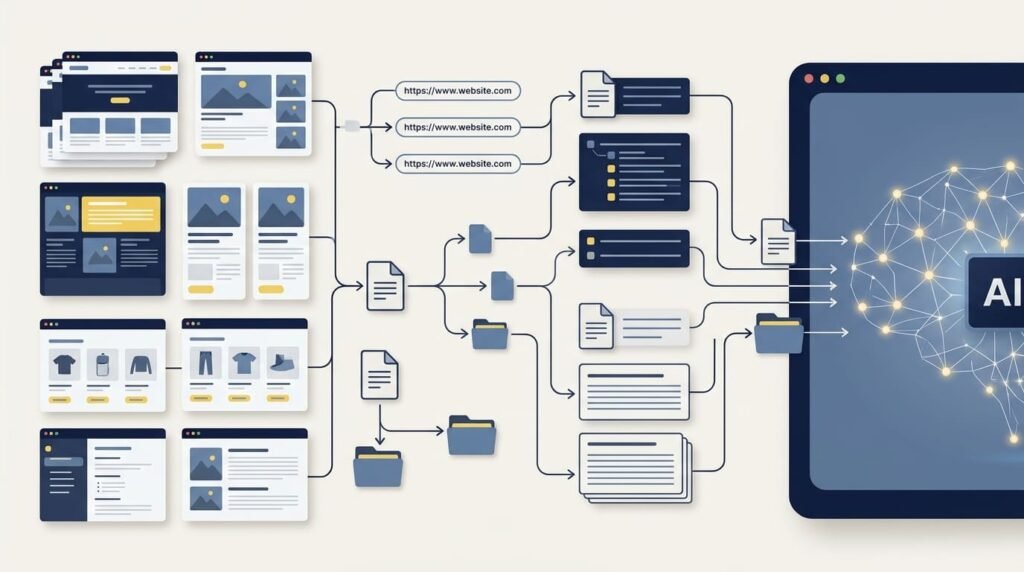
An AI content index for WordPress is a structured, machine-readable guide that helps compatible AI tools and automated agents discover important content on a website. One emerging approach is llms.txt, a Markdown file that summarizes a website and links to selected resources. Some implementations also generate llms-full.txt, which provides a more extensive representation of the site’s content.
For WordPress site owners, the challenge is not simply creating these files. It is keeping them organized as posts, pages, products, and other content change over time.
The free HS3Dev AI Content Index for llms.txt plugin was developed to help address this practical problem. It dynamically generates llms.txt and llms-full.txt, lets administrators control which content is included, and provides tools for managing the output without manually maintaining text files.
However, an important distinction comes first: an AI content index is a way to organize and present content, not a guarantee that an AI system will crawl, cite, recommend, or rank a website.
What Is an AI Content Index?
A website may contain hundreds or thousands of individual resources, including blog posts, service pages, documentation, product descriptions, and support articles. Although this information is available through the website, an automated system may need to navigate page structure, menus, scripts, and other interface elements to locate relevant material.
An AI content index provides a more direct map of selected resources.
For example, a WordPress website might organize its index into sections such as:
- About the website: What the organization does and who it serves.
- Guides and articles: Helpful resources covering important topics.
- Products and services: Product pages, service descriptions, and documentation.
- Technical resources: API references, developer guides, and support documentation.
The objective is to present useful context and links in a predictable, text-based format that compatible tools can process.
This approach is related to the broader idea of making website information easier for automated systems to discover and use. It does not replace the website’s normal pages, navigation, XML sitemap, or technical SEO foundations.
What Are llms.txt and llms-full.txt?
The terms are related, but they serve different purposes in common implementations.
What is llms.txt?
llms.txt is a proposed Markdown-based convention introduced to provide AI tools and agents with a concise guide to a website’s important information and resources.
A simplified example might look like this:
# Example Technology Website

> Practical guides for WordPress developers and website owners.

## WordPress Development

- [WordPress Security Guide](https://example.com/security/):
  Practical website security recommendations.

- [API Integration Guide](https://example.com/api-integration/):
  An introduction to integrating external services.

## Developer Resources

- [Documentation](https://example.com/documentation/):
  Technical guides and reference material.
This example illustrates the general idea: a site description followed by organized links and short explanations.
The actual format can include additional context, and the current proposal is documented at llmstxt.org.
What is llms-full.txt?
llms-full.txt is commonly used by implementations that provide a more extensive, consolidated text representation of website content. Rather than presenting only a concise index, it can include fuller content for selected resources.
The distinction is useful:
llms.txtprovides a relatively concise guide to important resources.llms-full.txtprovides a more extensive content representation in implementations that support it.
The llms-full.txt filename is used by tools and plugins, including HS3Dev, but it should not be mistaken for a universally required component of the original llms.txt proposal.
Both files should be reviewed for accuracy, relevance, and appropriate content selection. A larger file is not automatically a better one.
Why Is Maintaining an AI Content Index Manually Difficult in WordPress?
Creating a small Markdown file by hand is straightforward. Keeping it accurate on a changing website is a different task.
Consider a WordPress site that publishes new articles every week, updates product descriptions, removes outdated pages, and uses custom post types. Its content index may become inaccurate unless someone regularly updates it.
Common maintenance problems include:
1. New content is missing. New posts, pages, and products may not appear in the index until someone adds them manually.
2. Outdated URLs remain listed. Deleted or renamed content can leave broken or irrelevant links behind.
3. Content selection becomes difficult. Not every published page deserves equal attention. A site owner may want to include selected products and guides while excluding temporary pages or less relevant content.
4. Page builders can complicate extraction. Some websites rely on builders and shortcodes to construct their visible content. A basic extraction process may not always produce the clean text an administrator expects.
5. Large websites need efficient processing. Rebuilding an index for thousands of resources requires careful handling of processing time, memory, and updates.
6. Multilingual websites need appropriate URL selection. Different language versions may require different content and URL handling.
These are practical content-management issues. An AI content index WordPress plugin can help automate repetitive work while allowing site owners to control what gets published.
How WordPress Plugins Can Automate Content Indexing
Instead of manually writing and updating the files, a plugin can retrieve selected WordPress content, format it, and serve the resulting index.
Depending on the implementation, useful capabilities may include:
- Selecting content by post type.
- Including or excluding individual posts, pages, products, or URLs.
- Using existing SEO metadata or excerpts to describe resources.
- Regenerating output when website content changes.
- Handling larger collections through batch processing.
- Supporting multilingual configurations and page-builder content.
- Providing diagnostics when a file or URL behaves unexpectedly.
Automation does not remove the need for editorial judgment. Administrators should still decide which resources are appropriate to expose in a public index and check the resulting output.
How HS3Dev AI Content Index for llms.txt Approaches the Problem
HS3Dev AI Content Index for llms.txt is a free, open-source WordPress plugin developed by Mirza Hadi Baig. It was built to make the creation and ongoing management of AI-oriented content indexes more practical for WordPress websites.
Rather than requiring administrators to maintain both files manually, the plugin dynamically generates llms.txt and llms-full.txt through WordPress.
Its documented capabilities include:
- Content control: Select post types and include or exclude individual posts, pages, products, and URLs.
- SEO integration: Work with metadata from Rank Math, Yoast SEO, All in One SEO, and SEOPress.
- Page-builder compatibility: Support content extraction from page-builder-based sites, with an additional compatibility mode.
- Multilingual support: Support configurations using WPML and Polylang.
- Batch processing: Handle larger content collections in batches.
- Automatic regeneration: Refresh output according to supported update settings.
- Crawler request analytics: Review requests to the generated files from identified AI crawler user agents.
- Diagnostics and conflict detection: Help administrators investigate common configuration and output issues.
The files are generated dynamically, so the plugin does not require physical copies of these files to be maintained manually in the website’s root directory.
The goal is to make content selection and ongoing maintenance easier while keeping control in the hands of the site administrator. As with any plugin, compatibility should be checked against the particular website, theme, hosting environment, and installed plugins.
You can review the features and download the plugin from the official WordPress.org listing, or learn more on the HS3Dev plugin project page.
Three WordPress Plugins to Consider for Generating llms.txt
There is no single plugin that is best for every WordPress website. The right choice depends on the required output, content controls, compatibility needs, and how the files will be maintained.
Here are three options worth evaluating.
1. HS3Dev AI Content Index for llms.txt
Best suited to site owners who want control over both files and selected content.
HS3Dev generates llms.txt and llms-full.txt dynamically. Its feature set includes individual content inclusion and exclusion, custom URL handling, SEO-plugin integration, page-builder compatibility, multilingual support, batch processing, crawler request analytics, and diagnostic tools.
Its focus is not just generating an index once, but helping WordPress administrators manage what appears in that index as the website evolves.
2. Dynamic llms.txt Generator
An alternative for configurable, content-rich output.
The Dynamic llms.txt Generator by ColorWhistle provides configuration for content types, metadata, headings, content limits, update frequency, and caching. Its documented approach writes the generated llms.txt file to the website’s root directory.
Consider this option if its file-generation approach and output controls fit your site-management requirements.
3. Website LLMs.txt
An alternative for automatically managing a website’s llms.txt file.
Website LLMs.txt by Ryan Howard focuses on generating and updating llms.txt, with content selection and integration with several SEO plugins. Its published description also covers excluding content marked noindex or nofollow.
Review the current feature list and test its output against your site’s requirements before choosing it.
Comparison note: These are three relevant options, not an independently measured ranking of all available plugins. Features can change between releases, so verify each plugin’s current documentation and compatibility before installation.
Does llms.txt Improve AI Search Rankings or Citations?
This is where website owners should be particularly careful.
An AI content index may offer a convenient way to organize important resources for compatible agents and workflows. But publishing a file does not prove that an AI platform will request it, use its contents, cite a page, or recommend a product.
Google’s current guidance is explicit: Google Search does not use llms.txt as a special signal for its search or generative search features, and maintaining the file will neither improve nor harm Google Search visibility or rankings. Google continues to recommend foundational SEO practices and useful, reliable, people-first content. See Google’s guide to optimizing for generative AI features.
That means an llms.txt implementation should be viewed as an optional content-organization approach—not a replacement for technical SEO, not an access-control mechanism, and not a guaranteed GEO technique.
For broader context, see Beyond Sitemap: What Role Could llms.txt Play in AI Search?, which examines the distinction between publishing a file and demonstrating that an AI system actually uses it.
Practical Checklist Before Publishing an AI Content Index
Before generating or maintaining these files on a WordPress site, work through the following checks:
- Identify the purpose. Decide which content and workflows the index should support.
- Choose relevant resources. Prioritize accurate, useful, publicly accessible pages.
- Review URLs. Check that selected links are correct and do not point to outdated content.
- Check the generated text. Confirm that titles, summaries, and extracted content are understandable.
- Review exclusions. Avoid unintentionally exposing sensitive or non-public information in a public index. Remember that listing or omitting a URL does not itself control access.
- Test compatibility. Check page-builder output, multilingual URLs, and any relevant custom post types.
- Recheck after updates. Make sure the generated files reflect changes to important website content.
- Measure what can actually be observed. Request logs may show that a user agent fetched a file, but that alone does not prove an AI model used it in a response.
These steps make the implementation more deliberate and easier to maintain, without relying on unsupported claims about search performance.
Frequently Asked Questions
What is an AI content index for WordPress?
An AI content index is a structured guide to selected website resources intended to help compatible AI tools and automated agents discover relevant information. The llms.txt format is one proposed approach for presenting important content and links in a readable format.
What is the difference between llms.txt and llms-full.txt?
llms.txt typically provides a concise guide to important website resources. llms-full.txt is commonly used by implementations that provide a more extensive, consolidated representation of selected content. llms-full.txt is not a universally required part of the original llms.txt proposal.
Does WordPress automatically generate llms.txt?
It depends on your WordPress setup and installed plugins. A dedicated plugin, such as HS3Dev AI Content Index for llms.txt, can dynamically generate llms.txt and llms-full.txt and provide controls for selecting which content is included.
Does llms.txt improve Google rankings or AI citations?
No ranking or citation improvement is guaranteed. Google states that llms.txt is not a special ranking or generative-search signal. Website owners should continue to prioritize useful content, accessibility, and sound technical SEO practices.
Is HS3Dev AI Content Index for llms.txt free?
Yes. HS3Dev AI Content Index for llms.txt is available as a free, open-source WordPress plugin. You can review its current features and installation information on the official WordPress.org plugin page.
Can I choose which WordPress content appears in the index?
HS3Dev provides controls for selecting post types and including or excluding individual posts, pages, products, and URLs. Review the generated files to confirm that the output matches your intended content selection.
Should llms.txt replace an XML sitemap or robots.txt?
No. An XML sitemap helps search engines discover URLs, robots.txt communicates crawl instructions to compliant crawlers, and llms.txt is a proposed format for presenting a curated content guide. They serve different purposes and should not be treated as interchangeable.
Final Thoughts
Managing content for an evolving web does not require chasing every new AI-search trend. It requires understanding what each technical approach is designed to do, where it fits, and what evidence supports its use.
An AI content index can provide a structured map of selected WordPress resources. The challenge is keeping that map relevant as a site grows—without manually maintaining every link and content entry.
HS3Dev AI Content Index for llms.txt offers a practical, free way to generate and manage llms.txt and llms-full.txt from WordPress, with content-selection controls and tools for ongoing maintenance.
It is worth considering when that workflow meets a real need. Just keep expectations realistic: an organized index can make selected content easier to present to compatible tools, but reliable technical SEO, accessible pages, and genuinely useful content remain essential.
About the Author
Mirza Hadi Baig is a Full-Stack Web Developer, Technical Problem Solver, and Product Builder with 17+ years of professional experience across the technology industry. His work spans WordPress and WooCommerce development, custom functionality, system integrations, technical troubleshooting, website security, performance optimization, and technical SEO.
He develops practical digital tools to address real-world website challenges, including HS3Dev AI Content Index for llms.txt, a free, open-source WordPress plugin for generating and managing AI-oriented content index files. His broader interests include AI-assisted development, API integration, structured data, and Generative Engine Optimization (GEO).
His approach combines practical problem-solving with an emphasis on understanding the underlying technology, reviewing generated output, and building solutions that are maintainable and reliable.
Explore his work at hadi-mirza.com or connect on LinkedIn.