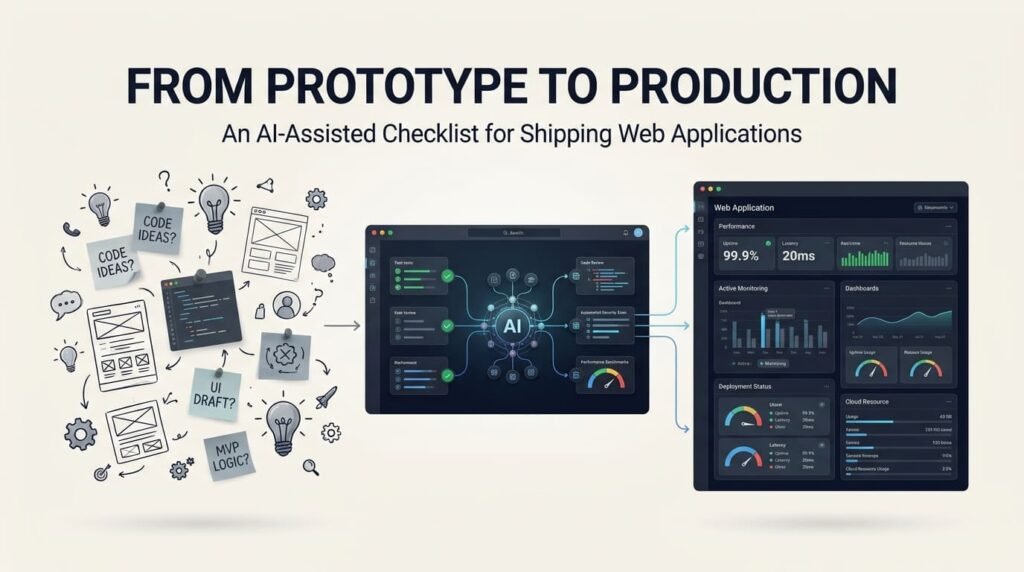
Building a working prototype is an exciting milestone in software development. A few well-written prompts, an AI coding assistant, and some development tools can help turn an idea into a functional application much faster than traditional development workflows.
However, there is an important difference between building something that works during development and delivering an application that is ready for real users.
A prototype may demonstrate the main functionality, but production introduces additional responsibilities. Authentication, authorization, data protection, error handling, performance, browser compatibility, database reliability, deployment configuration, and ongoing maintenance all become important.
An application that works perfectly on a local development machine may fail when deployed to a live server. A feature that appears functional during a demonstration may expose security weaknesses or behave unexpectedly when multiple users interact with it.
This is where AI-assisted development can provide additional value.
AI can help developers review code, identify potential problems, prepare testing scenarios, generate deployment documentation, analyze errors, and organize production-readiness tasks. It can also help explain unfamiliar configurations and suggest improvements.
However, AI-generated code and recommendations are not automatically production-ready. Developers must verify the implementation, test the application under realistic conditions, and remain responsible for security, reliability, and performance.
The objective is not simply to deploy an application faster. It is to deliver software that works reliably beyond the development environment.
A successful prototype demonstrates an idea. A production-ready application delivers a dependable solution.
1. From Prototype to Production: Understand the Difference
A prototype is generally built to demonstrate an idea, explore functionality, or validate an approach. It may contain temporary data, simplified authentication, limited error handling, or development-specific configurations.
A production application has different expectations.
It must handle real user activity, protect information, manage failures, and operate within a properly configured environment.
Consider a simple customer management application.
The prototype might allow users to:
- Register and log in.
- Add customer records.
- View a customer list.
- Edit existing information.
Before production, developers must investigate additional requirements:
- Can users access only their own records?
- Are passwords and authentication sessions handled securely?
- What happens when two users update the same record?
- Are database operations validated?
- What happens if an API becomes unavailable?
- Are sensitive configuration values protected?
- Can the application recover from a failed deployment?
- Are backups available and restorable?
These questions demonstrate why a functional demonstration is not sufficient evidence of production readiness.
AI can help identify these gaps by reviewing requirements and generating scenarios that developers might otherwise overlook.
For example, ask:
Review this application as a production-readiness auditor. Identify missing functionality, security weaknesses, database risks, integration problems, performance concerns, and deployment requirements. Separate confirmed issues from potential risks and explain how each should be verified.
The important point is to use AI as a review assistant, not as a source of automatic approval.
2. Review the Architecture and Code Before Release
The first major production-readiness task is reviewing the application itself.
AI-generated code can accelerate development, but generated components must fit the existing architecture.
Developers should examine:
Code structure: Are responsibilities separated properly? Are components, services, database operations, and business logic organized logically?
Dependencies: Are third-party packages necessary, maintained, and compatible with the application?
Database design: Are relationships, indexes, constraints, and data validation appropriate?
API implementation: Are endpoints consistent? Are requests validated? Are errors handled correctly?
Authentication and authorization: Does the application distinguish between identifying a user and determining what that user is permitted to do?
Maintainability: Can another developer understand, troubleshoot, and extend the application?
For WordPress projects, this review should also consider hooks, plugin compatibility, theme dependencies, custom database operations, capabilities, nonces, sanitization, and output escaping.
A useful AI prompt:
Review this code for production suitability. Examine architecture, naming, dependencies, error handling, security, maintainability, and compatibility. Do not rewrite everything immediately. First identify specific problems, explain their impact, and recommend targeted improvements.
This approach reduces the risk of allowing AI to make unnecessary changes to code that already works.
For further reading, see my article Beyond Code Generation: How AI Is Changing the Full-Stack Developer’s Workflow.
3. Security Checklist: Protect the Application and Its Users
Security should be reviewed before deployment, not after an incident.
A prototype may use simplified permissions, development credentials, or temporary configuration. These shortcuts must not automatically become part of the production environment.
Developers should review several important areas:
- Authentication: Verify login, password handling, session management, and account recovery.
- Authorization: Ensure users cannot access administrative functions or other users’ information without permission.
- Input validation: Validate user input on the server side, not only through browser-side checks.
- Output handling: Apply appropriate encoding and escaping to reduce injection and cross-site scripting risks.
- API security: Validate requests, permissions, authentication, and rate limits where appropriate.
- Sensitive information: Protect API keys, database credentials, tokens, and other secrets.
- HTTPS: Ensure production communication uses properly configured HTTPS.
- File uploads: Restrict file types, sizes, storage locations, and execution permissions.
- Error handling: Avoid exposing database details, credentials, stack traces, or internal configuration to users.
- Logging: Record relevant security events without storing passwords, authentication tokens, or unnecessary personal information.
AI can assist by reviewing code snippets, identifying suspicious patterns, and suggesting security test cases.
However, asking AI whether an application is secure does not establish that it is secure.
Use established security references such as the OWASP Application Security Verification Standard (ASVS) and the OWASP Web Security Testing Guide to structure security verification.
These resources cover areas including authentication, access control, data protection, configuration, and application testing.
For AI-generated code, an additional review is important: understand what the code does before deploying it, particularly when it handles user data, authentication, or external services.
4. Test Functionality, Integrations, and Real-World Scenarios
A prototype often gets tested through a few successful interactions.
Production testing must go further.
Developers should verify both expected and unexpected behaviour.
Functional testing
- Do all important features work?
- Are forms submitting correctly?
- Are records created, updated, and deleted as expected?
- Do permissions match the requirements?
Validation and edge-case testing
- What happens when required fields are empty?
- How does the application handle invalid formats?
- What happens when a record does not exist?
- Can duplicate submissions cause problems?
Integration testing
- Do APIs return the expected data?
- Are payment or email integrations working?
- What happens when an external service times out?
- Are failed requests handled appropriately?
Responsive and browser testing
- Does the interface work on mobile devices?
- Are layouts consistent across supported browsers?
- Are navigation, buttons, and forms usable?
Regression testing
- Do existing features still work after recent changes?
- Have new scripts or styles affected unrelated components?
- Do plugin or dependency updates introduce compatibility problems?
AI can help convert requirements into test cases, prepare sample inputs, generate unit tests, and explain failing test results.
For example:
Create a test plan for this application based on its requirements. Include successful scenarios, invalid inputs, authorization checks, API failures, edge cases, and regression tests. Explain which tests should be automated and which require manual verification.
The developer must still execute the tests and inspect the results.
A passing test suite is useful evidence, but it does not prove that every possible failure has been covered.
5. Prepare the Production Environment and Deployment Process
An application can work perfectly in development and still fail after deployment.
The reason may be a difference in server configuration, runtime versions, environment variables, file permissions, database settings, or dependencies.
Before deployment, verify:
- Production PHP, Node.js, or other runtime versions.
- Required extensions and dependencies.
- Database connection and migration settings.
- Environment-specific configuration.
- Secure storage of credentials and API keys.
- Correct file and directory permissions.
- HTTPS and domain configuration.
- Production error handling and logging.
- Removal of development tools, test files, and debugging endpoints.
- Backup and recovery arrangements.
For WordPress deployments, also check plugin and theme compatibility, permalink settings, scheduled tasks, upload directories, caching, and the effects of changing domains or server environments.
AI can help prepare deployment instructions and explain configuration differences.
However, deployment should follow a repeatable process rather than relying on an unverified list of commands generated by AI.
A useful reference is OWASP SAMM – Secure Deployment. It highlights the importance of documented deployment processes, consistent releases, and deployment records.
Use Staging Before Production
A staging environment provides an opportunity to test the application in conditions closer to the live environment.
The recommended sequence is:
Development → Testing → Staging → Production
Before moving to production, verify that:
- The staging environment uses appropriate production-like configuration.
- Database migrations have been tested.
- Critical user journeys work.
- Integrations have been checked.
- Backups are available.
- A rollback or recovery plan exists.
Not every project needs a complicated deployment pipeline. The process should match the application’s complexity and risk.
The objective is to make releases predictable and recoverable.
6. Performance, Accessibility, SEO, and GEO Readiness
Production readiness is not limited to functionality and security.
Users also expect applications to load efficiently, work across devices, and provide understandable interfaces.
Developers should consider the following areas.
Performance: Review unnecessary JavaScript, large images, excessive network requests, database queries, caching, and server response times.
Core Web Vitals: Measure real-world user experience using metrics such as Largest Contentful Paint (LCP), Interaction to Next Paint (INP), and Cumulative Layout Shift (CLS). Google’s Web Vitals documentation provides measurement guidance.
Accessibility: Check semantic HTML, keyboard navigation, form labels, contrast, focus indicators, and accessible error messages. Refer to the W3C Web Content Accessibility Guidelines.
Technical SEO: For public-facing websites, review crawlability, indexability, canonical URLs, XML sitemaps, metadata, internal linking, mobile usability, and structured data.
GEO and AI search readiness: Organize important content with clear headings, descriptive language, accurate entity information, useful documentation, and appropriate structured data.
These requirements should be considered according to the application type. A private administrative dashboard, for example, has different search requirements from a public business website.
My article Structured Data for AI Search: What Website Owners Actually Need to Know discusses the role of structured information in helping search systems understand website content.
GEO should not be treated as a deployment guarantee or a promise of AI citations. The priority remains making information useful, accurate, accessible, and understandable.
7. Documentation, Monitoring, and Post-Launch Maintenance
Deployment is not the end of the development lifecycle.
Once an application is live, developers need to understand how it behaves under real usage.
A production application should have appropriate monitoring and maintenance arrangements.
Important areas include:
- Application and server error logs.
- Database health and backup status.
- Uptime and availability monitoring.
- Failed API requests and integration errors.
- Security updates and dependency maintenance.
- Performance monitoring.
- Deployment history.
- Recovery and rollback procedures.
- Technical documentation.
AI can help developers summarize logs, investigate recurring errors, prepare release notes, document APIs, and create maintenance checklists.
However, sensitive production logs and user information should not be pasted into external AI services without checking data protection requirements and approved handling practices.
Developers should also document how the application is configured, deployed, tested, and recovered.
This becomes particularly important when projects are maintained by multiple developers or transferred to another team.
The NIST Secure Software Development Framework provides guidance on integrating security throughout software development, including protecting software, producing secure releases, and responding to vulnerabilities.
8. The AI-Assisted Production-Readiness Checklist
Before releasing an application, developers can use the following checklist as a final review.
Code and Architecture
- Code reviewed and understood.
- Dependencies checked and updated.
- Database structure and migrations verified.
- Error handling reviewed.
Security
- Authentication and permissions tested.
- Input validation and output escaping checked.
- Secrets and credentials protected.
- HTTPS and production configuration verified.
Testing
- Core functionality tested.
- API and third-party integrations verified.
- Edge cases and regression tests completed.
- Mobile and browser compatibility checked.
Deployment
- Staging environment verified.
- Backups and recovery plan confirmed.
- Production environment configured.
- Rollback procedure documented.
After Launch
- Logging and monitoring enabled.
- Performance and accessibility reviewed.
- SEO and GEO requirements checked where relevant.
- Documentation and maintenance plan prepared.
A checklist helps organize the release process, but completing every item does not automatically certify an application as secure or production-ready. Each check must be supported by appropriate testing and evidence.
A Practical AI Prompt for the Final Review
Developers can use this prompt before a production release:
Act as a senior software engineer conducting a production-readiness review. Evaluate the application against code quality, architecture, security, authentication, database integrity, API integrations, functional testing, performance, accessibility, SEO requirements, deployment configuration, backups, monitoring, and maintenance.
Identify confirmed issues, potential risks, missing information, and unverified assumptions separately. Prioritize findings by severity and explain how each should be tested or resolved.
Do not assume the application is production-ready simply because it runs successfully. Do not mark any check as passed without supporting evidence.
The developer should then investigate the findings, apply appropriate fixes, and verify them independently.
Final Thoughts: Shipping Software Requires More Than Generating Code
AI has reduced the effort required to move from an idea to a working prototype. Developers can explore designs, generate components, build integrations, and troubleshoot problems with considerably more assistance.
But shipping an application introduces responsibilities that cannot be ignored.
Security, testing, performance, deployment configuration, data protection, monitoring, and maintenance determine whether an application can serve real users reliably.
The developer’s role is therefore not limited to reviewing generated code. It involves understanding the complete system, identifying risks, making technical decisions, and taking responsibility for the final release.
A useful development approach is:
Understand → Plan → Implement → Review → Test → Secure → Deploy → Monitor → Refine.
AI can assist throughout this lifecycle, but production readiness must be established through actual verification, not AI-generated confidence.
A prototype proves that an idea can work. Engineering discipline makes it ready for the real world.
About the Author
Mirza Hadi Baig is a Full-Stack Web Developer, Technical Problem Solver, Product Builder, and AI SEO & GEO Strategist with 17+ years of experience in the technology industry. His professional background spans IT education, healthcare information systems, WordPress and WooCommerce development, PHP, JavaScript, APIs, technical troubleshooting, and independent digital product development.
He explores practical applications of AI in software development, technical SEO, structured data, and Generative Engine Optimization. His work focuses on building useful digital products and making web applications more reliable, secure, maintainable, and accessible.
Through DCX Herald, he shares practical technical insights about modern web development, AI-assisted engineering, and the evolving responsibilities of developers.