
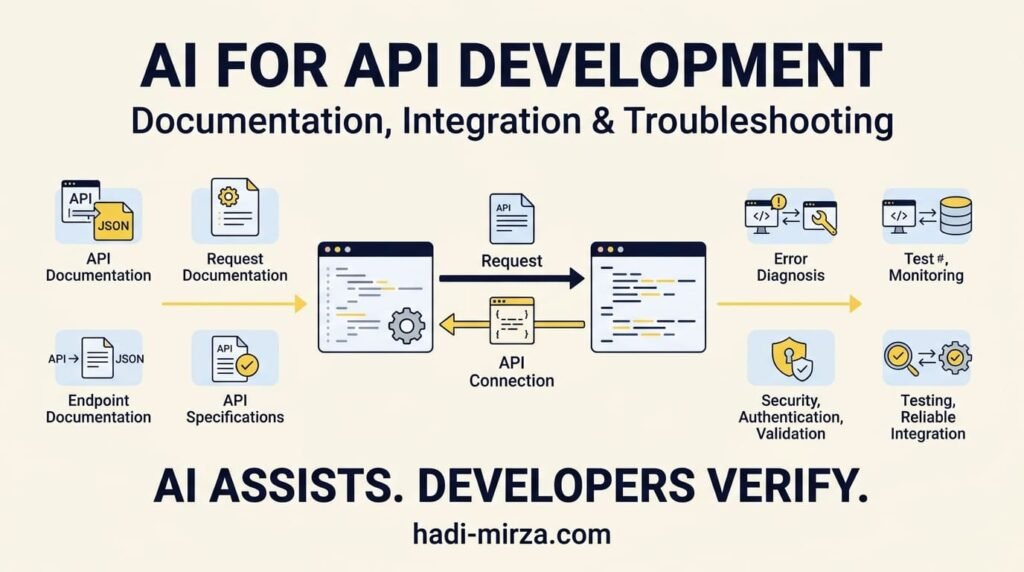
APIs connect websites, applications, databases, payment providers, authentication systems, and external services. AI for API development can help developers understand API concepts, generate request examples, interpret responses, prepare documentation, plan integrations, and troubleshoot errors. However, successful API integration requires more than generating a request that works once. Developers must understand the API contract, validate data, manage authentication, handle failures, protect sensitive information, and test the complete workflow.
As AI becomes part of everyday software development, the opportunity is not simply to write API code faster. It is to use AI to understand systems, investigate problems, and build more reliable integrations while retaining control over technical decisions.
1. Understanding APIs Before Using AI
An Application Programming Interface (API) defines how one software system communicates with another. It describes available operations, required inputs, expected outputs, authentication requirements, and possible errors.
For example, an e-commerce website might use APIs to:
- Retrieve product information from a database or external service.
- Create an order and submit payment.
- Check shipping status.
- Synchronize customer records with a CRM.
- Connect a WordPress website to another application.
In a typical HTTP-based API interaction, a client sends a request to a server. The server processes it and returns a response containing a status code, headers, and, when applicable, a response body.
Developers should understand several basic concepts before relying on AI-generated integration code:
- Endpoints: The URLs or paths used to access particular resources or operations.
- HTTP methods: Such as GET for retrieving data, POST for submitting data, PUT for replacing a resource, PATCH for partial updates, and DELETE for removing a resource.
- Headers: Metadata used for content negotiation, authentication, and other request requirements.
- Request bodies: Data sent to an API, commonly formatted as JSON.
- Response status codes: Indicators of the outcome of a request.
- Authentication and authorization: Mechanisms that establish identity and determine what a caller may access.
The MDN HTTP request methods reference explains how HTTP methods differ. Understanding those differences helps developers evaluate whether an AI-generated request matches the intended operation.
AI can explain unfamiliar terminology and generate examples, but developers still need to confirm that those examples match the actual API documentation.
2. How AI for API Development Helps With Requests and Responses
One practical use of AI is turning API documentation into understandable, testable requests.
Suppose a developer needs to retrieve product information from an external service. The documentation specifies an endpoint, a required API key, and a JSON response.
Instead of starting from an unfamiliar code sample, the developer can ask AI to explain the endpoint, identify required headers, describe the expected response, and create an example request for a preferred programming language.
AI can assist with:
- Translating API documentation into a step-by-step implementation plan.
- Generating sample HTTP requests and JSON payloads.
- Explaining query parameters, headers, and request bodies.
- Converting a request from cURL into PHP, JavaScript, or Python.
- Interpreting response structures and identifying relevant fields.
- Explaining common status codes and potential failure causes.
- Creating test cases for valid and invalid requests.
Example: Understanding an API response
Imagine an API returns the following JSON:
{
  "id": 1042,
  "status": "processing",
  "total": 79.99,
  "currency": "USD"
}
A developer might ask AI to explain the fields and show how to read the order status in PHP.
AI could generate a draft such as:
$order = json_decode($response_body, true);

if (is_array($order) && isset($order['status'])) {
    $status = $order['status'];
}
This example demonstrates basic JSON parsing, but it is not a complete production integration. The actual implementation must also handle HTTP failures, malformed JSON, unexpected field types, missing data, and any relevant business rules. If the response comes from an external service, the application should validate it rather than blindly trusting its contents.
The developer must also confirm that $response_body is the correct variable and that the response has been received successfully.
For more detail about response outcomes, see the MDN HTTP response status codes reference.
The important distinction: AI can produce a plausible request or response handler. Developers must verify that it behaves correctly within the real application.
3. Planning API Integrations Before Writing Code
API integration is not just a matter of connecting two endpoints. It involves understanding how information moves between systems and what should happen when something goes wrong.
Consider a WordPress website that sends new customer orders to an external inventory service. A successful integration must do more than submit an order number.
The developer needs to determine:
- Which system owns the authoritative order data?
- Which fields must be sent to the external service?
- How should the application authenticate?
- What happens if the external service is unavailable?
- How should duplicate requests be handled?
- How should failed synchronization attempts be recorded?
- How will changes to the external API be managed?
AI can help turn these questions into an integration plan, identify missing requirements, propose an initial implementation structure, and suggest test scenarios.
A practical AI-assisted integration workflow
Step 1 — Define the business requirement. Describe what the integration must accomplish, which systems are involved, and what counts as success.
Step 2 — Examine the API contract. Review the official documentation, endpoints, schemas, authentication methods, rate limits, and error responses.
Step 3 — Map the data. Identify how fields in one system correspond to fields in the other. Confirm required fields, data types, formats, and validation rules.
Step 4 — Plan failure handling. Decide how the application should respond to timeouts, rate limits, invalid responses, expired credentials, and service outages.
Step 5 — Generate and review the implementation. Use AI to draft code, but check that it follows the existing architecture, framework conventions, and security requirements.
Step 6 — Test the complete workflow. Verify successful requests, failed requests, duplicate submissions, unexpected responses, and recovery after temporary failures.
Step 7 — Monitor and maintain. Record useful diagnostic information, monitor recurring failures, and update the integration when the API changes.
This process is useful for WordPress plugins, PHP applications, JavaScript front ends, mobile applications, and other systems that communicate with external services.
4. Using AI to Create Better API Documentation
API documentation is often overlooked when developers focus on implementation. Yet incomplete documentation can make an otherwise functional API difficult to integrate, maintain, and troubleshoot.
AI can help transform existing API specifications, code, and verified examples into clearer documentation.
Useful tasks include:
- Writing endpoint descriptions and usage examples.
- Explaining required parameters and request headers.
- Documenting request and response schemas.
- Creating examples for successful and unsuccessful requests.
- Describing authentication requirements and permission boundaries.
- Preparing onboarding guides for developers.
- Identifying inconsistencies between documentation and implementation.
- Drafting changelog entries when an API evolves.
For example, a developer could provide an existing endpoint specification and ask AI to create a reference section containing the endpoint purpose, method, parameters, example request, example response, authentication requirements, and possible error conditions.
The generated document should then be compared against the actual implementation and authoritative API specification.
Why structured API documentation matters
For REST APIs, the OpenAPI Specification provides a standard, machine-readable way to describe API endpoints, operations, parameters, request bodies, responses, and security requirements.
When an OpenAPI specification is available, AI can help explain it, draft usage examples, identify potentially missing descriptions, and assist with documentation maintenance.
However, AI-generated documentation can introduce errors if it invents parameters, describes unsupported behaviour, or uses outdated endpoint details.
A useful rule is to treat documentation as a contract that must match the implemented API—not as marketing text that merely sounds convincing.
Good documentation should answer five practical questions:
- What does the endpoint do?
- What information must the caller provide?
- How is the caller authenticated and authorized?
- What response should the caller expect?
- What can fail, and how should the caller respond?
5. Troubleshooting API Errors With AI
API debugging can be time-consuming because an error may originate in the client, server, network, authentication process, data format, or external service.
AI can help developers narrow down possible causes, but the quality of the diagnosis depends on the evidence provided.
Common API problems and how AI can help
401 Unauthorized
Possible causes include missing credentials, an expired token, or an incorrectly formatted authorization header. Verify the authentication scheme and token validity without sharing the token itself.
403 Forbidden
The caller may be authenticated but lack the required permission. Check roles, scopes, resource ownership, and authorization rules.
404 Not Found
The endpoint or resource may be incorrect, unavailable, or inaccessible under the current permissions. Confirm the base URL, route, API version, and resource identifier.
400 Bad Request
The request may contain missing fields, invalid values, malformed JSON, or incorrect parameter formats. Compare the request against the documented schema.
429 Too Many Requests
The client may have exceeded a rate limit. Inspect the provider’s rate-limit guidance and response headers, then implement appropriate backoff and retry behaviour.
500-level server errors
The server or an upstream dependency may be failing. Check the provider’s status information, request identifiers, logs available to you, and whether the failure is temporary.
These are diagnostic starting points, not guaranteed explanations. A status code alone rarely identifies the complete root cause.
For example, a 401 response does not always mean a token has expired, and a 404 response does not always mean that the resource never existed.
A better way to ask AI for debugging help
Instead of asking, “Why is my API broken?”, provide a focused description of the problem:
- The intended outcome.
- The HTTP method and endpoint pattern, with private values removed.
- The status code and sanitized response body.
- The relevant request headers, excluding credentials.
- The programming language and framework.
- What you expected and what actually happened.
- Any recent changes or reproducible steps.
Then ask AI to rank likely causes, explain how to verify each one, and suggest the smallest safe diagnostic step.
This approach encourages evidence-based debugging instead of accepting the first plausible answer.
For additional context on learning to evaluate AI-generated code, read Should Developers Learn Coding Fundamentals Before AI Coding Tools?.
6. Security and Reliability Must Remain Developer Responsibilities
API integrations can expose sensitive data or give external systems the ability to perform important operations. AI-generated code must therefore be reviewed for security and reliability before deployment.
Protect credentials and sensitive information
Never paste live API keys, access tokens, passwords, private customer information, or confidential production logs into an AI tool unless the tool and your organization’s policies explicitly permit that use.
Use appropriate secret management, restrict credential permissions, and avoid placing API keys in public client-side code. Server-side credentials should remain on the server.
Validate input and external responses
Do not assume that a request parameter or third-party response is trustworthy. Validate input, enforce data types and business rules, and handle missing or unexpected fields safely.
Enforce authentication and authorization
Authentication confirms who is making a request; authorization determines what that caller is allowed to do. Both must be implemented and tested at the appropriate boundaries.
Avoid unsafe retries
Retries can help recover from temporary failures, but repeating a non-idempotent operation can create duplicate orders, payments, messages, or records. Use suitable idempotency mechanisms where supported, and understand the provider’s retry rules.
Add timeouts, logging, and monitoring
External services can become slow or unavailable. Set appropriate timeouts, record useful diagnostic details, and monitor recurring failures. Logs should help diagnose problems without exposing credentials or sensitive information.
The OWASP API Security Project provides guidance on risks such as broken authorization, broken authentication, excessive resource consumption, security misconfiguration, and unsafe consumption of APIs.
AI can help create security checklists and identify potential issues, but it cannot certify an integration as secure simply because the generated code looks reasonable.
7. A Practical Checklist for AI-Assisted API Workflows
Before deploying an API integration, use a checklist to confirm that the implementation has been reviewed beyond its happy path.
- Confirm the endpoint, HTTP method, and API version.
- Verify authentication, authorization, and credential storage.
- Validate request parameters and payloads.
- Check response schemas, data types, and missing fields.
- Handle relevant HTTP status codes and provider-specific errors.
- Set suitable timeouts and retry rules.
- Prevent duplicate operations where appropriate.
- Test invalid inputs, permission failures, and service outages.
- Review logging, monitoring, and sensitive-data handling.
- Verify documentation against the actual implementation.
- Test the integration in a staging or test environment.
- Document dependencies, limitations, and maintenance responsibilities.
AI can help draft this checklist for a specific integration, generate test cases, and explain unfamiliar failure scenarios. The developer remains responsible for confirming that the checks are appropriate and that the system passes them.
8. What Developers Should Learn Alongside AI Tools
Using AI effectively for API work does not require memorizing every HTTP specification. It does require a foundation that makes it possible to evaluate generated suggestions.
Developers should gradually build their understanding of:
- HTTP methods, headers, status codes, and request-response behaviour.
- JSON and other common data formats.
- Authentication, authorization, and secure credential handling.
- Programming logic, exceptions, and error handling.
- API contracts, schemas, and documentation.
- Debugging, testing, and version control.
- Databases and the relationships between application data.
- Deployment, monitoring, and production troubleshooting.
These fundamentals help developers ask better questions, detect incorrect assumptions, and make sound technical decisions.
The goal is not to reject AI-generated code. It is to understand enough to review, adapt, test, and maintain it.
9. The Future of API Development Is AI-Assisted, Not Unchecked Automation
AI can reduce the time needed to understand an unfamiliar API, create initial requests, draft integration code, write documentation, and investigate errors. It can also help developers explore alternative approaches and generate test scenarios they might otherwise overlook.
But an API integration is successful only when it meets the application’s requirements, respects security boundaries, handles failures, and behaves consistently in the real environment.
A generated request that returns a successful response is only one step. The wider workflow must still account for data integrity, authorization, retries, monitoring, documentation, and future changes.
For developers, the opportunity is to spend less time on repetitive drafting and more time understanding systems, reviewing decisions, solving integration problems, and improving reliability.
AI can help connect the pieces. Developers must make sure the complete system works.
Frequently Asked Questions
How can AI help with API development?
Can AI build a complete API integration?
Can AI generate API documentation?
How can AI help troubleshoot API errors?
Is it safe to share API keys with AI tools?
What is the role of OpenAPI in AI-assisted development?
What should developers learn before relying on AI for API integration?
Final Thought
AI is becoming a valuable assistant for API development, documentation, integration planning, and troubleshooting. Its greatest benefit is not simply generating code more quickly; it is helping developers understand unfamiliar systems and work through problems more efficiently.
But speed is useful only when the result is correct, secure, and maintainable.
Use AI to explore and accelerate. Use engineering judgment to verify and deliver.
About the Author
Mirza Hadi Baig is a Full-Stack Web Developer, Technical Problem Solver, Product Builder, and AI SEO & GEO Strategist with 17+ years of professional experience across the technology industry. His background spans IT education, healthcare IT and administrative information systems, WordPress and WooCommerce development, technical troubleshooting, and practical digital product development.
His technical work focuses on building and improving websites, developing custom functionality, integrating systems, resolving complex website issues, and improving performance, security, and search visibility. With experience across different areas of IT, he brings a practical, problem-solving perspective to modern web development and the evolving role of AI in software engineering.
Beyond development, Hadi builds digital tools and products that address real-world technical needs, including Schema Genie Pro for structured data, HS3Dev AI Content Index for AI-oriented content discovery, GEOScope Content Analyzer for content and SEO analysis, ButtonCraft Generator, and SecurePass Generator.
His professional interests include AI-assisted software development, API integration, technical SEO, generative engine optimization (GEO), emerging technologies, and continuous technical learning. His approach emphasizes understanding the underlying problem, evaluating possible solutions, and validating the results rather than relying on generated output alone. He believes AI can make technical work more efficient, but sound fundamentals, engineering judgment, security, and testing remain essential to building reliable digital solutions.
Through his technical articles and the DCX Herald and Workplace Wisdom Herald publishing initiatives, Hadi shares practical insights on web development, AI adoption, technical problem-solving, and the changing relationship between people and technology.
Explore his work at hadi-mirza.com or connect with him on LinkedIn.