Introduction: An Old Website Is Not Automatically a Bad Website
A website that is five, seven, or even ten years old is not automatically a website that needs to be rebuilt.
This is particularly true with WordPress, which has grown from a blogging platform into a widely used content management system for everything from small business websites and personal portfolios to publishing platforms, ecommerce stores, membership sites, and more complex business websites.
A WordPress website can often remain useful for years if its core technology, content structure, security, performance, and maintenance practices are still healthy.
The problem begins when website owners confuse age with failure.
A website can look outdated while its technical foundation is perfectly repairable.
Another website can look modern while its underlying architecture is difficult to maintain, slow, insecure, poorly structured, or holding back the business.
So the smarter question isn’t:
“How old is my website?”
It is:
“Is my current website foundation still capable of supporting what my business needs today?”
That distinction is the foundation of this Smart Web Decisions article.
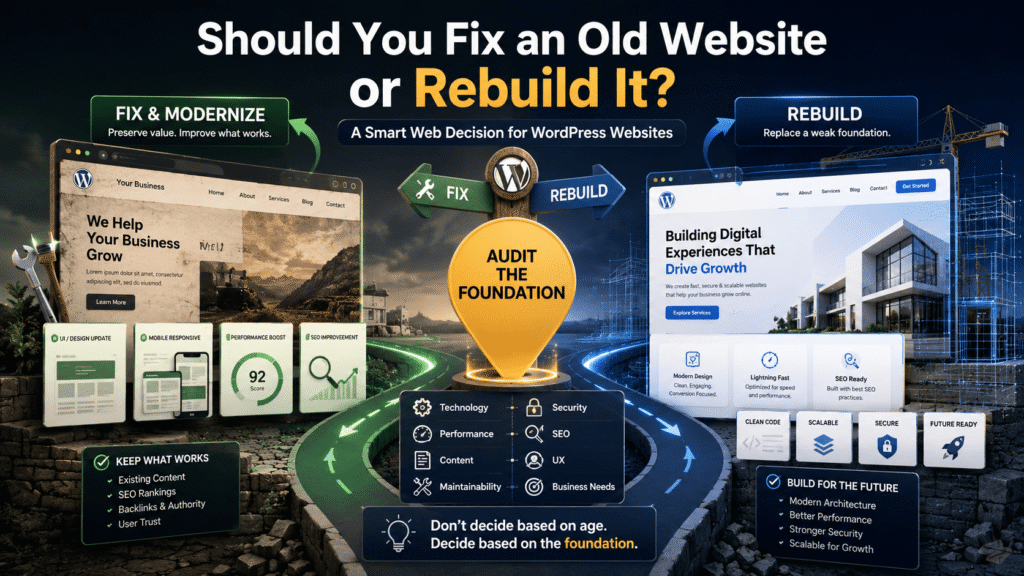
The decision between fixing and rebuilding should consider technology, design, performance, SEO, content, security, maintainability, business goals, and cost.
And with WordPress, there is another important consideration:
You don’t always need to throw away the website to modernize it.
Sometimes a well-planned upgrade, theme change, performance improvement, content restructuring, or selective redevelopment can solve the problem without a complete rebuild.
What Does “Fixing an Old Website” Actually Mean?
Fixing doesn’t necessarily mean making a few cosmetic changes.
Depending on the website, fixing or improving an existing WordPress website can involve:
- Updating WordPress core
- Replacing outdated plugins
- Removing unnecessary plugins
- Updating or replacing a theme
- Improving mobile responsiveness
- Optimizing images
- Improving page performance
- Cleaning unnecessary code
- Fixing broken links
- Improving navigation
- Restructuring content
- Improving internal linking
- Updating metadata
- Correcting technical SEO issues
- Improving accessibility
- Adding structured data
- Reworking selected templates
- Improving security
- Replacing outdated integrations
In other words:
Fixing can be a significant modernization project without being a complete rebuild.
This is particularly useful when the existing website already has valuable assets.
For example, imagine a WordPress business website that has:
- Five years of useful content
- Existing Google visibility
- Valuable backlinks
- A good domain history
- Working WordPress installation
- A stable database
- A reasonable URL structure
But the design is outdated and some pages are slow.
Destroying everything and starting from zero may not be the smartest first decision.
What Does “Rebuilding” Mean?
A rebuild goes deeper.
Instead of improving the existing structure, you may replace major parts—or potentially most—of the website.
A rebuild could involve:
- New theme or design system
- New templates
- New information architecture
- New URL structure
- New content organization
- New plugin stack
- New custom functionality
- New integrations
- Database/content migration
- New hosting architecture
- New development approach
- Major UX restructuring
For a WordPress website, this might mean keeping WordPress but rebuilding the website around a new theme, custom theme, block-based architecture, or redesigned content structure.
It doesn’t necessarily mean:
WordPress → completely different CMS
A rebuild can still be a WordPress rebuild.
That distinction is important.
If WordPress is still appropriate for the business, replacing a poorly designed website does not automatically require abandoning WordPress.
The First Decision: Is the Foundation Still Healthy?
Before deciding anything, examine the foundation.
Think of your website as a building.
If the walls, electrical system, plumbing, and foundation are healthy but the paint and interior design are outdated, you renovate.
If the underlying structure is failing and almost everything depends on outdated infrastructure, rebuilding may make more sense.
Websites work similarly.
A healthy foundation might include:
- Supported software
- Maintainable code
- Reliable hosting
- Reasonable performance
- Secure configuration
- Stable database
- Usable content structure
- Valuable existing URLs
- Functional integrations
- Manageable plugins
- Sustainable maintenance
If most of these are healthy, repair and modernization may be the better choice.
If several fundamental areas are failing simultaneously, rebuilding deserves serious consideration.
Don’t Start With Design
This is one of the biggest mistakes businesses make.
Someone looks at an old website and says:
“It looks old. We need a new website.”
But visual appearance is only one part of the problem.
Before redesigning anything, ask:
Is the website actually failing?
Look at:
Performance
Does it load efficiently?
Mobile experience
Can visitors use it comfortably on phones and tablets?
Security
Can WordPress, plugins, themes, and integrations still be maintained safely?
SEO
Does the existing website have valuable search visibility that needs to be protected?
Content
Is the content still useful?
Architecture
Can the current structure support the business’s future requirements?
Maintenance
Can developers update and modify the website without constantly fighting old code?
Business requirements
Can the website actually support what the organization needs now?
Only after answering these questions should design become a major factor.
When Should You Fix an Existing WordPress Website?
An old WordPress website is often a good candidate for improvement when its problems are isolated rather than fundamental.
For example:
Fix or modernize when:
- The WordPress installation is maintainable.
- The database is healthy.
- Most important URLs are valuable.
- Existing content performs well.
- The theme can reasonably be updated or replaced.
- Plugin problems can be resolved.
- Performance problems have identifiable causes.
- The website’s information architecture still makes sense.
- The existing SEO foundation is valuable.
- The required functionality can still be implemented.
- The design is the main weakness.
- The business does not require a fundamentally different website architecture.
Imagine a five-year-old WordPress website with excellent content and strong organic traffic.
Its problems are:
- Outdated visual design
- Poor image optimization
- Some slow pages
- Weak mobile spacing
- Old navigation
Those are significant problems.
But they don’t necessarily mean the website needs to be destroyed.
A targeted modernization could be enough.
When Does Fixing Become a Trap?
The opposite problem is equally important.
Sometimes developers continue patching an old website because rebuilding feels expensive.
The project gradually becomes:
Fix → patch → update → compatibility problem → workaround → another patch
Eventually, every change becomes harder.
For example:
You update one plugin.
↓
A custom function stops working.
↓
You modify the custom code.
↓
The theme has an old dependency.
↓
Another feature breaks.
↓
You add another workaround.
↓
Performance gets worse.
↓
The next developer is afraid to touch the code.
At that point, the question isn’t:
“Can we fix it?”
Technically, almost anything can sometimes be fixed.
The better question is:
“Does continuing to fix it make business and technical sense?”
Warning Signs That a Rebuild May Be Better
A rebuild becomes more attractive when problems are deeply connected.
Consider a website where:
- The theme is heavily outdated.
- Custom code is difficult to maintain.
- Plugins conflict regularly.
- The mobile experience requires major restructuring.
- The information architecture no longer fits the business.
- Performance problems are architectural rather than isolated.
- Security maintenance is becoming difficult.
- Important integrations are obsolete.
- The content structure needs major restructuring.
- The website needs functionality the current architecture cannot reasonably support.
- Developers spend more time working around the existing system than improving it.
When many of these problems occur together, repeatedly repairing individual symptoms may become inefficient.
This is the key difference:
A repair solves problems inside a healthy structure.
A rebuild replaces a structure that is itself becoming the problem.
Website Age: Useful Signal, Poor Decision Rule
Age is worth considering, but it shouldn’t be the deciding factor.
A website from 2018 might still have:
- Clean architecture
- Updated WordPress
- Modern plugins
- Good performance
- Strong security
- Valuable content
- Excellent SEO
Meanwhile, a website launched last year could already have:
- Bloated plugins
- Poor architecture
- Slow templates
- Weak content structure
- Security problems
- Bad mobile UX
Therefore:
Don’t ask:
“How old is the website?”
Ask:
“How healthy is the website?”
That is a much better starting point.
WordPress Makes the Decision More Flexible
One reason WordPress deserves special consideration is its flexibility.
A business doesn’t necessarily have only two options:
Keep everything
or
Throw everything away
There is a middle ground.
You can selectively modernize:
Theme
Templates
Plugins
Content
Navigation
Performance
SEO
Security
Custom functionality
This allows a website to evolve rather than being completely replaced every few years.
For a small business or startup, this can be especially useful.
A startup may begin with a relatively simple WordPress website:
Home → About → Services → Blog → Contact
As the business grows, it might eventually need:
- Landing pages
- Lead generation
- Resource libraries
- Case studies
- Customer portals
- Ecommerce
- Booking
- Advanced forms
- Integrations
- Multilingual content
The website can evolve with the business.
But eventually, if the original architecture becomes a serious constraint, a rebuild may become the smarter investment.
Fix vs. Rebuild:
For the website version, you can use this comparison table.
| Consideration | Fix / Modernize | Rebuild |
|---|---|---|
| Core technology | Still healthy | Obsolete or difficult to maintain |
| Content | Valuable and well organized | Needs major restructuring |
| URLs | Existing URLs have value | Structure needs major changes |
| Design | Mainly outdated | UX needs fundamental redesign |
| Performance | Problems are fixable | Problems are architectural |
| Plugins | Mostly manageable | Frequent conflicts or obsolete dependencies |
| Theme/code | Maintainable | Difficult to maintain |
| SEO | Existing foundation is valuable | Current structure seriously limits SEO |
| Security | Can be brought up to date | Fundamental security/maintenance concerns |
| Functionality | Current system can support needs | New requirements exceed current architecture |
| Cost | Usually lower initial investment | Higher initial investment |
| Risk | Lower migration risk | Higher migration and SEO risk |
| Best approach | Improve what already works | Replace the foundation while preserving valuable assets |
The SEO Question: Could Rebuilding Hurt Your Website?
Absolutely.
This is one of the most important reasons not to treat a website rebuild as merely a design project.
A website can have years of accumulated search value.
That value may exist in:
- URLs
- Backlinks
- Search rankings
- Indexed pages
- Internal links
- Content
- Metadata
- Images
- Structured data
- Brand searches
- Historical relevance
A rebuild can accidentally remove or change these assets.
For example:
Old URL
example.com/services/web-design/
becomes:
example.com/solutions/website-services/
The new URL may be perfectly reasonable.
But if the old URL disappears without an appropriate redirect, the website may create an unnecessary loss of continuity.
A rebuild therefore needs an SEO migration plan, not just a design plan.
Before Rebuilding, Audit What You Already Have
Before deleting anything, identify what deserves to be preserved.
Create an inventory of:
URLs
Which pages currently exist?
Traffic
Which pages receive organic and referral traffic?
Rankings
Which pages have meaningful search visibility?
Backlinks
Which URLs have valuable external links?
Content
Which articles, guides, services, and resources are still valuable?
Metadata
Which titles and descriptions should be retained or improved?
Internal links
Which pages are important parts of your site’s navigation and topic structure?
Structured data
Which schema implementations need to be migrated?
Redirects
Which old URLs need to map to new destinations?
The principle is:
Don’t rebuild from what the website looks like today. Rebuild from what the website has already accumulated.
A New Website Can Still Have Bad SEO
This deserves a direct answer.
Does rebuilding a website automatically improve SEO?
No.
A rebuild can improve SEO when it resolves genuine problems with:
- Performance
- Accessibility
- Information architecture
- Content organization
- Technical implementation
- Mobile experience
- Internal linking
- Crawlability
- Maintainability
But a new website can also perform worse if the rebuild removes valuable content or changes important technical signals without proper planning.
New technology does not automatically create better search visibility.
Better architecture can.
Better content can.
Better user experience can.
Better technical implementation can.
But simply saying “we rebuilt the website” proves none of these things.
The AI Search and Content Perspective
There is another reason website architecture matters today.
Your website isn’t only being designed for traditional search engines and human visitors.
AI-powered search systems increasingly need to retrieve and interpret information from websites.
That makes content structure important.
A modern rebuild should consider:
- Clear page topics
- Descriptive headings
- Logical content hierarchy
- Meaningful internal links
- Clear entities
- Useful definitions
- Direct answers to important questions
- Structured data where appropriate
- Accessible HTML
- Fast page performance
- Strong information architecture
This doesn’t mean rebuilding a website for AI.
It means avoiding an architecture that makes important information unnecessarily difficult to understand.
A good website should be understandable to:
People
Search engines
AI-powered information systems
Accessibility technologies
The underlying principle is the same:
Make important information clear and accessible.
Don’t Rebuild Just Because a New Theme Looks Better
This is especially relevant to WordPress.
A new theme can make a website look dramatically better in a demonstration.
But before replacing the existing website, ask:
- What problem does the new theme solve?
- Can the current theme be improved?
- What happens to existing templates?
- What happens to page URLs?
- What happens to custom functionality?
- What happens to structured data?
- What happens to metadata?
- What happens to internal links?
- What happens to page performance?
- What happens to existing content?
A beautiful theme can still produce a worse website.
Design is an important reason to improve a website.
It is not, by itself, a reason to destroy its foundation.
The Cost Question Is Bigger Than Development Cost
A rebuild may have a higher initial development cost, but the real comparison should include the total cost of ownership.
For example:
Continuing to repair
Development time
- maintenance
- compatibility fixes
- security work
- performance optimization
- technical debt
versus:
Rebuilding
Research
- planning
- development
- migration
- SEO preservation
- testing
- launch
- future maintenance
Sometimes fixing is clearly cheaper.
Sometimes rebuilding costs more initially but produces a healthier system that is easier and cheaper to maintain.
The cheapest option today isn’t necessarily the cheapest option over three years.
A Practical Website Decision Framework
Before making the final decision, evaluate the website across eight areas:
1. Technology
Is the platform and technical stack still appropriate?
2. Security
Can the system and its components be maintained securely?
3. Performance
Can current performance problems be fixed without replacing the architecture?
4. SEO
Does the existing website have valuable search assets that should be preserved?
5. Content
Is the existing content valuable and structurally usable?
6. UX
Does the current website fail users, or does it simply look dated?
7. Maintainability
Can developers safely modify and update the website?
8. Business Requirements
Can the current architecture support the next stage of the business?
Then ask one final question:
Are the problems isolated, or are they connected to the foundation?
That question often reveals the answer.
Three Realistic WordPress Scenarios
Scenario 1: Modernize, Don’t Rebuild
A small business has a six-year-old WordPress website.
It has:
- Valuable service pages
- Existing organic traffic
- Good backlinks
- Stable WordPress installation
- Reasonable URL structure
But it has:
- Old visual design
- Poor image optimization
- Some slow pages
- Weak mobile spacing
Smart decision:
Modernize the existing website.
The business already has valuable digital assets. The problems are mostly repairable.
Scenario 2: Rebuild the WordPress Website
A growing company has an older WordPress website with:
- Custom legacy code
- Outdated theme
- Plugin conflicts
- Poor mobile architecture
- Duplicate content
- Difficult maintenance
- Slow templates
- New business requirements
Developers spend more time working around the existing architecture than improving it.
Smart decision:
Plan a controlled rebuild.
But preserve valuable URLs, content, backlinks, metadata, and other SEO assets during migration.
Scenario 3: Don’t Rebuild Yet
A startup has a three-year-old WordPress website.
The owner wants a new website because competitors have redesigned theirs.
But the current website:
- Loads quickly
- Works well on mobile
- Has useful content
- Has good search visibility
- Supports current business requirements
The only real complaint is:
“It doesn’t look as modern.”
Smart decision:
Improve the design rather than rebuild the entire website.
A visual refresh may solve the actual problem at a fraction of the cost and risk.
The Smart Web Decision
The best decision is rarely:
Old website → New website
Instead, think:
Audit → Understand → Prioritize → Fix or Rebuild → Protect What Works
Your existing website may contain years of accumulated value.
Don’t throw that value away simply because the design feels old.
At the same time, don’t keep patching a fundamentally broken architecture simply because rebuilding feels expensive.
The right question is not:
“Should I keep my old website?”
The better question is:
“What should I preserve, what should I improve, and what needs to be replaced?”
That is a much smarter web decision.
Final Takeaway
A website doesn’t need to be new to be effective.
And a new website doesn’t automatically become effective because it is new.
For WordPress websites especially, the decision should be based on the health of the foundation, the value of existing assets, the severity of current problems, future business requirements, and the cost of maintaining the current system.
Fix when:
The foundation is healthy and the problems are repairable.
Rebuild when:
The foundation itself is limiting the website.
And before rebuilding:
Protect what already works.
Your rankings, URLs, content, backlinks, users, data, and accumulated knowledge are part of the website’s value.
A smart rebuild doesn’t start by deleting the old website.
It starts by understanding what the old website has already earned.
Frequently Asked Questions
Q: Should I redesign my old website or rebuild it?
Ans: Redesign or modernize an existing website when its technical foundation is healthy and the main problems involve design, UX, content, performance, or isolated functionality. Consider a rebuild when the underlying architecture is itself creating ongoing problems.
Q: How do I know if my WordPress website needs a rebuild?
Ans: Look beyond its age. If outdated code, plugin conflicts, poor architecture, security issues, performance limitations, difficult maintenance, and new business requirements are all connected to the existing foundation, a rebuild may make more sense.
Q: Is an old website bad for SEO?
Ans: Not necessarily. Website age alone does not make a website bad for SEO. An older website can have valuable content, backlinks, rankings, and domain history. Technical problems, poor content, weak UX, and outdated architecture are more important considerations.
Q: Can rebuilding a website hurt Google rankings?
Ans: Yes. A rebuild can affect search visibility if valuable URLs, content, internal links, metadata, redirects, structured data, or other SEO assets are lost or changed incorrectly. SEO migration planning should therefore happen before the rebuild launches.
Q: Is it better to fix an old WordPress website or start over?
Ans: It depends on the condition of the existing foundation. If WordPress, the database, content structure, URLs, theme architecture, and plugins remain manageable, improving the existing site may be more efficient. If fundamental architecture problems affect multiple areas, rebuilding may be the better choice.
Q: Does a new website automatically improve SEO?
Ans: No. A new website can improve SEO when it solves genuine technical, structural, content, performance, or UX problems. Simply replacing an old website with a new one does not guarantee better rankings.
Q: Should SEO be considered before rebuilding a website?
Ans: Yes. SEO should be part of the planning stage rather than something added after development. Existing URLs, traffic, rankings, backlinks, content, metadata, internal links, redirects, and structured data should be audited before migration.
Q: How often should a business website be rebuilt?
Ans: There is no universal rebuild schedule. A website should be evaluated based on its technology, security, performance, maintainability, UX, SEO, and business requirements rather than a fixed number of years.
Q: Can I modernize a WordPress website without rebuilding it?
Ans: Yes. Depending on the situation, you can update or replace the theme, improve templates, optimize performance, restructure content, improve navigation, replace plugins, strengthen security, and modernize the UX without completely rebuilding the website.
Q: What is the biggest mistake when rebuilding a website?
Ans: Treating the rebuild as only a design project. A website migration can affect SEO, content, URLs, performance, functionality, accessibility, and user experience. A successful rebuild considers all of these before launch.